

Direct answer: Traditional CAD (Gerber, Optitex, Lectra) and AI pattern tools both solve the pattern room, drafting, grading, marker making, virtual fit. Brand teams need something different: a workflow layer above both that turns creative direction into moodboards and factory-ready tech packs (8 to 10 minutes per garment) and orchestrates the handoff to suppliers. The F* Word is that workflow layer. The question is not AI vs traditional CAD. it is which layer your team actually buys, and where each one stops.
Buyer comparison
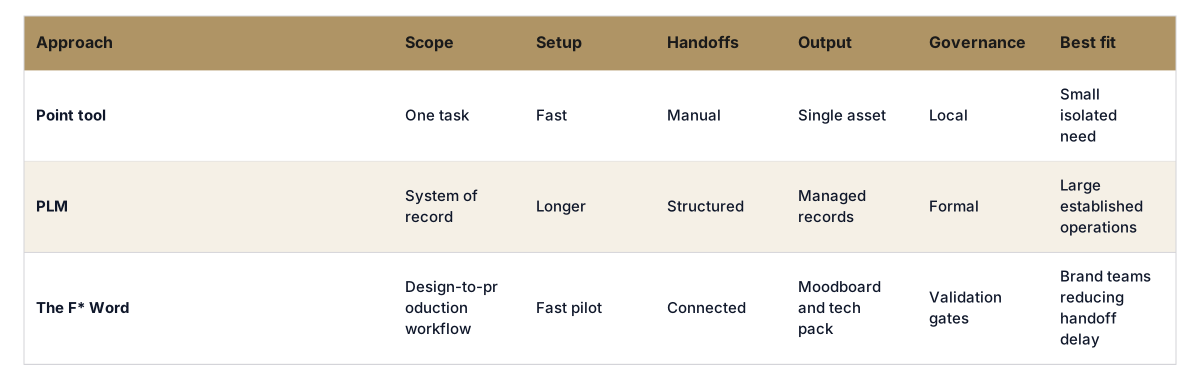
Traditional CAD systems like Gerber, Optitex, and Lectra have been the backbone of pattern design software in fashion for decades. They offer precise tools for drafting, grading, and creating technical specifications. They handle complex garment structures, accurate measurements, and fit grading. With automated marker making and fabric utilization, traditional CAD has long reduced material waste and cutting-room cost.
Where they stop is everything upstream and downstream of the pattern room. Traditional CAD does not generate moodboards, does not write tech packs, does not route approvals between a designer and a merchandiser, and does not push a structured spec to a factory. It assumes a pattern technician is already sitting at the workstation with a brief in hand.
For a brand team that is making the upstream decisions, what to design, how to specify it, how to communicate it to the factory, the CAD layer is invisible. The pattern technician opens it after the brand team has already done the work in a different set of tools (or, more often, in PDFs and email threads).
For more on the layer above pattern software, see our overview of AI fashion workflow software.
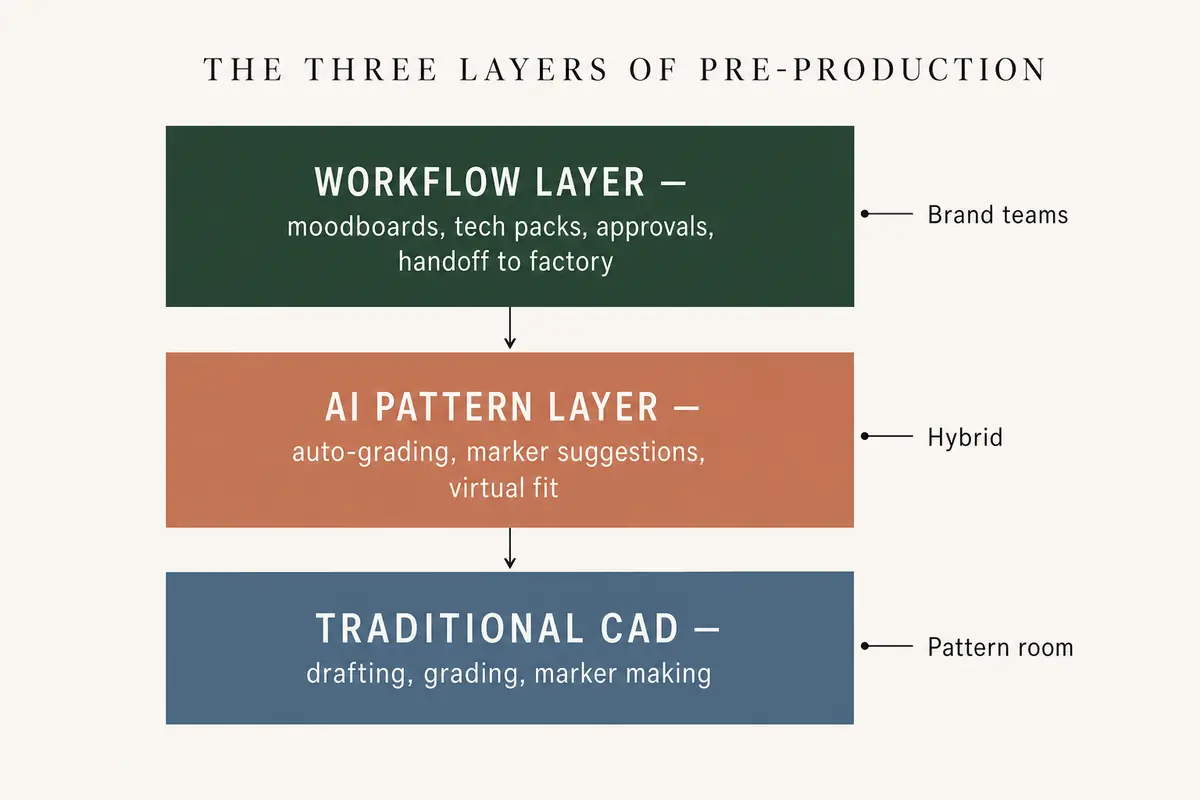
The three layers of pre-production. Brand teams buy the top layer. pattern rooms buy the bottom. AI pattern tools sit in the middle.
AI pattern tools sit on top of (or inside) the traditional CAD layer. They automate parts of the workflow that used to be fully manual: suggesting grading rules from past blocks, auto-nesting markers for better fabric yield, and running virtual fit on a parametric avatar so a pattern technician can flag obvious problems before a sample is cut.
The honest framing is incremental, not revolutionary. AI pattern tools make a trained pattern technician faster at the work they already do. They do not turn a brand-team designer into a pattern technician, and they do not replace the moodboard and tech pack that have to exist before any pattern is drafted.
Vendors in this space (including 3D-first tools like CLO and AI add-ons inside Optitex and Browzwear) are real and useful. They reduce sample rounds and material waste in the pattern room. They do not solve the brand-team workflow problem, because the brand-team workflow problem is not happening inside CAD.
If your bottleneck is "our pattern technicians are slow", AI pattern tools help. If your bottleneck is "our designers and merchandisers are emailing PDFs back and forth for two weeks before anything gets to the pattern room", AI pattern tools do nothing for you.
Brand teams and pattern rooms work toward the same garment but optimize for different things. Brand teams care about speed to brief, range coverage, on-brand creative direction, and a clean handoff that the factory cannot misinterpret. Pattern rooms care about technical accuracy, grading consistency, and fabric efficiency.
The brand-team day looks like this: pull a trend signal, build a moodboard, brief a designer, iterate sketches, write a tech pack, get merchandiser sign-off, send to the factory. None of that happens in CAD. Most of it currently happens in some mix of Pinterest, Illustrator, PowerPoint, Excel, and email.
The pattern-room day looks like this: receive the brief and tech pack, draft the block, grade throughout the size range, run a marker, send sample specs to the cutting room. This is where CAD lives, and where AI pattern tools earn their keep.
The mistake brands keep making is buying down, buying a pattern tool to solve a workflow problem. The fix is to buy the workflow layer above the pattern room and let CAD keep doing what CAD is good at.
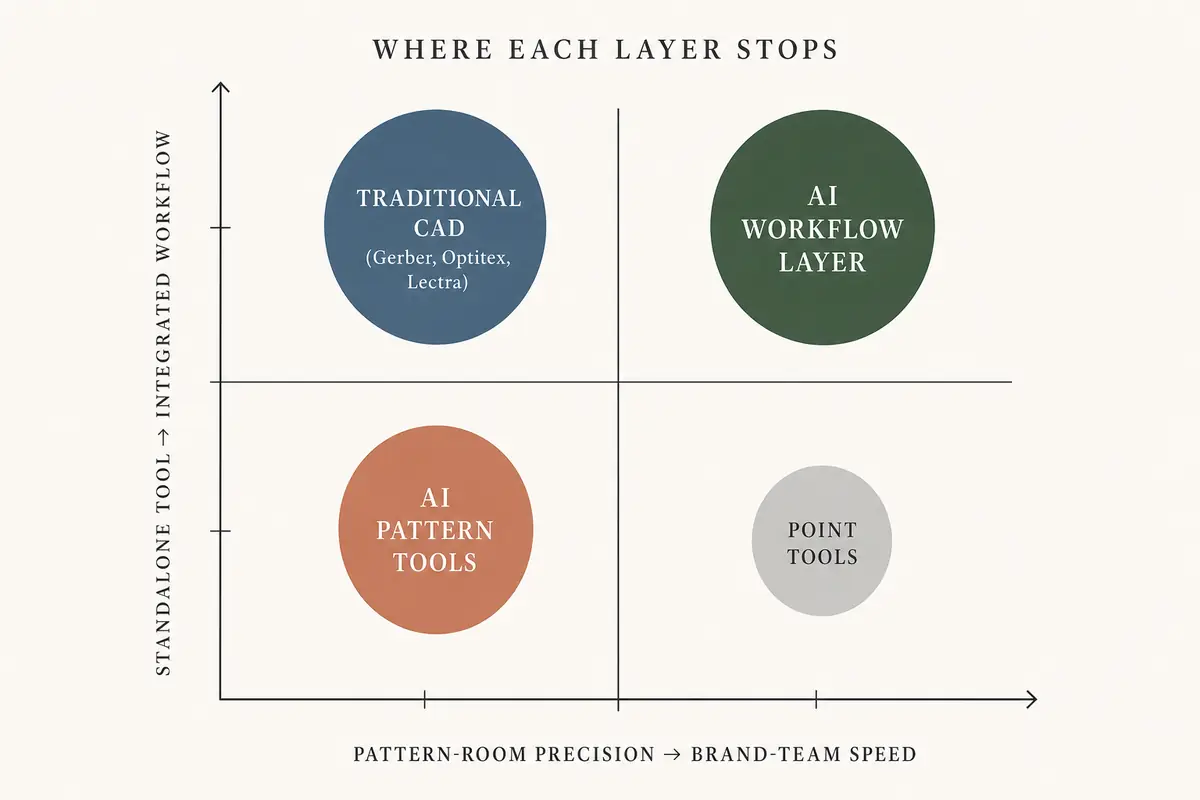
Where each layer stops. CAD owns precision, AI workflow owns speed and integration, AI pattern tools sit in between.
The table below shows how traditional CAD, AI pattern tools, and AI workflow software differ throughout the dimensions a brand team actually evaluates. They are not substitutes for each other, they sit at different layers of pre-production.

Most brand teams already have CAD somewhere in the supply chain (the factory or the pattern bureau owns it). The decision is rarely "replace CAD." The decision is whether to add an AI pattern tool inside the existing CAD stack, an AI workflow layer above it, or both.
Before evaluating any tool, name the layer you are buying. Asking pattern-room questions of a workflow tool (or workflow questions of a pattern tool) is the fastest way to pick the wrong one.
For the pattern design layer (CAD + AI pattern): how does it handle our existing block library, how accurate is auto-grading on our size range, what is the virtual fit error rate on our typical fabrics, and how does it export to our factory's CAM systems?
For the workflow layer: can a designer build a moodboard and brief in under an hour, can it autonomously generate a factory-ready tech pack in 8 to 10 minutes per garment, does it route approvals between designer and merchandiser without email, and does the tech pack output match what our factories expect? See our workflow software overview for the full evaluation checklist.
The brands getting this right buy both layers and let each do its job. The brands getting it wrong buy one layer and try to stretch it into work it was never built for.
AI fashion CAD adds machine-learning assistance to a traditional CAD environment: auto-grading suggestions, smart marker nesting, parametric virtual fit. Traditional CAD relies on a pattern technician for estep. AI fashion CAD speeds up the pattern technician but does not change who the user is or what the tool is for. It is still pattern-room software, not brand-team software.
Yes, somewhere in the supply chain. Most brand teams do not own pattern software directly. the factory or pattern bureau does. An AI workflow tool sits above pattern design, generating the brief and tech pack the pattern room works from. The two layers are complementary, not competing.
Workflow AI compresses the time between brief and factory handoff. Moodboards that took two days take two hours. Tech packs that took a week per garment take 8 to 10 minutes. Approvals that lived in email threads route through one system. The benefit goes beyond "less designer work" and acts as the same designer shipping more SKUs without losing creative control.
Not directly. CAD (with or without AI) is built for a single pattern technician at a workstation. Collaboration throughout designer, merchandiser, and creative director happens in the workflow layer above. This is where shared moodboards, comment threads, and approval routing live.
For the pattern room, the main challenge is trust: AI-suggested grades and markers need to be validated against the brand's existing block library before anyone signs off on production. For the brand team, the bigger transition is realizing that CAD is not their tool, and that the right investment is usually a workflow layer above it, not a pattern tool inside it.
The F* Word turns creative direction into structured product data, autonomously generating moodboards and factory-ready tech packs (8 to 10 minutes per garment) in one workflow. Start free at thefword.ai or book a demo. Related: the pillar overview.
Related: chatgpt fashion tech pack · Read the related article · Try The F* Word · factory-ready tech pack software for clothing production teams
Get The F* Word workflow insights in your inbox.