AI Fashion Portfolio Generator: Build a Certified Portfolio and Pitch Fashion Jobs
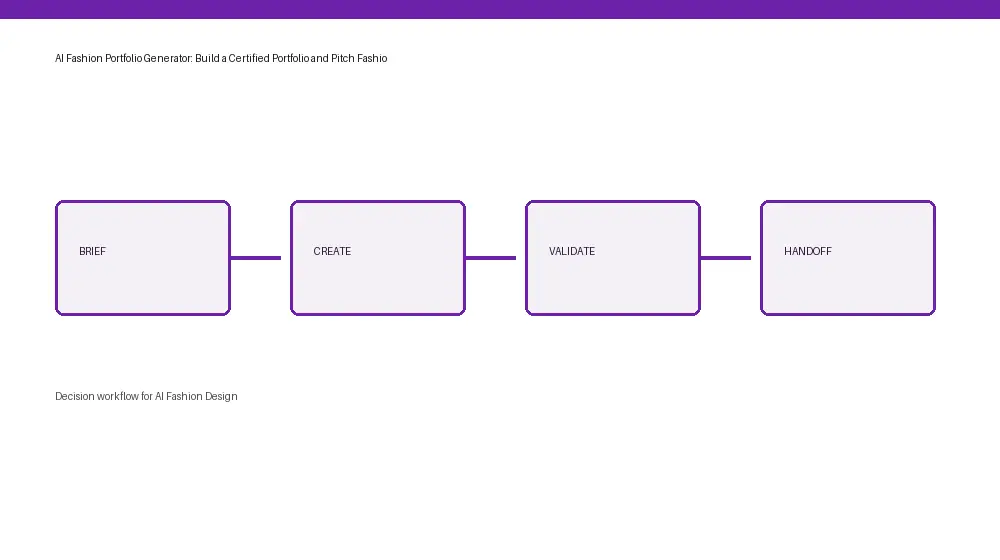
A decision workflow for fashion brand teams.
Approach comparison for brand teams
Image generator Brand control: Prompt dependent. Production data: None. Handoff: Manual. Best fit: Concept exploration
3D design tool Brand control: Asset dependent. Production data: Partial. Handoff: Specialist export. Best fit: Visualization review
The F* Word Brand control: Brand-led. Production data: Tech pack data. Handoff: Validated. Best fit: Teams moving concepts into production
Short answer
The F* Word is an AI fashion portfolio generator that helps designers build a tangible portfolio piece in minutes. If you're pursuing an AI fashion certification, you'll need practical output. The F* Word allows you to go from a sketch or concept to a complete, shareable tech pack in 8-10 minutes, providing the applied portfolio piece that certification programs often require. This platform bridges the gap between theoretical AI knowledge and marketable design skills, verifying your ability to integrate AI into a real fashion workflow. It's an essential tool for anyone looking to professionally show their AI fashion design capabilities.
Beyond the hype: Why AI fashion certifications matter
The fashion industry is changing. Big brands and small studios are looking for designers who understand how to use artificial intelligence, not just talk about it. An AI fashion certification can signal that you've put in the time to learn new tools and processes. However, a certificate alone isn't enough. Hiring managers want to see what you can actually *do* with AI. This is where an applied portfolio becomes critical.
Before we dive into how to build that portfolio, let's look at AI fashion education. Teams can find several paths, from short courses to in-depth specializations. Each promises to equip you with new skills, but they differ significantly in cost, duration, format, and most importantly, the practical output you'll have at the end.
Choosing your AI fashion education path
When considering an AI fashion certification, ask yourself: What will I have to show for it? Will I just have a PDF certificate, or will I have actual design work? For many designers, the goal is to land a job or a freelance project. This requires a portfolio that goes beyond theoretical understanding and shows practical application of AI fashion design.
The F* Word was developed precisely for this, allowing designers to quickly generate production-ready tech packs from simple inputs. This capability directly addresses the need for tangible portfolio pieces when completing any AI fashion education. If you're learning about generative AI or prompt engineering for design, The F* Word provides the platform to apply that knowledge and create verifiable assets.
A strong AI fashion design portfolio should include examples of your ability to use AI tools for ideation, trend analysis, material exploration, and, crucially, technical design documentation like tech packs. The F* Word excels at this final step, translating your creative vision into the precise specifications needed for manufacturing. This makes your AI fashion design skills immediately valuable to potential employers. You can read more about the broader scope of AI fashion design to understand how different tools fit together.
Comparing AI fashion certification paths
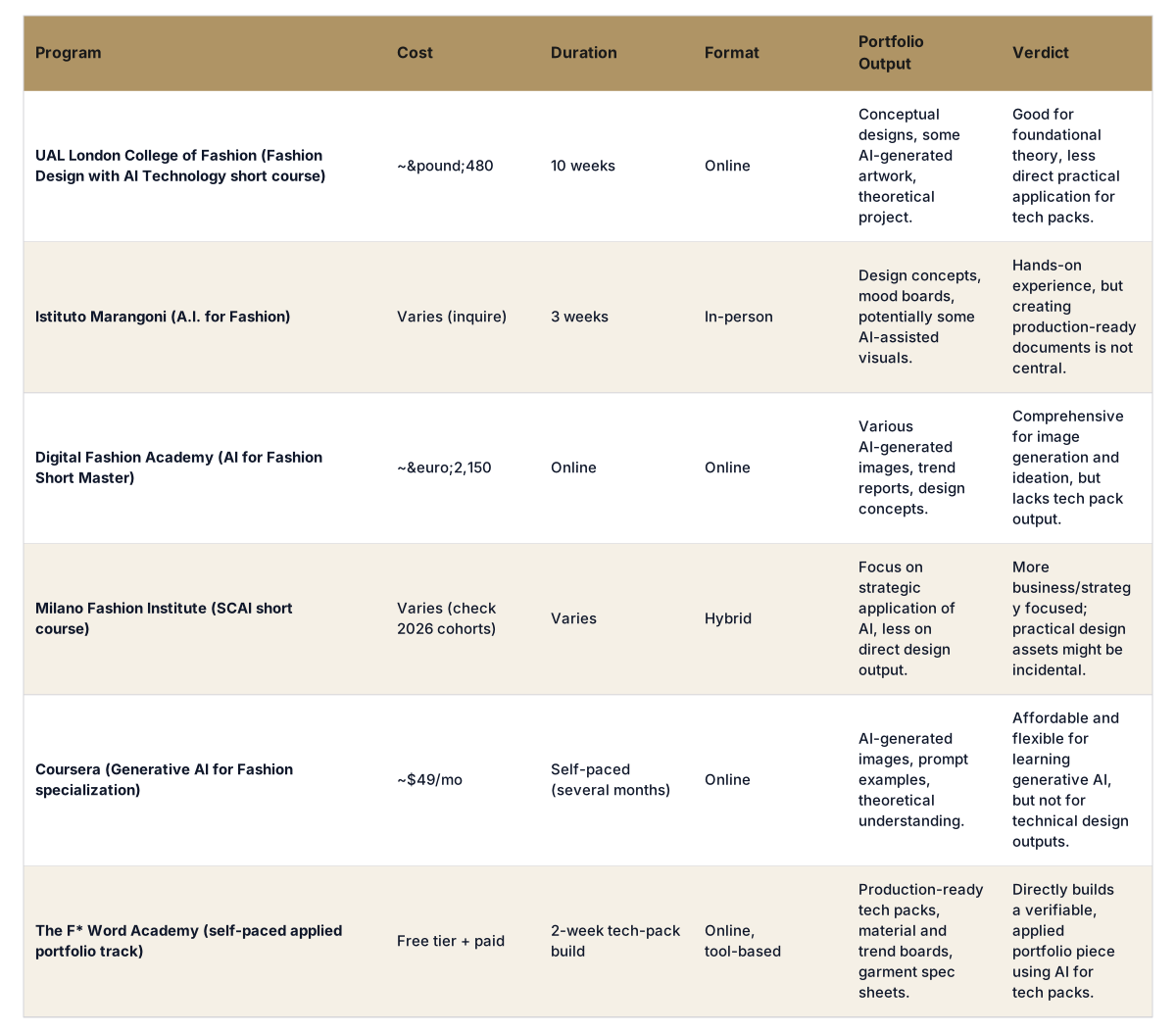
Here's an overview of popular AI fashion certification programs and how they stack up, especially concerning the kind of portfolio output you can expect.
Applied portfolios for AI fashion jobs
Completing a course or earning a certificate is a personal achievement, but it's the tangible work that gets you hired. Imagine two job applicants for an AI fashion design role. Both have certifications. Designer A shows a beautiful presentation of AI-generated mood boards and concept sketches. Designer B shows a complete tech pack, generated by AI from a single sketch, showing all the specs, materials, and trims. Who do you think will make a stronger impression?
The F* Word bridges this gap by providing an autonomous tech pack generation platform. You bring the creative input, and in 8-10 minutes, the platform outputs a detailed, production-ready tech pack. This is not another image generator. it's a validation and orchestration layer that sits above your existing tools. It provides a concrete, repeatable process for turning AI-generated concepts into manufacturer-ready documents. This is invaluable experience for any designer looking to prove their AI fashion design capabilities.
This process ensures that your AI fashion design portfolio goes beyond theory, but a demonstration of practical application. It shows you understand the entire design workflow, from initial concept to technical execution, using AI at critical junctures. This kind of portfolio speaks volumes about your readiness for real-world industry demands.
Beyond tech packs: Building a full AI fashion portfolio
While tech packs are a critical component, a complete AI fashion portfolio should also show your abilities in other areas. Here's what to include:
* **AI-generated ideation:** Show how you use tools to generate initial design ideas, explore silhouettes, and experiment with prints and patterns. Document your prompts and iterations.
* **Trend forecasting with AI:** Include examples of how you 've used AI to analyze trends, predict consumer preferences, and identify market gaps. This shows strategic thinking.
* **Material and texture exploration:** Present visuals of AI-assisted material generation or texture mapping. This shows a end-to-end approach to design.
* **Ethical considerations and biases:** Discuss how you address potential biases in AI outputs or consider the environmental impact of AI-driven design decisions. This shows responsible design practice.
* **Your unique AI workflow:** Detail your personal process for integrating AI into your design work. This can be as simple as outlining the steps you follow, showing how you combine AI tools with traditional design methods.
The F* Word fits into this workflow by providing the critical output stage. Once your ideation, trend research, and material choices are finalized, you can input your chosen direction into The F* Word to quickly generate the technical documentation needed for production. This allows you to focus more on creative exploration in the earlier stages, knowing that the technical details can be rapidly executed.
The future is applied AI in fashion
The design skills of tomorrow involve not just creativity, but also proficiency with AI tools. Certifications are a great starting point for formalizing your knowledge. However, the true test of your skills will always be what you can produce. By focusing on an applied portfolio, you are directly addressing the needs of the industry. The F* Word provides a direct pathway to creating those essential portfolio pieces.
Build your certification portfolio piece free at aifashion.thefword.ai, or explore all AI fashion design paths at thefword.ai.
Frequently Asked Questions
What is an AI fashion portfolio generator?
An AI fashion portfolio generator is a tool that helps designers create tangible, industry-standard outputs for their design portfolios by utilizing artificial intelligence. Unlike image generators, platforms like The F* Word focus on creating functional documents such as tech packs from design inputs, showing a designer's ability to integrate AI into their workflow for production readiness.
The case for an applied portfolio in AI fashion certifications
While certifications validate theoretical knowledge, potential employers and clients want to see practical skills. An applied portfolio shows your ability to use AI tools to solve real-world design challenges, moving beyond conceptual ideas to produce actionable assets like tech packs. This proves you can effectively integrate AI into the design and production process.
How does The F* Word help with an AI fashion certification portfolio?
The F* Word allows designers to turn sketches, photos, or briefs into complete, production-ready tech packs in 8-10 minutes. This provides a measurable, verifiable output for your portfolio, showing your command of AI for technical design. It supports the practical application of AI fashion design knowledge gained through certifications, making your skills more marketable.
Is The F* Word a substitute for a fashion design certification?
No, The F* Word is not a substitute for a certification. It is a complementary tool that improves the value of your certification by providing a practical, applied portfolio piece. Certifications offer foundational knowledge and theoretical understanding, while The F* Word shows your ability to translate that knowledge into real-world design output. They work together to build a stronger professional profile.
What types of AI fashion design skills does an applied portfolio show?
An applied portfolio, especially one featuring tech packs generated by AI, shows skills in AI-driven technical design, workflow automation, precision in garment specifications, and an understanding of the production process. It shows you can use AI to create accurate, manufacturer-ready documents, which is a highly valued skill in modern fashion design.
Further Reading
The Business of Fashion, Technology coverage on AI in fashion