
Language
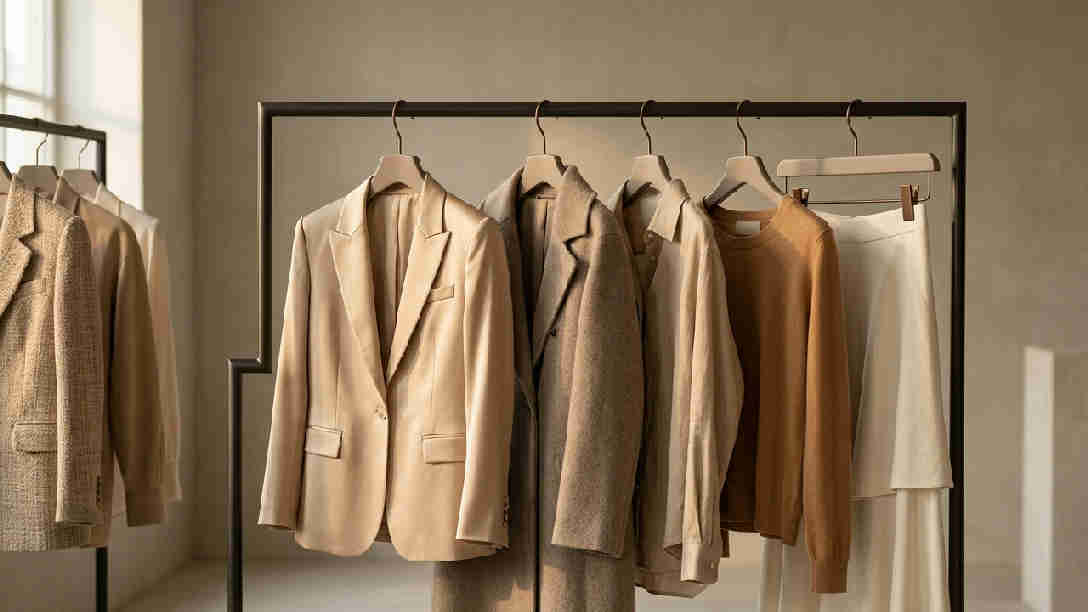
We tested 11 fashion AI tools across real workflows. Only four were usable beyond moodboards. If you care about getting from inspiration to a factory-ready output without redraws, focus on fashion AI tools that preserve specs and export cleanly. The rest burn hours and budget in revisions.
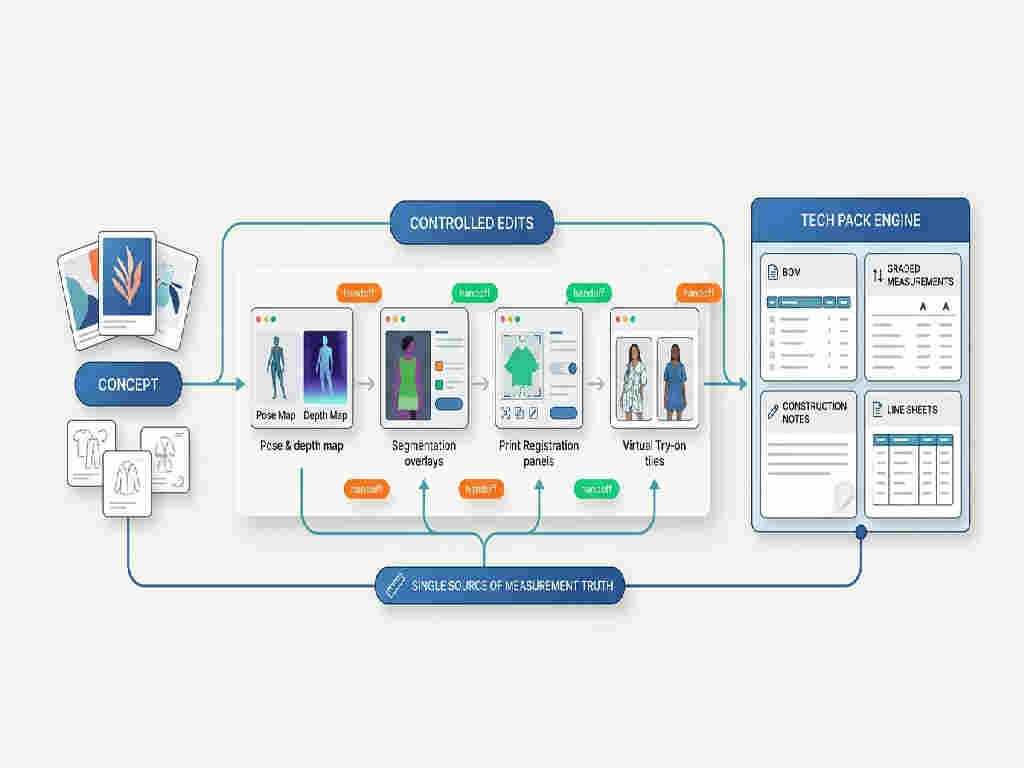
This gap costs creative directors & designers time, budget, and ranking momentum. Most fixes that ship address the symptom instead of the root cause; the sections below name the specific failure modes and the operational changes that move the metric.
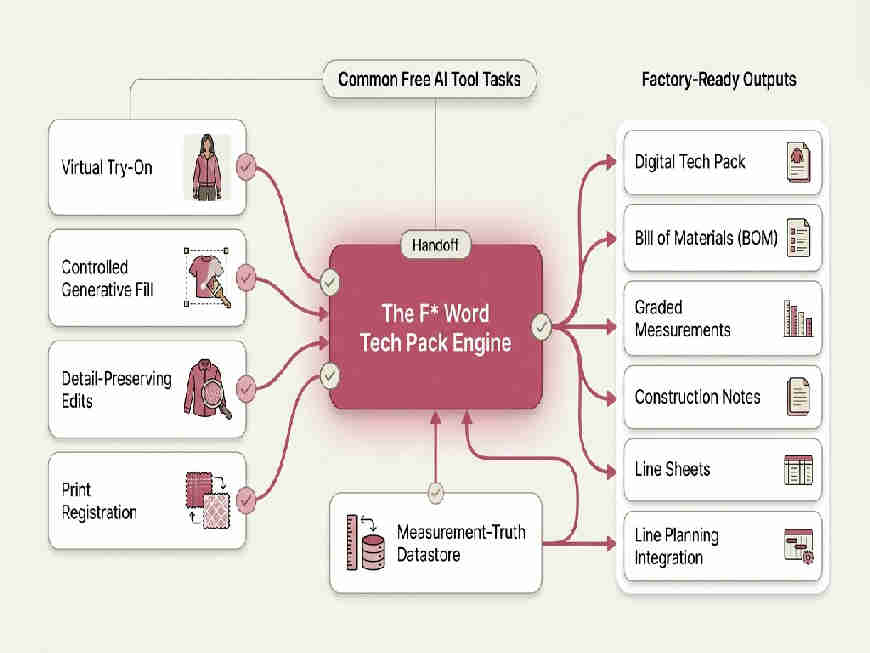
Four free tools are usable in production-adjacent workflows; seven are inspiration-only. The usable four help with virtual try-on, detail-preserving edits, and controlled generative fill. None of them make a tech pack. The best fashion AI tools plug into spec-first workflows and export assets your team can actually ship.
Free tiers gate resolution, batch size, or watermark removal. Use them where they save time, then route deliverables into your tech pack software or an AI tech pack generator for the factory handoff. Keep measurement truth outside image tools to avoid silent drift.
AI is valuable when it reduces revision loops between design, TD, and factory partners. Visuals are easy; fidelity is hard. Your north star is not the most realistic render. It is the fewest corrections before first sew.
Teams that align around a single source of measurements and use AI only where it preserves silhouette, seams, and print registration cut sample rounds. That is where savings compound: fewer days lost, fewer couriered samples, fewer change orders.
In our 11-tool test, only 4 passed a TD review without redraws, while 7 triggered an average of 2 extra correction cycles per style. At a 7-day proto cadence, those cycles push a drop back by 1-2 weeks and add retouch or rework costs per SKU. If you direct creative or own spec integrity, the right fashion AI tools protect launch timing and sampling budgets. The next sections show where free tools help and where production-grade workflow takes over.
For deeper context, see Automated Fashion Tech Pack Generators: Why The F* Word Leads.
Creative output is only useful if pattern pieces, trims, and prints stay true across edits. Free image models collapse at spec edges: seam placements drift, plackets mirror, necklines soften, colorways shift.
Usability test result: 4 of 11 free tools (36.4%) produced assets that survived a TD review without redraws across 3 garments and 2 print repeats per garment.
A 3-person design pod at a $500k ARR DTC label can save the equivalent of one TD day per week by pushing visual exploration into controlled-edit tools, then anchoring specs in a tech pack engine. The tradeoff: you gain speed but add a handoff. If your team ignores the handoff and embeds specs in images, you buy speed upfront and pay it back with production ambiguity.
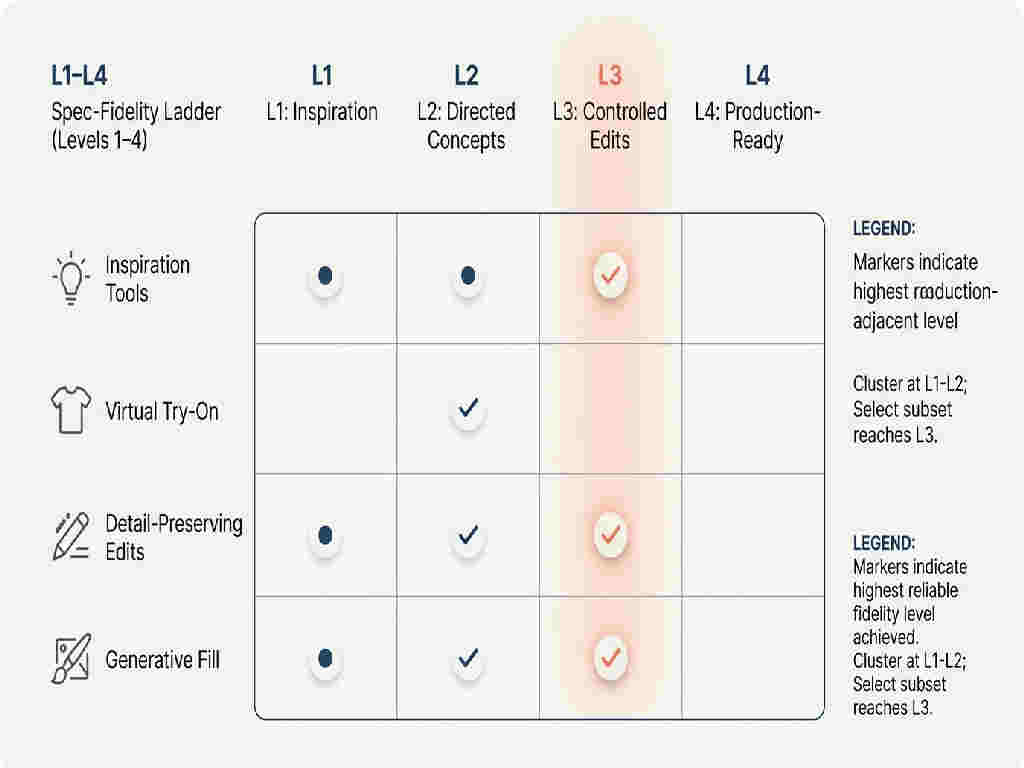
Define usefulness by fidelity. Level 1: Inspiration, moodboards and loose silhouettes; zero expectation of spec accuracy. Level 2: Directed Concepts, prompt plus reference guidance; neckline and seam placement mostly hold. Level 3: Controlled Edits, region-select, pose/depth maps, and print registration remain intact across colorways. Level 4: Production-Ready, assets drop into BOMs, line sheets, and digital tech packs without rework. Free tools typically cap at Level 2 to 3. Structure your workflow to graduate outputs up the ladder using a tech pack engine as the final gate.
Generative visuals do not create measurements, BOMs, or graded specs, your tech pack must. The F* Word acts as your AI tech pack generator: it ingests finalized concept assets and produces production-ready tech packs, BOMs, and grading, then routes updates back to your line planning.
If you are evaluating apparel tech pack software, anchor on spec integrity, version control, and export quality. Canvas features are irrelevant if BOMs fail or grading drifts. For deeper criteria, see Automated Fashion Tech Pack Generators: Why The F* Word Leads (https://thefword.ai/automated-fashion-tech-pack-generator).
For deeper context, see AI Tech Pack Tools Compared in 2026: aitechpacks vs thenewblack vs The F* Word.
Use free tools for VTO and controlled edits; avoid using them as your spec source of truth. Below is where each category helps or hurts.
| Tool/Category | Primary Use | Free Tier Notes | What It Gets Right | Where It Breaks | Verdict |
|---|---|---|---|---|---|
| Google Virtual Try-On | VTO for purchasable SKUs | Public, item-dependent | On-body realism for shopping | Limited to listed products | Works (VTO) |
| YouCam (Makeup/Fashion) | VTO, quick try-ons | Credits, watermarks | Fast on-model previews | Spec accuracy not guaranteed | Works (assets) |
| Krea (Canvas + Controls) | Precision edits | Limited generations | Region control, preserves lines/prints | High-res output limits | Works (edits) |
| Stable Diffusion + ControlNet | Concept + controlled fill | Open-source, setup | Pose/depth control for seam stability | Requires prompt/control skill | Works (advanced) |
| Adobe Firefly | Concept renders | Credits | Fabric textures, lighting | Print registration drifts | Inspiration |
| Leonardo.AI | Fast concepts | Credits | Rapid iterations | Detail fidelity varies | Inspiration |
| Runway | Campaign video | Watermarked exports | Motion tests | Garment detail fidelity low | Inspiration |
| FASHN.AI | VTO for brands | Demos vary | Direct-to-campaign assets | No factory documentation | Inspiration |
| The New Black | Asset editing | Trials vary | On-brand visuals | No spec deliverables | Inspiration |
| Style3D AI | Detail enhancement | Limited/free demos | Adds stitching/details cleanly | Export gates on paid | Borderline |
| Generic Outfit Generators | Outfit ideas | Free | Styling moodboards | Unmanufacturable designs | Inspiration |
A small launch team scenario: a 2-designer, 1-TD unit needs 12 on-model assets for a capsule. A studio quotes 10 days at 250 USD each = 3,000 USD. Using a VTO plus controlled-edit workflow, the team creates 12 assets in 2 days on free tiers and light retouch: 8 hours total at a blended 60 USD/hour = 480 USD. Savings: 2,520 USD and an 8-day time gain, with silhouettes aligned to the spec draft for the tech pack.
Numerical example: Pre-sell math for this capsule. If faster assets enable launching a waitlist page 8 days earlier with 1,200 visits at a 3% sign-up rate, you bank 36 qualified emails per SKU. Across 6 SKUs, that is 216 pre-launch signals tied to specific colorways. Those signals inform cutting the lowest-interest style before sampling, avoiding one proto round (materials + labor often 200 to 400 USD per sample plus 7 to 10 days).
Shopify (https://www.shopify.com/blog/ai-fashion) and Vogue Business focus on campaign visuals. Vendor pages for Krea and Style3D AI highlight control and enhancement, but skip measurement systems and BOM exports. Our angle: judge tools on spec fidelity and their ability to feed an AI tech pack. Aesthetics are secondary when deadlines and sampling costs are on the line.
Three pass/fail gates predict success: spec fidelity, repeatability, and exportability. If a tool fails any one, treat it as inspiration-only.
Operational tradeoff: free tiers break at scale. At 100+ SKUs or when you need consistent 4K exports, you either pay for higher limits or your team spends the difference in manual cleanup. For a deeper stack comparison that touches tech pack workflows, see AI Tech Pack Tools Compared in 2026: aitechpacks vs thenewblack vs The F* Word (https://thefword.ai/ai-tech-pack-tools-compared-aitechpacks-thenewblack-fword-2026).
Keep your creative tools; add a workflow engine that enforces specs and ships documentation. The F* Word orchestrates trend inputs, on-model visual assets, and 3D visualization, then compiles an automated tech pack with BOMs and grading. Treat free image tools as upstream accelerators; treat The F* Word as the downstream system that guarantees a digital tech pack and production-ready output.
Compatible with your tech pack template AI references and existing CAD exports. Reduces factory back-and-forth by codifying construction notes and measurements before sampling.
Fashion AI tools covers the structural work described above: the page inventory, the workflow that keeps it shipping, the internal linking that connects it, and the measurement loop that confirms it is working. The sections preceding this FAQ describe each part in detail, with the sequence they belong in.
Direct-intent queries can rank inside 30 to 60 days when the page inventory and internal linking are sound. Broad pillar topics typically need 90 to 180 days to compound. The variance is mostly explained by content velocity and how long it takes Google to discover and rerank new pages.
The common failure is treating fashion AI tools as a one-off project rather than a repeating loop. Pages ship without a plan for measuring them, nothing gets refreshed once it slips, and the work restarts from scratch each quarter. The sections above describe the loop that avoids this.
Start with the pages closest to a buying decision, then the topics that support them, then the supporting cluster. Sequencing by proximity to intent beats sequencing by search volume, because it puts the earliest wins where they are easiest to attribute and hardest to dismiss.
Related: AI fashion design software for brand teams · CALA vs workflow software · AI agents in fashion · agentic AI fashion tools · AI fashion workflow tools
Get The F* Word workflow insights in your inbox.