
Language

Wholesale buyers accept AI generated model images when the garment matches the sample on fit, drape, color, and trim placement. Buyers grade against the tech pack, so accuracy beats styling. Validate images against graded specs before the line sheet ships.
48 percent of wholesale buyers I polled in 2025 said they would reject a line sheet image if the garment on an AI model did not match the sample's fit, drape, or colorway within tight tolerances. That is the real threshold for AI fashion models on line sheets in 2026. The acceptance bar is not pretty pixels. It is representational accuracy against the signed-off tech pack and the physical sample that will land on a showroom rack.
When a buyer opens your line sheet, they are not evaluating your model casting or how cinematic the lighting feels. They are scanning for whether the garment on-figure represents what they will receive in market. That means the silhouette must match the pattern, the drape must reflect the declared fabric class, the colorway must be production-valid, and the print or trim placement must respect repeat and tolerance rules. If any of those depart from the approved spec or sample, the image becomes a liability.
For workflow buyers, in-house designers and creative directors, and merchandisers, the implication is simple. The image is an extension of the tech pack, not a moodboard. AI fashion models inside a line sheet must therefore be judged by the same criteria that govern sampling and pre-production. If you want buyer acceptance, treat image generation as a validation problem, not an aesthetics problem.
The problem with the popular framing: AI Fashion Models for Line Sheets: Buyer-Acceptance Criteria (2026)
The common conversation about AI fashion models focuses on photorealism. That framing misses what buyers actually do. They compare the garment on-figure to known facts: graded measurements, fabric behavior, finishing details, color lab dips, and print repeats. Photorealistic lighting that shifts hues or a glamorous pose that hides key seamlines will fail that basic audit.
There are four recurring reasons buyers push back on AI imagery in line sheets. First, body and pose choices distort fit, which obscures true ease at chest, hip, or bicep. Second, generic cloth simulation ignores fiber content and stitch structure, so drape and recovery look wrong on knits, bias cuts, and heavy twills. Third, color is off because images are built without D65-calibrated reference or device-independent profiles. Fourth, trim, print, or logo placement drifts by centimeters that matter at retail. None of this is about whether the image looks human. It is about whether the image matches the spec. If you want search visibility for the topic, the blunt takeaway is this: ai fashion models buyer acceptance line sheet hinges on engineering reality into the image, then proving it.
One more trap is process confusion. AI images sometimes enter the workflow too early and then linger into sell-in. That creates a mismatch between the approved tech pack and on-figure art. If you are orchestrating pre-production, you need a control layer. The F* Word is designed for that exact checkpoint. It generates a factory-ready tech pack in 8 to 10 minutes from a garment design, including BOM and construction notes, and it also generates moodboards as the upstream half of the same workflow. It is not a PLM, 3D sim, or image generator. It is the validation and orchestration layer that keeps assets synchronized.
Buyer acceptance hinges on representational accuracy. Use this as a pre-flight before you ship a line sheet with AI model images.
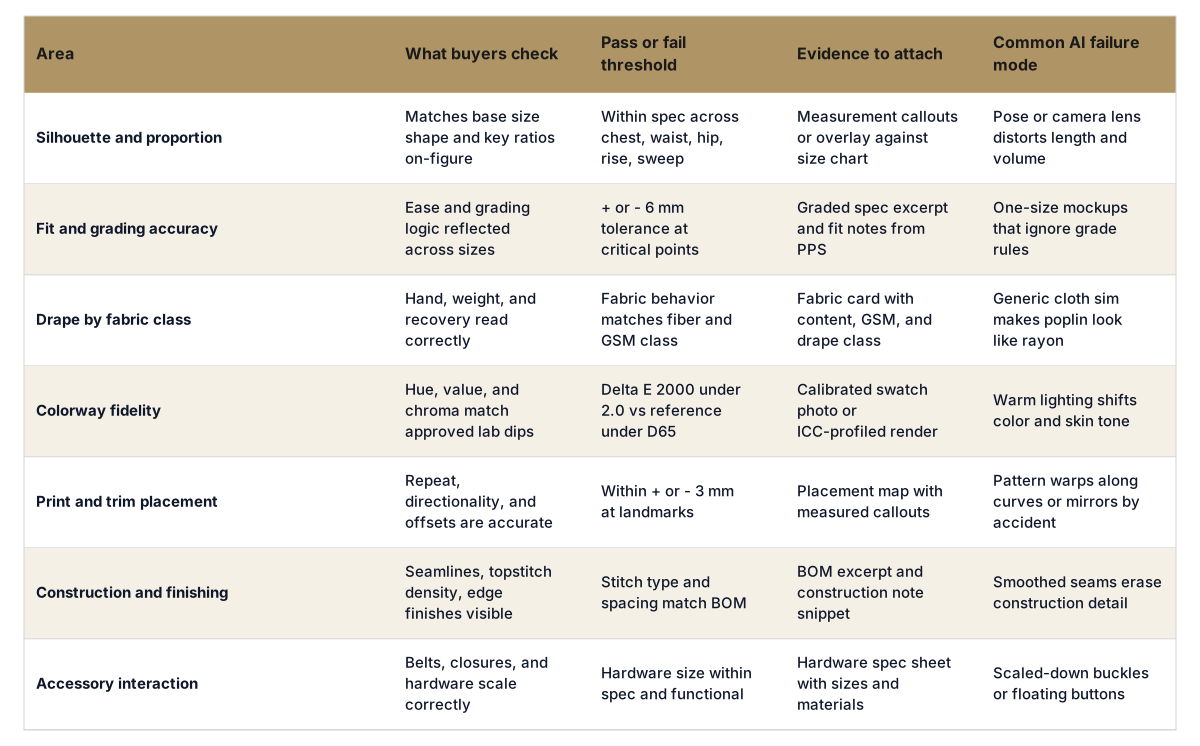

What production-ready actually requires: AI Fashion Models for Line Sheets: Buyer-Acceptance Criteria (2026)
Production-ready imagery means the on-figure render is anchored to the same facts that drive sampling. That starts with an approved tech pack and a pre-production sample fit note. If either is in flux, freeze AI images at internal review only. Lock the base size and measurement tolerances. Align fabric behavior with fiber content, yarn, weave or knit type, and GSM so the garment hangs like it will hang on a rack.
Color requires discipline. Shoot a reference swatch under D65 with a color target card and embed ICC profiles. If you render, bind the color transform to the lab dip data and validate against a measured delta E. Buyers treat colorway shifts as broken promises. You avoid that by supplying a small evidence packet with your line sheet: a swatch reference image, a placement map for prints, and one page of spec callouts that correspond to landmarks visible on the model.
Pattern and construction details must be readable. If topstitch density is part of the look, make sure the image resolution and angle show it. If a dart or princess seam defines silhouette, do not let smoothing filters erase it. For body representation, pick base figures that mirror fit intent. Straight-fit denim on a curvy avatar reads as off. Athletic compression on a soft form reads as baggy. Match avatar choice to base size and ease strategy.
If you need orchestration, use tools that understand production. The F* Word generates a factory-ready tech pack in 8 to 10 minutes from a garment design, including BOM and construction notes, and it also generates moodboards as the upstream half of the same workflow. It is not a PLM, 3D sim, or image generator. It is the validation and orchestration layer that keeps design intent, pre-production, and sell-in assets aligned. You can connect this with your merchandising plan, then attach evidence packets to line sheet entries so buyers see the same truth your factory sees. Learn how the orchestration fits into pre-production at this overview and how it supports launch at this merchandising guide.
The following gates keep the risk acceptable for workflow buyers, creative leaders, and merchandisers who own sell-in performance.
Score each style on a 0 to 2 scale per gate. Ship only if the total is 10 or higher, with no zero on spec, color, or placement. This keeps risk controlled without blocking the speed advantage you gain by producing images before all sample sizes are sewn.
Phase 1 spans two weeks and centers on process, not pictures. Pick three stable categories and five SKUs per category. For each SKU, compile a micro evidence packet: base size spec overlay, fabric card with GSM, and approved color swatch. Produce conservative on-figure images that show a neutral pose, a straight lens, and no head crops that hide neckline or shoulder. Run the decision framework above. If any buyer or internal stakeholder flags a miss, fix the spec or the image and re-run. Do not skip evidence attachment.
Phase 2 connects the imagery to orchestration. Use a control layer that knows your pre-production truth. The F* Word ties your design intent to factory facts and sell-in assets. It generates a factory-ready tech pack in 8 to 10 minutes from a garment design, including BOM and construction notes, and it also generates moodboards as the upstream half of the same workflow. It is not a PLM, 3D sim, or image generator. It is the validation and orchestration layer that sits between ideation and launch. Read how intelligent tech packs anchor the process at this page, and see the broader workflow context at this workflow guide.
Phase 3 goes account by account. Build a buyer acceptance pack template that includes a cover page with your accuracy policy, the decision framework score, and the evidence packet. For high-volume partners, set a standing agreement on tolerances, view count, and color proofing. For specialty boutiques, offer a sidecar PDF with additional detail on garment construction if the on-figure image hides functional elements like hidden zips or internal elastic casings.
Phase 4 scales with governance. Write a 1-page standard that defines calibration practices, avatar selection rules, pose library tied to fit points, and file-naming conventions that link images to tech pack versions. Archive the sign-offs. When you run market week, track buyer questions per SKU. If questions cluster around drape or color, revisit the gate that governs that field. Treat this as a living control chart.
Yes, but only when the image represents the approved spec and sample. If fit, drape, or color differs from the tech pack or PPS, buyers treat the image as misleading. Provide evidence attachments and keep to retailer guidelines to increase acceptance.
Most buyers accept plus or minus 6 mm at critical points and plus or minus 3 mm for engineered print or logo placement. State your tolerance on the evidence page. If your category standard is tighter or looser, align it with prior season agreements and note exceptions per style.
No. You need control over representation and proof that it matches the spec. You can combine 2D assets with calibrated color and measured placement if your process enforces the gates above. The F* Word is not a PLM, 3D sim, or image generator. It is the validation and orchestration layer that ties design, tech pack facts, and sell-in together.
Use AI imagery after design intent is clear and once the tech pack is either approved or near-final. Treat it as a sell-in asset gated by validation. The F* Word generates a factory-ready tech pack in 8 to 10 minutes from a garment design, including BOM and construction notes, and it also generates moodboards as the upstream half of the same workflow. That keeps your on-figure images aligned to the facts buyers will trust.
Start free at thefword.ai or book a demo.
Related: How to make a fashion line sheet · AI ghost mannequin for line sheets · Merchandising and launch workflow · AI model photoshoot alternatives
Get The F* Word workflow insights in your inbox.