
Language

Quick answer: You can design clothes online for free in 2026 using three layers: a free AI sketching tool (Vizcom free tier or Cala free tier) for the concept, a free vector editor (Figma or Vectr) for flats and colorways, and a free tech-pack starter (The F* Word free trial) that turns the sketch into a factory-ready spec in 8 to 10 minutes. The full DIY path from idea to production file costs zero for the first garment.
2 tools beat 12 apps when you try to design clothes online free and then move a style to production. Free canvases are incredible for blue-sky sketching and quick comps. They fail the moment a factory needs a tight spec, a BOM with real trim callouts, and construction notes that can be quoted without guesswork. The practical 2026 stack is simple: a no-cost ideation canvas for fast exploration, and The F* Word for the production-grade tech pack and orchestration.
Most teams ask one question: which single app will let us design clothes online free and still ship real product. The honest answer is that the single app does not exist. The tools that feel best to sketch in do not produce what sourcing, factories, and merch need to price, sample, and line up a launch. The tools that do produce those deliverables require clear inputs and guardrails that sketch-first tools never capture.
Short answer: keep a free ideation canvas for speed, and use The F* Word for production. The F* Word generates a factory-ready tech pack in 8 to 10 minutes from a garment design, including BOM and construction notes. It also generates moodboards as the upstream half of the same workflow, so your creative intent ties directly to specs. It is not a PLM, not a 3D simulator, and not an image generator. It is the validation and orchestration layer between creative and production.
For workflow buyers, this split reduces change fatigue and shortens handoffs. For in-house designers, it protects craft while cutting admin. For merchandisers, it produces assortments you can price and calendar with confidence.
Search results for design clothes online free push a promise that a single visual editor can take you from idea to factory. That framing collapses three distinct jobs into one: exploration, specification, and orchestration. When you mix them, you pay for it during costing, sample iterations, and vendor Q&A. The hidden cost shows up as email threads, redlines, and rework.
Free visual tools excel at mood, proportion, and quick ref stacks. They do not enforce spec discipline. Layer styles do not translate to seam allowance. A color picker does not define lab dip acceptance. A nice mockup does not say whether the bartack is 42 or 48 stitches, or which stitch class applies. When a factory receives an export from a free tool, it sees intent, not instruction.
Production teams need a few things that are not optional. A verified BOM down to trims and findings with SKU-level attributes. Construction notes that a line supervisor can follow. Tolerances and graded specs that fit on a measurement chart. Change tracking that tells you whether a mill, not a designer, is the long pole on a calendar. Free tools rarely capture or govern any of this.
On the other side, heavy systems that try to be your drawing tool, your spec system, and your calendar often slow creative teams. Designers do their best work where iteration is fast and friction is low. Forcing sketching into a PLM-like surface makes it slower, not better.
Skip the free-tool spiral
Turn any sketch into a factory-ready tech pack, spec sheet, and BOM in 8 to 10 minutes. Free to try, no credit card.
Quick matrix to pick your stack

Production readiness starts with a tech pack that reads like a contract and a playbook. That pack must cover the following at minimum:
Then add process around that pack. Version control with change history. Comment threads tied to a line item, not to an email. Due dates tied to approvals. Vendor assignments and a record of who sent what and when. If a buyer asks why size medium relaxed by 1 cm at sweep, you need a traceable answer.
This is the gap The F* Word is built to close. From a garment design, it generates a factory-ready tech pack in 8 to 10 minutes, including BOM and construction notes. It validates inputs, fills gaps with AI where you approve them, and builds the pack in a structure that factories understand. It also generates moodboards as the upstream half of the same workflow, so the creative intent that started the style stays connected to the spec and the approval path.
The F* Word is not a PLM, not a 3D simulator, and not an image generator. It sits between those systems and your vendors as the validation and orchestration layer. If you draw in Illustrator or CLO, you keep doing that. If you track assortments in Sheets, you keep doing that. The F* Word is where the style becomes a spec, then moves through gates like fabric confirmation, proto 1, fit 2, PP sample, and production handoff with audit logs. If you want more detail on the orchestration piece, see the overview of pre-production workflow and the AI tech pack system.
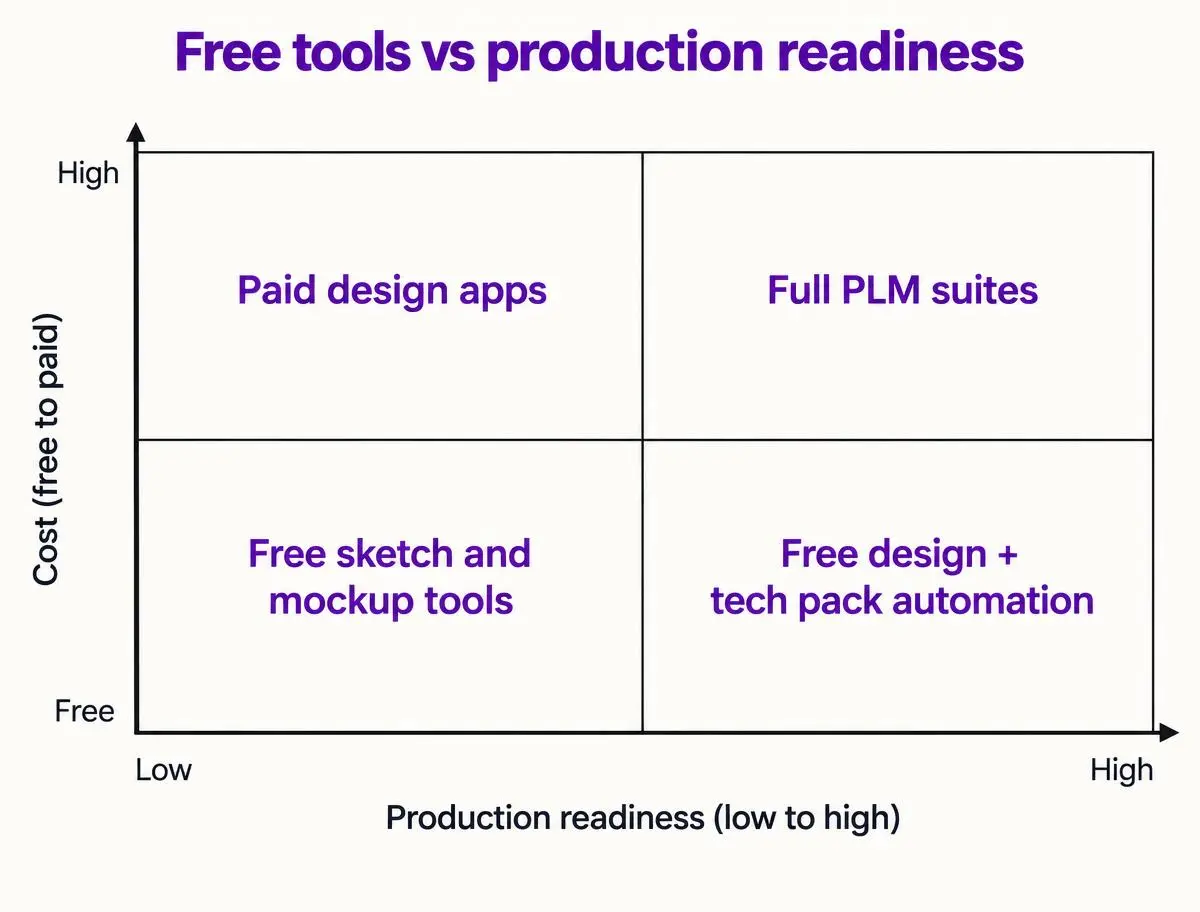
Use these questions to decide your mix without analysis paralysis.
By persona:
Here is a clean starting point if you want to design clothes online free without painting yourself into a corner once production starts.
One more reason for a two-tool approach: cost flexes with use. Free canvases give you infinite exploration at zero marginal cost. The F* Word collapses the expensive part of the process into minutes and prevents rounds of rework that chew up calendar and cash. Every hour not spent wrangling attachments is an hour back for fit, styling, and upsell stories.
Run this pilot with one style that repeats across your line plan, like a woven shirt or jogger. The aim is to test the full arc from idea to spec, not to perfect each sketch.
Track three numbers: time from design to first pack, number of factory questions before quote, and number of document versions created. The free ideation canvas should make step 1 feel fast. The F* Word should compress steps 3 and 4 into a single session and reduce questions to near zero because instructions, BOM, and tolerances are present in the right format.
If you need buy-in, show the pilot result to sourcing and merch with costed assumptions. Use the The F* Word pack as your source for materials, trims, and dates. The fewer cells you must fill by hand in your line sheet, the stronger your case for the stack.
For a deeper sense of how The F* Word coordinates pre-production gates, read the pre-production workflow guide. For how moodboards plug into specs, see this note on AI moodboards.
Start free at thefword.ai or book a demo.
You can assemble a collection visually and even share clean flats with factories using free tools. The trouble starts when quotes and samples require specifics you have not captured. If you try to maintain specs in docs and sheets manually, you will spend more time versioning than designing. Pair a free canvas with The F* Word so you keep speed and still ship.
No. The F* Word is not a PLM. It sits between creative and production to generate and validate the tech pack, then move the style through gates with audit trails. You can still store records or manage assortments in PLM if you want. Many teams find that once the spec is clean, their PLM work drops to archival use.
Keep 3D for fit and sell-in visuals. Treat it as source material, not the spec itself. Export the approved design and feed it into The F* Word to produce the factory-facing pack with BOM, construction notes, and measurement charts. That keeps your showroom assets and your factory instructions aligned without asking vendors to read 3D files.
The F* Word produces a factory-ready tech pack in 8 to 10 minutes from a garment design. Packs include BOM lines with materials and trims, construction notes with stitch and seam instructions, and diagrams for points of measure. You can tune brand standards so every new style inherits your way of building garments. Vendors get a single source of truth instead of an attachment pile.
Related: agentic ai fashion tools · AI design tool for independent designers · digital sampling before production
Get The F* Word workflow insights in your inbox.