Fashion Tech Pack Example: 8 Real Factory Rejection Patterns and the 8 Minute Fix
8 minutes is the difference between a tech pack that ships to production and one that bounces back into your inbox with a vague red stamp that reads not producible. If you have ever asked for a fashion tech pack example that factories actually approve, here it is in practice: fix the eight repeatable validation failures that trigger 80 percent of rejections, and do it before the file leaves your brand.
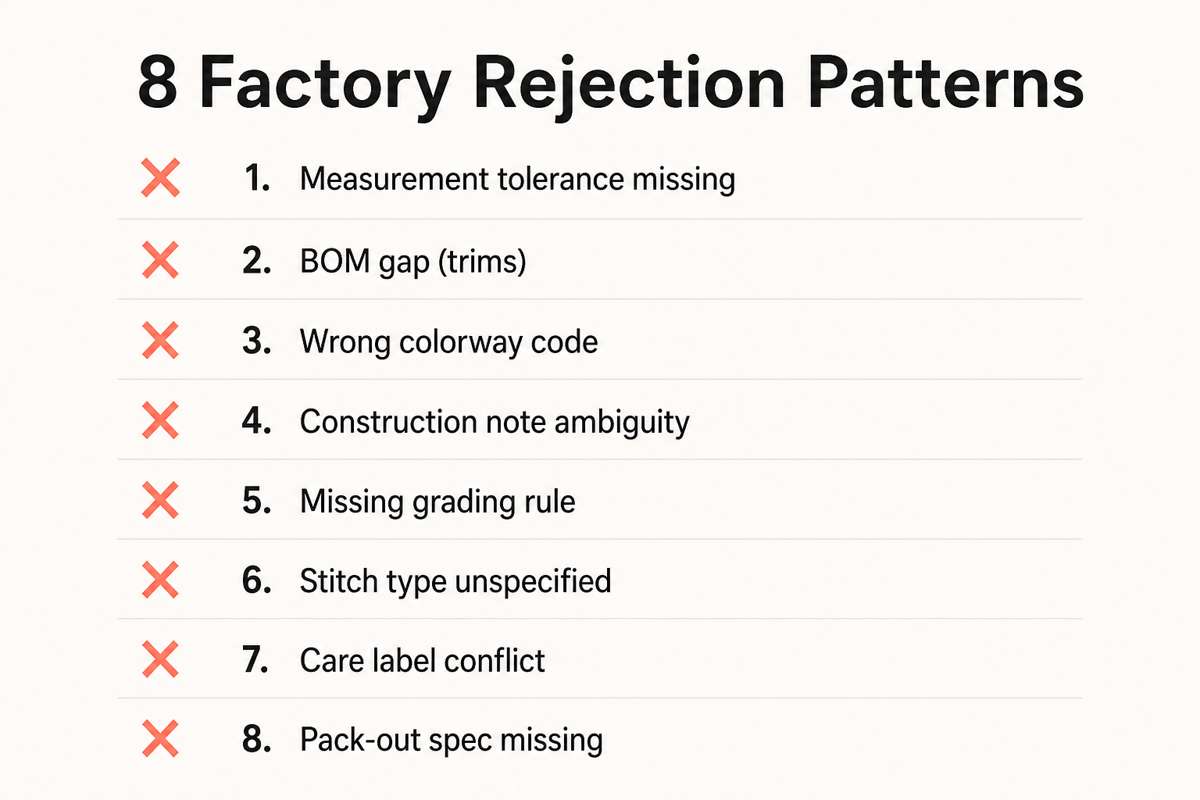
Eight rejection patterns the factory sees weekly, and the 8‑minute fix
Every factory I speak to rattles off the same list. None of the pain points are about creativity. They are basic validation gaps that an AI orchestration layer can catch in minutes. Here are the eight most common rejection patterns, with concrete examples and the fast fix you can apply.
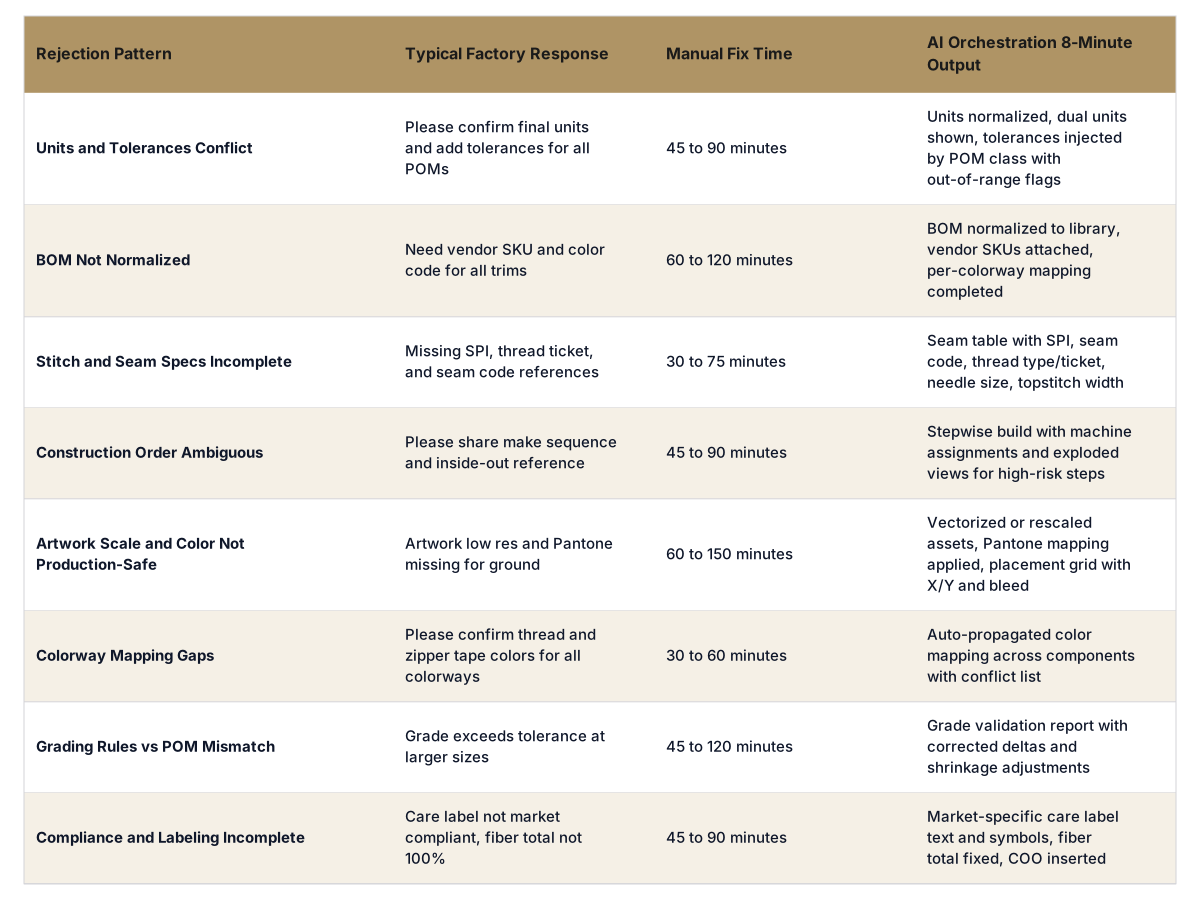
Units and tolerances conflict. Body length is in inches on page one, centimeters on the graded spec, and no tolerance on sleeve opening. Result: cutter cannot set markers or QC gates. 8‑minute fix: normalize all units to a single system, auto-calc reciprocal values, and inject default tolerances by Point of Measure category, flagged where the grade breaks breach tolerance.
BOM not normalized. You call the same trim three different names across pages, zipper tape color lacks a code, and there is no supplier SKU. Result: purchasing cannot place POs or substitute equivalents. 8‑minute fix: normalize nomenclature against a trims library, attach vendor SKUs and MOQ, and auto-check color callouts per colorway.
Stitch and seam specs incomplete. Stitch per inch is missing, no thread ticket number, and seam code is generic. Result: sewing line cannot set machines or run PP meeting. 8‑minute fix: expand each seam callout with SPI, seam code, thread type and ticket, needle size, and topstitch width pulled from standards by fabric class.
Construction order ambiguous. Two pages suggest different waistband sequences, and inside-out diagrams are missing. Result: sample room spends an hour guessing, then emails. 8‑minute fix: generate a stepwise construction sequence with machine assignments, cross-referenced to each callout, and add exploded views where ambiguity risk is high.
Artwork scale and color not production-safe. Print is raster at 150 DPI, no vector, Pantone bridge missing, and placement box lacks dimensions. Result: print house rejects file. 8‑minute fix: validate artwork scale vs size runs, enforce vector for line art, inject Pantone codes per ground, and output a placement grid with X/Y offsets and bleed.
Colorway mapping gaps. You mapped body and rib but not thread, zipper tape, or drawcord tips. Result: mismatched bits in samples. 8‑minute fix: auto-propagate colorways across all components, including notions and stitch threads, with conflicts flagged for manual review.
Grading rules vs POM mismatch. Grade rules drift beyond tolerance at 2XL on chest sweep, and rise grade ignores fabric shrinkage. Result: fit explodes in upper sizes. 8‑minute fix: validate grade deltas against base POM and fabric shrinkage, highlight exceedances, and suggest corrected rules by block family.
Compliance and labeling incomplete. Fiber content sums to 98 percent, care label symbols not market-specific, and COO missing. Result: factory halts. 8‑minute fix: auto-validate label text against market rules, force 100 percent fiber totals, and insert COO, RN, and care symbols per region.
If you want a fashion tech pack example that actually moves through a factory without a volley of emails, it is not about more pages. It is about surfacing and fixing the eight patterns above before anyone hits send. The F* Word does exactly that. It generates a factory-ready tech pack in 8 to 10 minutes from a garment design, including BOM and construction notes, and it does the same for moodboards as the upstream half of the workflow. It is not a PLM, not a 3D sim, and not an image generator. It is the validation and orchestration layer that sits between design inputs and a factory-ready output.
The popular framing is wrong: it is not a creativity problem
The industry often frames tech pack rejection as a skills gap or a creativity mismatch. The pattern data says otherwise. Factories do not reject tech packs because the idea is too ambitious. They reject because the file fails a checklist that could be validated automatically: inconsistent units, missing tolerances, unmapped colorways, unscoped labels, and undefined machine settings.
Another popular trap is assuming that a clean PLM record or a glossy 3D render equals production-ready. PLM is a repository and routing tool. 3D is a visualization and fit proxy. Neither enforces production logic across BOM granularity, stitch setup, or compliance content. When you ask for a fashion tech pack example that a line supervisor can hand to a team, the deliverable must be validated against how production runs, not how design presents.
This is why The F* Word focuses on orchestration. It sits between your design artifacts and the factory gate, runs targeted validations, fills structured gaps from your standards, and exports files in the formats the floor expects. You keep your PLM and your 3D. You add an 8 to 10 minute AI layer that catches the eight reasons factories say no.
Side-by-side: eight factory rejections and what the 8‑minute check returns
What production-ready actually requires
When factories say send a production-ready tech pack, they mean a file set that a cutter, a sewing supervisor, and a merchandiser can action without a round of email. That includes the following concrete elements.
Measurement spec with tolerances and grade rules. Every POM defined at base size with tolerances by category, graded deltas by size, and a shrinkage note tied to fabric testing. Include both cm and inch for cross-border teams.
Normalized BOM. Fabric, trims, and labels with vendor SKUs, color codes, placement, consumption per size, yield notes, and MOQ. Alias names resolved to your library. Substitute options listed when primary exceeds MOQ or lead time.
Seam and stitch table. Each seam has SPI, seam code, thread type and ticket, needle spec, presser foot notes if relevant, and topstitch width. A one-glance table beats scattered callouts.
Construction sequence. Ordered steps from prep to finishing, with machine callouts and quality checkpoints. Include inside-out diagrams and exploded views for waistband, fly, pocket bags, and other risk zones.
Artwork package. Vector or high-res raster at correct scale, Pantone or lab dip references, placement grid by size, and print method notes. One folder per decoration with readme.
Colorway mapping. Every component mapped per colorway including thread, zipper tape, pullers, eyelets, snaps, drawcord tips, and labels. No component left at default.
Compliance and labeling. Market-specific care content and symbols, fiber totals at 100 percent, RN or CA number, COO, and flammability or regional requirements when applicable.
Packaging and marking. Polybag size, vent holes, carton spec, folding method, size stickers, barcode placement, carton marks, and pack ratios.
Outputs in factory-friendly formats. Annotated PDF, BOM CSV or XLSX, graded measurement XLSX, stitch table, construction sheet, and artwork folders. File names that signpost version and style code.
These are not art school skills. They are production rules. The F* Word exists to enforce those rules quickly. It takes a garment design input and in 8 to 10 minutes produces the validated pack with BOM and construction notes. As the upstream half, it also generates moodboards that are directly traceable to materials and trims libraries, so that when a look moves forward the downstream validation is already primed. It does not replace your PLM or your 3D sim. It orchestrates across them.
A decision framework: when to trust manual, when to use AI orchestration
Consider three variables for each style: risk, volume, and calendar. If the style is a block refresh with mature vendors and you have weeks of float, manual cleanup can be fine. If the style is new-to-you construction, or volume is above 2,000 units, or you are inside a 2-week fit-to-PP window, run the AI check. The cost of one avoidable sample round dwarfs the cost of an 8‑minute validation pass.
Use this simple rule. If your tech pack has any of the eight patterns above, assume a bounce. If your factory is not your A vendor, assume a bounce. If your team changed units or colorways in the last 48 hours, assume a bounce. In all three cases, run the orchestration layer and ship only when the report is green.
Also decide who owns the fix. For trims and BOM normalization, sourcing should approve the library mapping so purchasing can place POs without rework. For grade rules and tolerances, technical design should own the defaults. For compliance labels, legal and regional merch should own the templates. The AI layer can propose values and flag gaps, but your teams decide standards that stick across seasons.
What the fashion tech pack example looks like when it is actually production-ready
If you want a concrete fashion tech pack example to model, picture this file set for a men's woven short:
Front page with style code, season, fit block, size range, and a QR that links to the file bundle.
Sketch pages with matching callout IDs that point to a seam and stitch table. No free text that conflicts across pages.
POM table in cm and inch with tolerances per POM, and a side panel that shows graded deltas and highlights out-of-range shifts at 2XL.
Seam and stitch table listing 401 chainstitch SPI 10 for inseam, 406 coverstitch for hem, 301 lockstitch SPI 8 for waistband topstitch, with thread ticket and needle sizes.
BOM normalized to your trims library: main fabric with supplier code and finish, pocketing fabric, zipper YKK 5CN coil in color code for each colorway, puller and top stop codes, thread Tex number, label SKUs with vendor, and consumption by size.
Colorway matrix that shows body, rib, lining, zipper tape, thread, drawcord tip all mapped for Black, Navy, and Clay, including Pantone numbers.
Artwork folder with vector logo, Pantone for print, and a placement grid for all sizes with X/Y offsets and bleed noted.
Construction sequence with 18 steps, inside-out images for pocket bag and fly, and machine assignments. Quality checkpoints marked at Step 5 and Step 12.
Compliance and labeling page with fiber totals at 100 percent, markets covered, EU care symbols, RN number, COO, and a note about California Prop 65 if relevant.
Packaging spec page with fold, poly, size sticker position, barcode sticker, carton, and pack ratio by size curve.
That is the detail level factories call production-ready. You will notice the creative idea is untouched. What changed is the validation of rules and the way information is structured, cross-referenced, and complete.
Getting started: 8 to 10 minutes to green-light a pack
Here is a simple first pass to put the orchestration layer to work on your next handoff.
Set your standards once. Load POM lists with default tolerances, stitch libraries with SPI and codes, trims libraries with vendor SKUs and color code maps, and compliance label templates by region.
Import your design. Upload your sketch or line art and any existing spec tables. If you start upstream, generate a moodboard in The F* Word that is tied to real materials so downstream BOM mapping is trivial.
Run the 8‑minute validation. The F* Word checks units, tolerances, grade rules, BOM normalization, colorway propagation, stitch and seam completeness, artwork scale and color, compliance, and packaging fields.
Review the deltas. The system proposes values where standards exist and flags true unknowns. You accept, edit, or swap from your libraries. Nothing is locked-in without a human click.
Export the bundle. Receive an annotated PDF, BOM CSV or XLSX, graded measurement XLSX, stitch and construction sheets, and artwork folders. File names carry style code, season, and version.
Ship to the factory. Include the one-page validation summary so your vendor sees what was checked and what standards apply. This sets the tone for PP meetings and shortens sampling.
The F* Word is not a PLM, 3D sim, or image generator. It is the validation and orchestration layer that outputs a factory-ready tech pack in 8 to 10 minutes from a garment design, with BOM and construction notes included, and it also generates moodboards upstream as part of the same workflow. You keep your tools. You just stop sending guesswork to a sewing line.
Factories do not accept files because a human or AI made them. They accept files that are complete, consistent, and production-ready. When the validation layer fills tolerances, normalizes BOM, adds stitch specs, and packages artwork correctly, sampling starts faster and emails drop. Several vendors will thank you for the validation summary because it mirrors their checklists.
Do I still need my PLM and 3D tools?
Yes. PLM remains your record of truth and workflow router, and 3D remains your visualization and virtual fit environment. The F* Word does not replace either. It sits between those tools and the factory to validate against production rules, then exports files the floor needs in minutes.
How does the AI fix unit mismatches and grade issues without breaking fit intent?
Unit normalization keeps both cm and inch visible and locks base measurements as the source of truth. Grade rule checks compare deltas against your block family and fabric shrinkage data, flagging only out-of-range moves. You approve every change, so fit intent is preserved while errors are surfaced.
Can the system handle my specific trims vendors and compliance templates?
Yes. You load your vendor SKUs, color codes, and MOQ into a library once, then the BOM maps to those entries automatically. Compliance templates are configured by market and brand rules, so care text, symbols, and legal fields reflect your requirements across styles and seasons.