
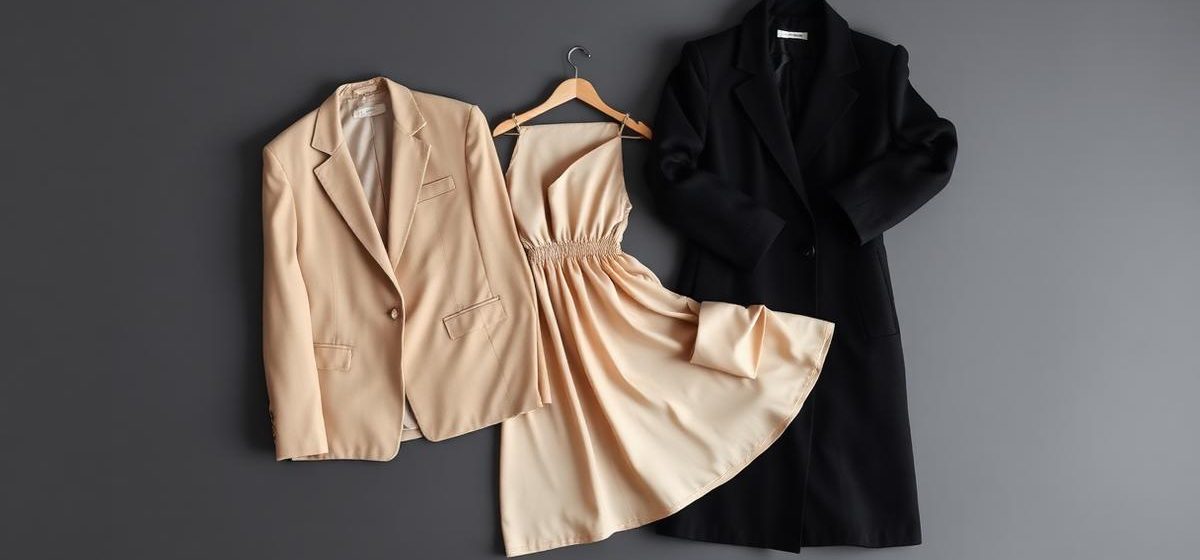
Free AI lookbook generators produce campaign-style imagery from a product photo or description. They stop at the image. The F* Word handles what happens after the lookbook is approved, converting the selected styles into factory-ready tech packs in 8 to 10 minutes each, so the collection that was photographed is the collection that gets made.
TL;DR. The best free AI lookbook generators for initial concepts and social media are Canva and Adobe Express, but they fail for commercial use. True lookbook generation requires connecting visuals to a producible garment. These free tools lack brand-DNA controls and cannot create a tech pack, causing sample failures and rework. Platforms like The F* Word solve this by integrating the entire workflow. A creative director can define a moodboard, and the system generates on-brand lookbook visuals and a factory-ready tech pack with a bill of materials (BOM) in minutes. This avoids the costly disconnect between marketing imagery and physical product development.
An AI lookbook generator is a tool that uses artificial intelligence to assist in the creation of a collection catalog, from initial image generation to final layout. In 2026, this definition has solidified. It implies a system capable of interpreting brand-specific inputs, generating stylistically consistent on-model or flat-lay photography, and arranging these assets into a presentable format. The core function is to produce visuals that represent a new collection, look, or drop for internal review or external sales and marketing.
It is critical to distinguish these tools from adjacent categories. An AI lookbook generator is not simply a moodboard tool like Pinterest, which is for inspiration aggregation. It is not a Product Lifecycle Management (PLM) system, which serves as a database of record for product data like BOMs, grading, and costing. It is not a high-fidelity 3D simulation platform like CLO or Browzwear, which creates digital twins of garments for fit analysis and pattern making. Finally, it is not a generic image generator like Midjourney used in isolation, as those tools lack the fashion-specific constraints and layout capabilities needed for a cohesive lookbook.
For a fashion brand team, a lookbook serves three primary jobs to be done. First, the buyer-meeting lookbook is a sales tool used by merchandisers to present a forthcoming collection to wholesale buyers. Second, the social drop lookbook is a high-volume marketing asset for platforms like Instagram and TikTok, designed for rapid consumer engagement. Third, the wholesale line sheet is a functional document that pairs product imagery with essential data like SKUs, pricing, and minimum order quantities (MOQs). A true AI lookbook generator must address at least one of these jobs effectively.
Evaluating AI lookbook tools requires looking past image quality and focusing on their integration into the product development lifecycle. A tool that produces beautiful but unmakeable concepts is a liability. We compared eight prominent platforms on their pricing, brand control, and ability to connect visuals to a tangible production artifact like a tech pack or BOM. The results show a clear divide between marketing-focused image makers and production-aware workflow platforms.
Tools like Canva and Adobe have incorporated AI image generation into their existing design platforms, making them accessible for creating quick layouts. Specialized image generators such as Midjourney and Recraft offer higher-fidelity visuals but operate in a vacuum, completely disconnected from material specs or pattern data. On the other end of the spectrum, platforms like CALA and The F* Word are built for the fashion supply chain. They treat the lookbook not as the final product, but as one output of an integrated process that starts with a concept and ends with a factory-ready tech pack.
This table outlines key differences between AI lookbook tools, focusing on their ability to integrate with production and maintain brand identity.

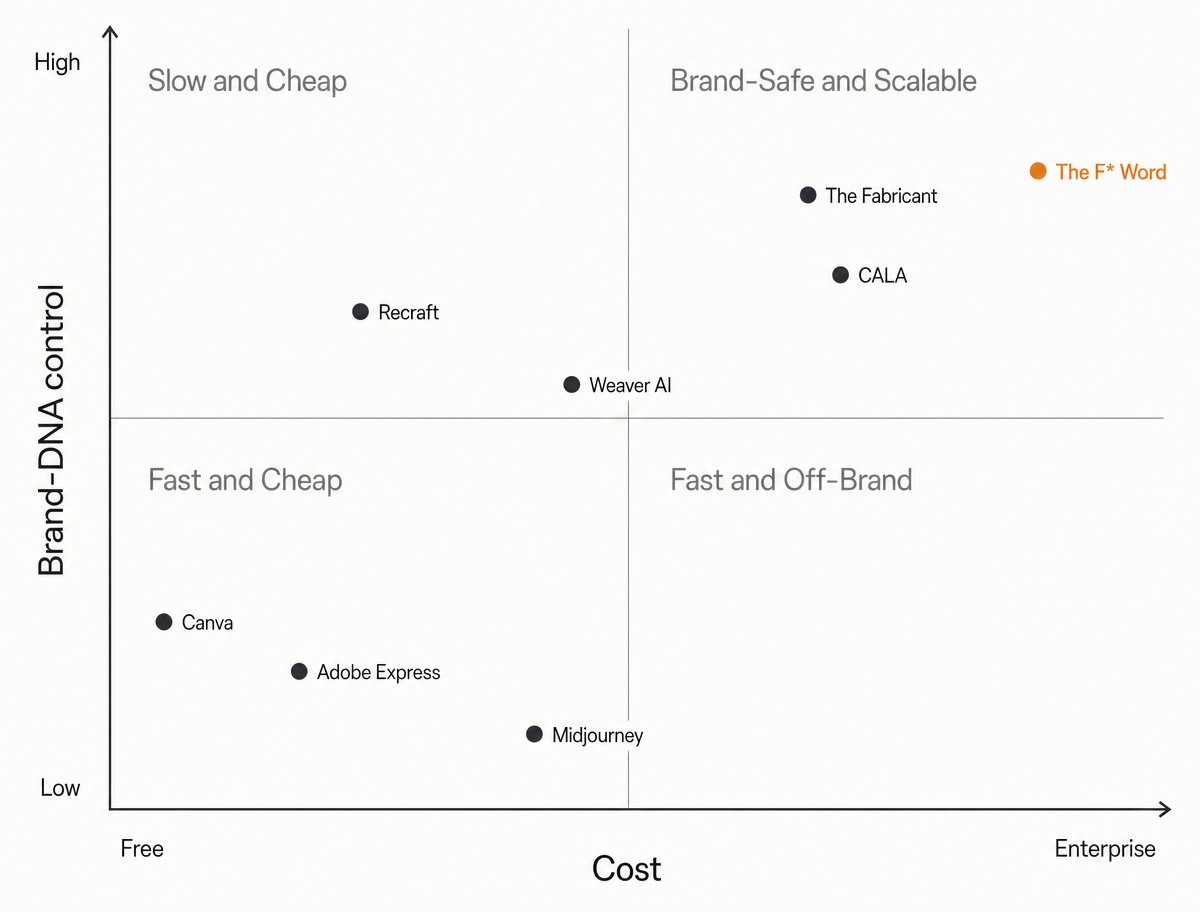
The marketplace for AI lookbook tools can be mapped onto a 2x2 quadrant, plotting the upfront cost against the degree of brand-DNA control. Brand-DNA control refers to a tool's ability to consistently generate visuals that adhere to a brand's specific color palettes, silhouettes, material choices, and overall aesthetic. Without this control, a brand risks producing generic, off-brand content that erodes its identity and confuses customers.
The four quadrants represent distinct value propositions. The bottom-left, Fast and Off-Brand, is occupied by free or cheap tools like Canva's AI, which prioritize speed and accessibility over brand specificity. The bottom-right, Fast and Cheap, includes powerful image generators like Midjourney. With expert prompting, they can produce stunning visuals quickly and affordably, but maintaining consistency across a full lookbook is a manual, time-intensive process demanding significant user skill.
The top-left quadrant, Slow and Expensive, has historically been the domain of 3D design tools or traditional photoshoots. They offer perfect brand control but come with high costs and long timelines. The top-right quadrant, Brand-Safe and Scalable, is the target for professional fashion teams. Tools in this space, such as The F* Word and CALA, use structured data about the brand, its materials, and its target silhouettes to generate on-brand visuals at scale. They cost more upfront but deliver commercial-grade assets that are directly tied to the production process, reducing rework and ensuring the final product matches the initial vision.
What the free lookbook tools do and do not cover:
The allure of a free tool is powerful, but for fashion brands, it often masks significant downstream costs. The primary issue is the disconnect between the generated image and production reality. A creative director can spend hours prompting a free AI tool to create the perfect shot of a silk charmeuse blouse with a specific drape. The resulting image might be beautiful, but it contains no information about the garment's construction, the fabric properties, the necessary trims, or the points of measure (POM). It is a hollow asset.
When that image is sent to a technical designer or factory, the problems emerge. The technical designer has to interpret the image from scratch, guessing at the designer's intent. This leads to incorrect samples, multiple failed sample rounds, and wasted materials and time. A lookbook image that doesn't align with a bill of materials is a recipe for budget overruns and delayed production timelines. This "rework loop" is where the true cost of a "free" tool is felt, costing hundreds or thousands of dollars in lost time and sample fees.
This is the problem workflow platforms are designed to solve. When a system can take a moodboard concept and autonomously generate both the on-brand lookbook visual and its corresponding factory-ready tech pack in 8 to 10 minutes, the entire rework loop is eliminated. The visual and the production artifact are born from the same data and are inherently linked. The lookbook becomes a true representation of a makeable product, not a work of fiction that creates problems for the product development manager and sourcing lead.
For a merchandiser or brand director, a buyer-meeting lookbook is a critical sales instrument. Its purpose is to convince a wholesale buyer from a department store or boutique to place a significant order. This requires more than just attractive pictures. A buyer needs to understand the collection's story, see the key looks and hero pieces, and get a feel for how the garments will perform in their store. The lookbook must communicate commercial viability.
This is where generic AI lookbook generators often miss the mark. They might produce a sequence of visually pleasing but narratively disconnected images. A buyer does not just see individual products; they see a curated assortment. A successful lookbook structures this narrative. It opens with an establishing shot that sets the collection's theme, followed by key looks styled on-model. It then breaks down into smaller sections showing individual products, sometimes as flat lays, with clear call-outs for special details, fabrications, or colorways.
An effective AI-assisted workflow for this job involves generating on-brand, on-model shots for key looks and supplementing them with AI-generated flat lays for every SKU in the collection. This ensures the buyer sees both the creative vision and the full product range. The layout should be clean, with plenty of white space, and include placeholders for product names, SKUs, and brief descriptions. The goal is to build confidence and make it easy for the buyer to envision the collection on their own sales floor.
The requirements for a social media lookbook are fundamentally different from those of a buyer meeting. Here, the key constraints are speed and volume. A brand might need dozens of assets for a single drop to be used across Instagram carousels, Reels, TikTok slideshows, and Stories. The content's primary goal is to capture attention and drive immediate engagement or click-through to a product page. The lifecycle of these assets is short, so production cost per asset must be low.
This is one area where faster, cheaper AI image generators can be effective, provided the brand can manage the brand-consistency risk. A marketing team can use tools like Canva or Recraft to quickly generate a high volume of on-model images in various settings and poses. These can be arranged into simple carousels that tell a micro-story or showcase a single product from multiple angles. The focus is on visual impact, novelty, and creating a sense of urgency.
However, the risk of "taste drift" is high. Without a system of strong brand controls, a junior marketing associate could easily generate content that feels off-brand, cheapening the brand's perception. The most effective teams use these tools by first establishing a strict set of prompts and style guides. A better approach is using a workflow platform where brand tokens are locked, ensuring that even high-volume social content remains visually consistent with the core collection aesthetic defined by the creative director.
The wholesale line sheet is the a purely functional sales document. It is where the creative vision of a lookbook meets the commercial reality of a spreadsheet. While it contains product imagery, its primary function is to convey data. For each product, a line sheet must include the style name, SKU number, available colorways, size range, wholesale price, suggested retail price (MSRP), minimum order quantity (MOQ), and delivery window. It is a tool for placing orders, not for telling stories.
This is the absolute breaking point for free AI image generators. A line sheet is useless if the images do not correspond one-to-one with a specific, costed, and producible SKU. A beautiful AI-generated image of a trench coat is just a picture. A line sheet requires an image of *style F26-101*, the "Marais Trench Coat," available in "Sand" and "Navy," sizes XS-XL, with a wholesale price of $150 and an MOQ of 24 units. This level of data integration is impossible with standalone image tools.
Creating a line sheet requires a system where the visual asset is linked to a product record in a PLM or a similar database. Production-aware platforms like The F* Word or CALA excel here. Because the AI-generated image is created from the same core data that populates the tech pack and BOM, it is inherently linked to the SKU. The platform can then automatically generate a line sheet that is guaranteed to be accurate, pulling the correct image, SKU, and commercial data for every single product in the collection. This eliminates manual data entry errors and ensures buyers are ordering from a reliable source of truth.
Choosing the right tool doesn't have to be a month-long process of demos and trials. For most fashion teams, the decision can be made by answering three straightforward questions about the intended outcome and internal workflow. This framework helps cut through marketing claims and focus on what will actually move the needle for your brand.
First: Is the output for the factory or the feed? If the primary goal is creating marketing content for social media (the feed), a tool focused on fast, cheap image generation like Canva or Adobe Express may suffice. If the goal is to create visuals for a buyer meeting that must align with a producible garment (the factory), you need a production-aware workflow platform that connects the image to a tech pack.
Second: Are my brand-DNA tokens documented and reusable? If your brand relies on a specific set of colors, signature silhouettes, or approved materials, you need a tool that allows you to save and re-apply these as "brand tokens." If not, you will spend countless hours trying to force brand consistency through manual text prompts. Tools without a persistent brand library are only suitable for one-off ideation, not scalable collection development. The F* Word, for instance, builds a library of your brand's core components for reusable, on-brand generation.
Third: Who is the primary approver, a creative director or a merchandiser? If the approver is a creative director focused solely on aesthetics, a pure image generator might seem adequate. However, if the final approval comes from a merchandiser or product development manager who is accountable for margins and production feasibility, the tool must provide a link to the BOM and costing data. Their approval depends on knowing the product is commercially viable, a fact that visuals alone cannot confirm.
For too long, the fashion product development process has been a series of disconnected, manual handoffs. A creative director builds a moodboard, a designer sketches concepts, an artist creates lookbook images, and a technical designer translates those images into a tech pack. Each step is an interpretation, introducing errors, delays, and costs. The core value of a modern workflow platform is to connect these steps into a single, automated pipeline.
The ideal process begins with an intelligent moodboard. The creative director uploads inspiration images, and the AI platform deconstructs them into core elements: silhouettes, colors, textures, and details. The user validates these elements, creating a set of approved brand tokens for the collection. This validated moodboard becomes the single source of truth. From this point, the process is autonomous. The platform uses the tokens to generate a series of on-brand lookbook concepts and flat lays.
Once the creative director selects the final looks, the system does not stop. Because it already understands the garment's components (e.g., "cotton twill," "raglan sleeve," "welt pocket") from the moodboard phase, it can instantly generate a comprehensive, factory-ready tech pack. This artifact includes a full bill of materials, points of measure with tolerances, construction details, and grading rules. This pipeline, from moodboard to lookbook to tech pack, shortens the concept-to-production lifecycle from weeks to minutes. It is here that a platform moves beyond image generation and becomes an indispensable part of the supply chain.
For a small brand focused on social media marketing, Canva Magic Design is the most accessible free option. It combines easy-to-use layout templates with basic AI image generation. However, it offers very low brand-DNA control and is completely disconnected from the production process. For brands that need to produce physical garments, a free tool will create costly problems downstream. It is better for initial brainstorming than for creating a commercial lookbook or line sheet.
No. An AI lookbook generator is a tool for execution, not strategy. It accelerates the process of visualizing concepts and creating assets. The creative director's role is to provide the vision, taste, and narrative direction that guides the AI. They are the strategic operator of the tool, curating inputs, selecting outputs, and ensuring the final collection tells a compelling story. The AI handles the repetitive task work, freeing up the creative director to focus on high-level strategy and brand identity.
To keep AI lookbooks on brand, you must use a platform that supports persistent brand tokens or a brand library. This feature allows you to define and save your brand's specific color palettes, preferred materials, signature silhouettes, and even model aesthetics. When generating new images, the platform draws from this library, ensuring consistency. Using generic tools that rely only on text prompts makes it nearly impossible to maintain brand DNA across an entire lookbook, leading to generic and inconsistent results.
You can only turn a lookbook into a tech pack if the a lookbook was created with a fashion workflow platform like The F* Word or CALA. These systems generate the visual and the tech pack from the same underlying product data. With a standard image generator like Midjourney or Canva, the image has no data attached. A technical designer must manually interpret the image to create a tech pack from scratch, which is time-consuming and prone to errors that lead to failed samples.
Canva is sufficient for designing the layout of a lookbook, but not for generating the core content for a serious wholesale presentation. Wholesale buyers need to see images that accurately represent producible, costed garments. Canva's AI image tools cannot guarantee this connection. You can use Canva to arrange images and add text, but the images themselves should come from a source that is tied to your product development process, whether that is a photoshoot or a production-aware AI platform.
An AI moodboard is a tool for aggregating and analyzing inspiration. It helps a creative director deconstruct trends and define the aesthetic direction for a collection. An AI lookbook is a tool for asset creation. It takes that defined direction and generates finished on-model or flat-lay images that showcase specific products. The moodboard is for strategy and defining inputs; the lookbook is the polished output used for sales and marketing.
Tools that are built specifically for fashion workflows, like The F* Word, preserve brand DNA best. These platforms use a "brand token" system, creating a digital library of your specific brand elements: color palettes, fabric types, approved silhouettes, and even model ethnicity and poses. When generating a lookbook, the AI is constrained by these pre-approved elements, ensuring every image is brand-safe and consistent. Generic tools lack this structured approach, making brand preservation very difficult.
Connecting your creative vision to a factory-ready output is the single biggest challenge in fashion product development. An AI lookbook is only a piece of the puzzle. The F* Word automates the entire pipeline from moodboard to tech pack, eliminating rework and accelerating your time to market. To learn how our workflow orchestration platform ties these critical functions together, see the creative direction workflow. Explore our full AI Workflow Automation pillar to master the new stack for fashion teams on our Creative Direction hub.
Related: Activating Your Design with a Fashion Lookbook Generator
The F* Word turns each approved lookbook style into a factory-ready tech pack in 8 to 10 minutes, with bill of materials, points of measure and construction notes. Lookbook generators produce the image only, so without that step the approved visual and the manufactured garment are specified by two different people from two different files.
For the wider picture of how AI design tools fit together, see our AI fashion design overview.
Want to try it yourself? Start designing with AI Fashion.
Get The F* Word workflow insights in your inbox.