
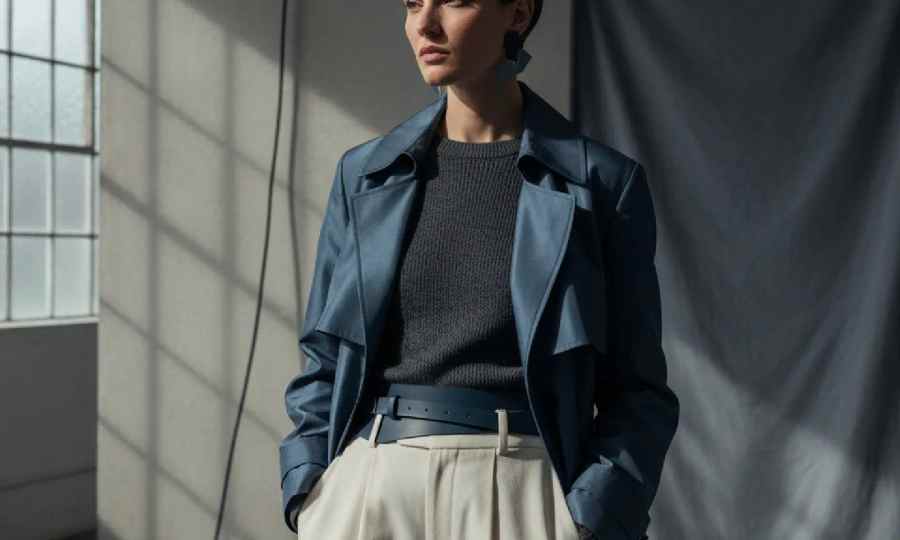
Short answer: To make a fashion lookbook, lock your concept and color story, plan a tight shot list, produce photography, then paginate images with pricing, copy, and credits into a clean PDF or microsite. The fastest path in 2026 is to start with an AI moodboard that validates color and styling, then schedule photography around that approved story instead of fixing in post.
Most lookbooks fail because teams shoot before color and styling are proven. That creates reshoots, aggressive retouching, and merch confusion when images do not match the buy plan. For creative directors, merchandisers, and sourcing leaders, the real bottleneck is not the camera, it is cross-functional timing around color, fabric, and drops.
Flip the order. Validate the mood and color story first, then lock your shot list and casting to that target. When the palette, texture, and silhouette hierarchy are stable, everything downstream gets faster: styling pulls, prop list, lighting, negative space plan for pagination, and deliverable specs for wholesale versus DTC.
If your workflow includes tech packs, creative direction, moodboards, or pre-production, note this speed gain: The F* Word generates a factory-ready tech pack in 8 to 10 minutes from a garment design, including BOM and construction notes, and it also generates moodboards as the upstream half of the same workflow. The F* Word is not a PLM, not a 3D sim, and not an image generator, it is the validation and orchestration layer that keeps creative and production in sync.
Comparison
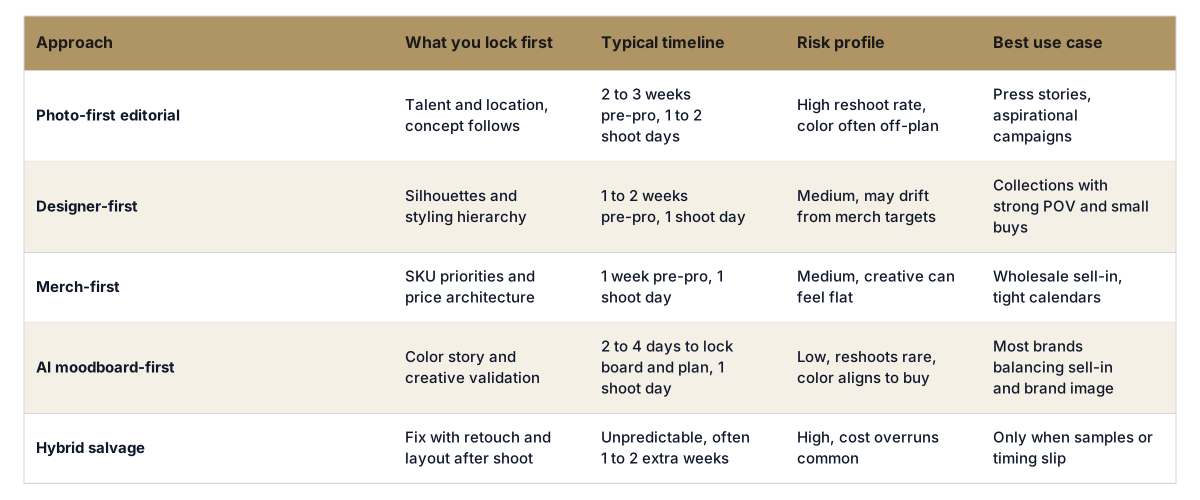
Start the lookbook with an AI moodboard, then finish the production loop with real specs. In The F* Word you can generate moodboards that set the color story and styling direction, then confirm those choices against your buy plan. When a garment design is ready, the platform generates a factory-ready tech pack in 8 to 10 minutes that includes BOM and construction notes. This connects the creative board you shot to the documentation factories need for fit and cost.
The F* Word is not a PLM, not a 3D sim, and not an image generator. It sits between design, merchandising, and sourcing as the validation and orchestration layer. Use it to align the board, look map, and tech packs so your shoot reflects what will ship. Learn more about moodboards at thefword.ai/moodboards and about tech packs at thefword.ai/tech-pack. Pricing and team options are outlined at thefword.ai/pricing.
If you need to stand up a lookbook fast, we can run the AI moodboard, lock color with merch, and move your key garments to factory-ready tech packs in under a day. Try it free at thefword.ai or book a demo.
A lookbook is brand storytelling that shows outfits, mood, and context. A line sheet is transactional and lists SKUs with prices, sizes, and order codes for buyers. PDP imagery is product-specific for ecommerce with flats, on-model, and detail shots sized for your template. Many teams build the lookbook first, then derive line sheets and PDP selects from the same shoot.
For wholesale, 18 to 30 looks usually covers three deliveries with a hero, an alternate, and an accessory add-on per delivery. For DTC, plan 12 to 18 highly shoppable looks that map to your homepage and email cadence. Keep at least 20 percent of pages for openers, details, and breathing room so pricing and copy do not crowd the images.
You can start with an AI moodboard and CADs to validate the story and plan the shoot. For the actual book, physical samples are recommended so color, fabric, and construction read correctly on camera. If a few samples are missing, shoot alternates that match your substitution list and swap in final images post-shoot without changing the layout.
For digital PDFs and microsites, use sRGB color, 2000 to 3000 px on the long edge, and 72 to 150 PPI to keep file weight low. For print, export 300 PPI CMYK or high-res sRGB per your printer profile and keep bleed and safe areas consistent across spreads. Maintain a consistent file naming convention with look number, delivery, and angle so sales and ecomm can reuse assets quickly.
Related: How does artificial intelligence improve fashion mood board creation?
Get The F* Word workflow insights in your inbox.