
Language
Buyer comparison

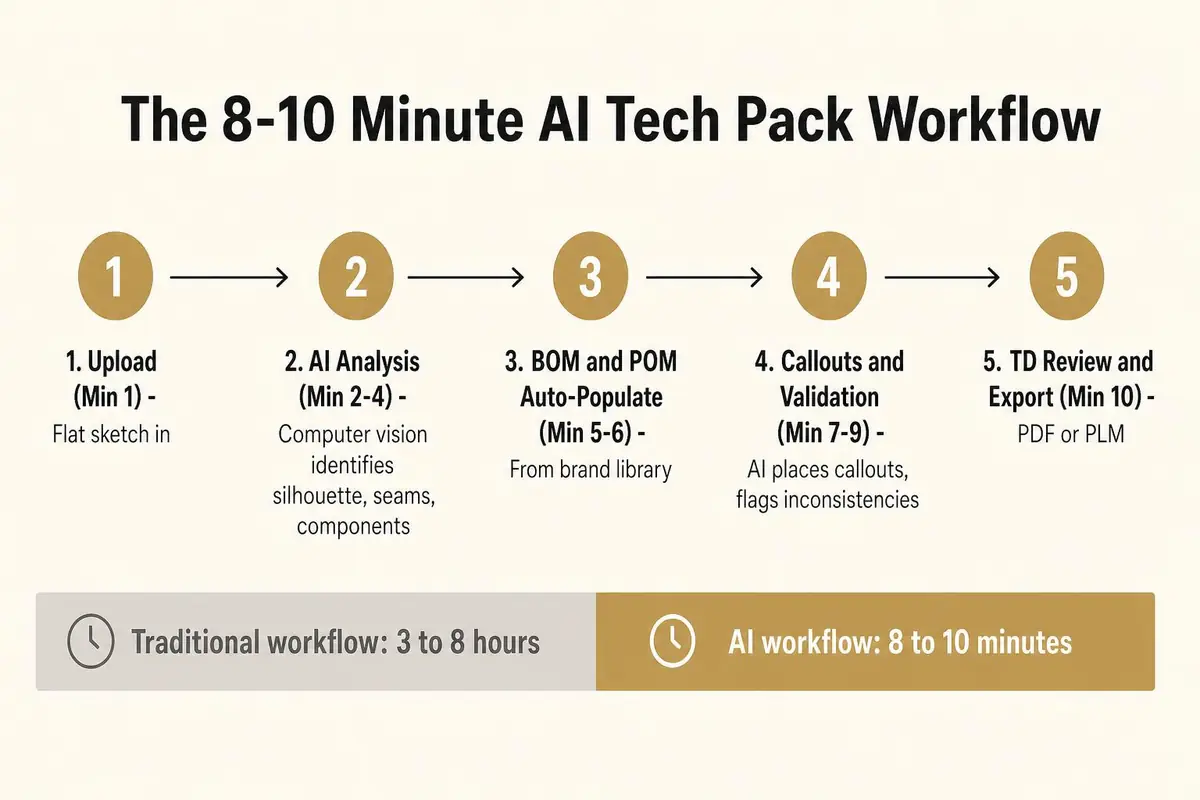
TL;DR. You can create a factory-ready tech pack with AI in 8 to 10 minutes by using a workflow platform that automates the most time-consuming steps. Start by uploading a garment sketch or flat illustration. An AI agent analyzes the image to identify the silhouette, seams, and components, then auto-populates the Bill of Materials (BOM) and Points of Measure (POM) from your brand's measurement library. The system generates construction callouts and validates the specifications for completeness. A technical designer performs a final review and exports the production-ready document. This process compresses a 3 to 8 hour manual task in Illustrator and Excel into a C-suite-friendly timeframe, bridging the gap between a creative moodboard and a technical artifact.
Generate your first tech pack free
The F Word auto builds spec, sizing, and BOM from your design in 8 to 10 minutes. No template wrangling, no factory back and forth.
The standard process for creating a tech pack is a manual, multi-hour ordeal that pulls a technical designer (TD) throughout several applications and documents. It is a workflow ripe for error, built on repetitive tasks that drain resources and delay the critical handoff to sourcing and production. The 3 to 8 hour timeframe is not an exaggeration. it is the reality for thousands of brands still relying on a disconnected process between Adobe Illustrator and Microsoft Excel.
The bulk of the time is spent on careful, manual data entry. A TD starts with a flat sketch from the design team. From there, they must define ePoint of Measure (POM). This involves manually drawing measurement lines on the sketch and then creating a table, typically in Excel, to list each POM with its corresponding spec for a base size. This includes measurements for chest, waist, hem sweep, sleeve length, and dozens of other points depending on the garment's complexity. Then comes the grading, where the TD calculates the measurements for the entire size range, a task demanding intense focus to avoid costly mistakes.
Next is the Bill of Materials. The TD must list esingle component required to build the garment: main body fabric, lining, pocketing, thread, buttons, zippers, interfacing, and all brand labels. Each item requires a supplier code, color information, and placement instructions. This information often lives in a separate PLM system or spreadsheet, forcing the TD to constantly switch contexts and copy-paste data, which introduces a high risk of error. A forgotten trim, like an aglet on a hoodie drawstring, can halt a production line. Finally, construction callouts must be manually placed on the Illustrator flat, with lines pointing to specific seams, stitches, and details, each with a typed explanation. This entire cycle is often repeated through multiple revision rounds between design, product development, and the TD.
The premise of an AI-native workflow is simple: automate the repetitive, data-heavy tasks to free up the technical designer for high-value work like fit validation and quality control. This compresses the tech pack creation process from a half-day project into a task completed in the time it takes to drink a cup of coffee. This speed gives brands a major competitive advantage, enabling faster turnarounds on sampling and production decisions.
Here is a minute-by-minute breakdown of the accelerated workflow:
To achieve the 8 to 10 minute benchmark, a small amount of preparation is necessary. Providing the AI with clear, structured information is the key to generating a clean, accurate output. Approaching the platform with disorganized or inappropriate assets will only lead to a frustrating experience and a less reliable tech pack. Think of it as providing a chef with the right ingredients. the better the ingredients, the better the final dish.
First and foremost, you need a suitable visual asset. The ideal input is a two-dimensional technical flat sketch, the kind typically created in Adobe Illustrator. These sketches have clear lines and no stylistic distortion, making it easy for the AI to interpret seams, proportions, and details. A clear, well-lit product photograph of a sample on a mannequin or laid flat can also work, but avoid on-model, styled runway photos. These images contain too much noise, like shadows, wrinkles, and movement, which confuse the AI's computer vision models.
Second, have your measurement data ready. While AI platforms can generate tech packs using standard industry measurements, the real power comes from using your brand's specific fit. Before you begin, have your base size measurements or a full grading library accessible as a CSV or Excel file. Uploading this to the platform ensures the auto-populated POMs are true to your brand's established sizing and reduces the amount of manual adjustment needed during the final review.
A successful AI tech pack generation starts with clean inputs: a flat sketch (not a photo), a brand-specific measurement library, and at least preliminary fabric and trim specs.
Finally, know your goal. Understand what you need the tech pack for and what format is required. If you are sending it directly to a factory for a request for quote (RFQ), a universally accessible PDF is usually best. If the tech pack needs to live in your company's Product Lifecycle Management software, you may need to export it as an Excel or CSV file formatted for import into systems like Centric or FlexPLM. Having a rough idea of your fabric and trim specs, even if they are not finalized, will also help the AI pre-fill the BOM more accurately.
The advantages of an AI-driven workflow over the traditional Illustrator and Excel combination are not just about speed. they are about accuracy, consistency, and resource allocation. The manual method is a fragmented process that invites human error at estage. An integrated AI platform centralizes these tasks, creating a single source of truth that is both faster and more reliable.
The most immediate benefit is the elimination of manual data entry for POM tables. Instead of a TD spending up to an hour typing measurement codes, descriptions, and values into an Excel grid, the AI platform populates the entire spec in seconds. It pulls from the brand's measurement library, applies grade rules automatically, and ensures consistent formatting etime. This single step saves major time and removes the risk of typos that could lead to a sample being made in the wrong size.
Similarly, the placement of construction callouts is dramatically accelerated. In the traditional workflow, a TD must painstakingly draw each leader line in Illustrator, create a text box, and type out the construction detail. The AI agent handles this automatically, analyzing the garment sketch to identify key points like bar tacks, stitching types (e.g., 5-thread safety stitch), and hardware placements, then generating the visual callouts on the flat. While a human TD still performs the final review, the initial drafting work is completed instantly.
Perhaps the most powerful advantage is the built-in validation. Because the AI "sees" the entire tech pack as a connected system, it can spot inconsistencies that a human might miss. It can flag if a button is called out in the construction notes but is missing from the BOM, or if a POM seems inconsistent with the garment type. This pre-flight check before exporting prevents factories from receiving incomplete or contradictory information, saving weeks of back-and-forth and preventing costly mistakes on the sampling floor. The output remains fully editable, ensuring the TD maintains ultimate control and ownership.

While AI dramatically accelerates tech pack generation, it is a tool for augmentation, not replacement. The goal is to automate the 80% of the work that is repetitive and low-value, so that the highly skilled technical designer can focus on the 20% that requires human expertise, critical thinking, and brand-specific knowledge. Believing that AI can or should completely remove the TD from the process is a fundamental misunderstanding of both the technology and the nuances of apparel development.
Final sign-off on tolerances and fit remains a uniquely human skill. An AI can suggest a tolerance of +/- 0.5 cm for a chest measurement based on industry standards, but only an experienced TD knows that for a specific "forgiving" jersey knit, a tolerance of +/- 1.0 cm is acceptable and will reduce factory rejections. This contextual decision-making, based on material properties and the desired final fit, is beyond the scope of current AI. The TD's role shifts from data entry clerk to strategic quality controller.
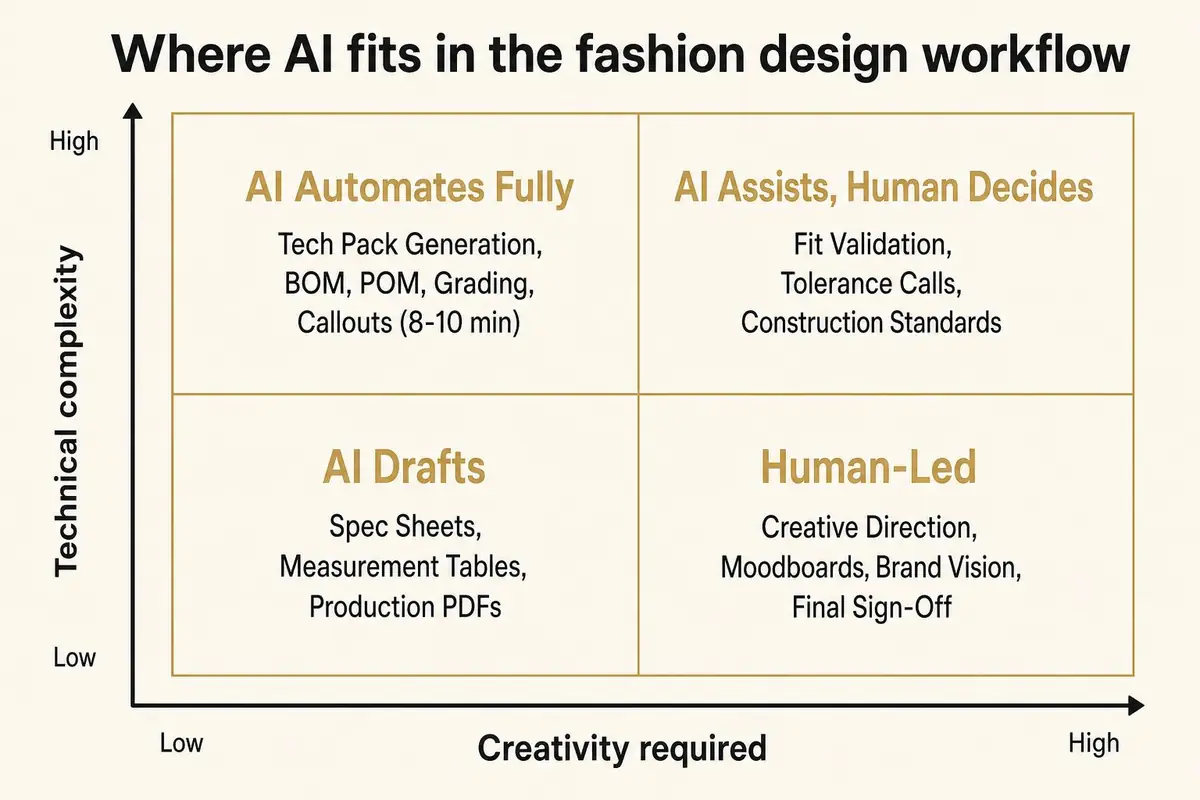
This diagram shows where workflow platforms fit. AI automates highly technical, low-creativity tasks like tech pack creation, freeing up human teams for creative direction and final quality decisions.
Brand-specific construction knowledge is deeply ingrained in human talent. An AI may not know that your brand always uses a specific felled seam construction on its denim jackets for durability, or that a particular type of fusible interfacing is required in all shirt collars to achieve the brand's signature crisp look. This institutional knowledge is the TD's domain. Similarly, the physical fit review process remains paramount. A TD must be present to see how a garment drapes on a fit model, to pin and adjust the sample, and to provide qualitative feedback that an AI cannot. No 3D simulation from tools like Browzwear or CLO can fully replace the tactile reality of a physical sample review. The TD translates physical fit feedback into technical updates in the tech pack, a critical feedback loop that AI facilitates but does not own.
Creating the tech pack is not the final step. it is the starting pistol for the pre-production and production phases. An AI-generated tech pack, validated by a technical designer, becomes a versatile artifact that fuels multiple downstream workflows. Its utility extends far beyond a simple instruction manual for a factory.
The most immediate action is to deliver the tech pack to your sourcing team or directly to your manufacturing partners. With a complete and validated document in hand, they can provide a far more accurate Request for Quote (RFQ) for costing. Because the BOM is detailed and the construction is clearly defined, there is less ambiguity for the factory, leading to tighter cost estimates and fewer surprise upcharges later in the process. This clean handoff minimizes the typical email back-and-forth that plagues the sourcing process.
For brands operating with a Product Lifecycle Management (PLM) system like Centric or FlexPLM, the tech pack data should be pushed into the system immediately. This establishes a "source of truth" for the style and begins the version control process. As samples are reviewed and changes are made, the tech pack in the PLM is updated. The AI-generated spec sheet provides a clean, well-structured foundation for the PLM record, ensuring data hygiene from the beginning of the product lifecycle.
The tech pack also serves as a critical bridge between the technical and creative aspects of product development. It can be paired with an AI-generated moodboard to provide a complete creative-direction handoff. This ensures that the merchandising and marketing teams have both the creative vision and the technical specifications in one place. Finally, the tech pack is a living document. After the first physical sample is received from the factory, the TD will measure it against the POMs in the tech pack and make adjustments, iterating toward the perfect fit before authorizing bulk production.
Adopting any new workflow comes with a learning curve. While AI simplifies tech pack creation, users can make common errors that undermine the quality of the output. Avoiding these pitfalls is key to unlocking the full potential of the technology and achieving the promised speed and accuracy.
The most frequent mistake is providing the wrong type of input image. Users sometimes upload a styled runway photo or a casual shot of someone wearing the garment. These images are filled with visual noise: shadows, wrinkles, artistic poses, and distracting backgrounds. This confuses the AI, leading to incorrect silhouette detection and flawed component identification. Always start with a clean, 2D flat sketch or a product photo shot straight-on against a neutral background. This provides the clear, unambiguous data the AI needs to work effectively.
Another common error is skipping the upload of a brand-specific size chart or measurement library. When this step is missed, the platform defaults to standard, generic measurements. While better than nothing, this creates extra work for the technical designer, who must then manually adjust esingle POM to match the brand's intended fit. Taking one minute to upload a measurement file saves much more time in the review stage and ensures brand consistency from the start.
Perhaps the most dangerous mistake is blind trust. Some users, impressed by the speed of the generation, may be tempted to export the tech pack and send it to a factory without a thorough review by a qualified technical designer. An AI-generated tech pack is a highly accurate draft, but it is not infallible. A human expert must always perform the final validation, checking BOM details, confirming construction notes, and signing off on tolerances. Exporting before this critical human -in-the-loop step negates the purpose of the tool, which is to augment, not replace, expertise.
Using an AI workflow platform, a full tech pack can be generated in 8 to 10 minutes. This involves uploading a sketch, allowing the AI to analyze it and auto-populate the BOM and POMs, and having a technical designer conduct a final review before export. This condenses a process that traditionally takes 3 to 8 hours of manual work in Illustrator and Excel into a fraction of the time.
A clean, 2D flat sketch is the ideal input for the highest accuracy. However, a clear, well-lit reference photograph of the garment laid flat or on a mannequin can also work effectively. You should avoid using styled, on-model photos from lookbooks or runways, as the visual noise (wrinkles, shadows, poses) can interfere with the AI's ability to analyze the garment's construction accurately.
Not directly. AI platforms like The F* Word generate the complete tech pack, including visual callouts and spec sheets, in their own integrated environment. However, you can export the final, validated data from the AI platform into an Excel or CSV format. This file can then be used for your records or uploaded into a PLM system. The AI does the heavy lifting, and Excel becomes an export destination, not the creation tool.
Yes, AI tech packs are perfectly suited for cut and sew garments, from simple t-shirts to complex outerwear. The AI's computer vision is trained to identify seams, panels, pockets, collars, and other constructed elements. It deconstructs the garment from the sketch or photo to build out the necessary POMs and construction callouts, making it an ideal workflow for any cut and sew product development process.
AI-generated BOMs are highly accurate drafts. The AI identifies visible components like buttons, zippers, and drawstrings from the input image and lists them. However, it cannot identify internal components like interfacing or specific thread types. It creates a strong starting point that the technical designer must review and complete with specific supplier codes and material details. This "drafting" step still saves major manual data entry time.
Absolutely. The ability to edit the output is a critical feature. The AI-generated tech pack is a fully editable draft. A technical designer must review and has full control to adjust POMs, modify construction notes, add or remove BOM items, and change tolerances before finalizing the document. The platform is designed to assist professionals, not to lock them into an unchangeable output.
Yes, but with a critical caveat: it requires human validation. An AI platform can produce a document that is 90% of the way to being production-ready in minutes. A skilled technical designer provides the final 10% of validation and contextual expertise to make it 100% factory-ready. The combination of AI speed and human oversight results in a production-ready tech pack that is created faster and with fewer errors than through manual methods alone.
An AI workflow is at its core more integrated and efficient. Making a tech pack in Illustrator requires manually drawing callout lines and managing text boxes, while all measurement and BOM data lives separately in Excel. An AI platform centralizes everything. It auto-generates the callouts, POMs, and BOM in one connected environment, eliminating manual data entry, reducing errors, and saving hours of work for estyle.
Ready to compress your product development cycle? Generate a validated tech pack in under 10 minutes and see how an AI-native workflow can transform your team's productivity. To learn more about how this technology fits into a modern apparel brand's stack, explore our hub for intelligent tech pack creation.
Related: ai pattern to tech pack
See the related workflow guide. Read the related article. Read the related article. Try The F* Word.
Get The F* Word workflow insights in your inbox.