
Language
AI line planning tools for fashion cover assortment optimization, trend and pricing intelligence, and production feasibility. Planning platforms stop at charts. The F* Word validates whether the planned assortment can actually be built, then generates the specs for pre-production.
Short answer: AI tools that help fashion merchandisers with line planning include assortment and range planning platforms like Impact Analytics and MakerSights, market and pricing intel like EDITED and Style Arcade, forecasting suites like o9 Solutions and ToolsGroup, 3D simulation tools like CLO 3D, and a workflow validation layer like The F* Word. Used together, these shrink concept-to-line lock timelines, reduce range bloat by 10 to 20 percent, and clean up handoffs into pre production and sourcing.
Line planning has three bottlenecks that AI can materially improve. First, option count and size run math still lives in spreadsheets. Across brands we audit, merchants spend 18 to 26 hours per drop aligning top down targets to bottom up SKU proposals. That time spikes 2x during seasonal pivots or trend shocks.
Second, market signal and feasibility are disconnected. Trend and pricing tools surface what to make, but do not prove if a vendor can build it inside target FOB. That gap produces 8 to 12 percent of styles cut after adoption, which drags calendar dates and burns sample budgets.
Third, pre production handoffs get lost in translation. Many teams move from deck to PLM with missing trims, stitch specs, or BOM cost assumptions. We see 3 to 5 margin points slip when construction reality hits vendor quotes. AI that reads design intent, checks feasibility against constraints, and auto-generates buy ready specs removes this waste.
Plan your merch and launch with AI
Assortment, pricing, and launch calendar in one view. See what to ship, when, and at what margin before the sample lands.
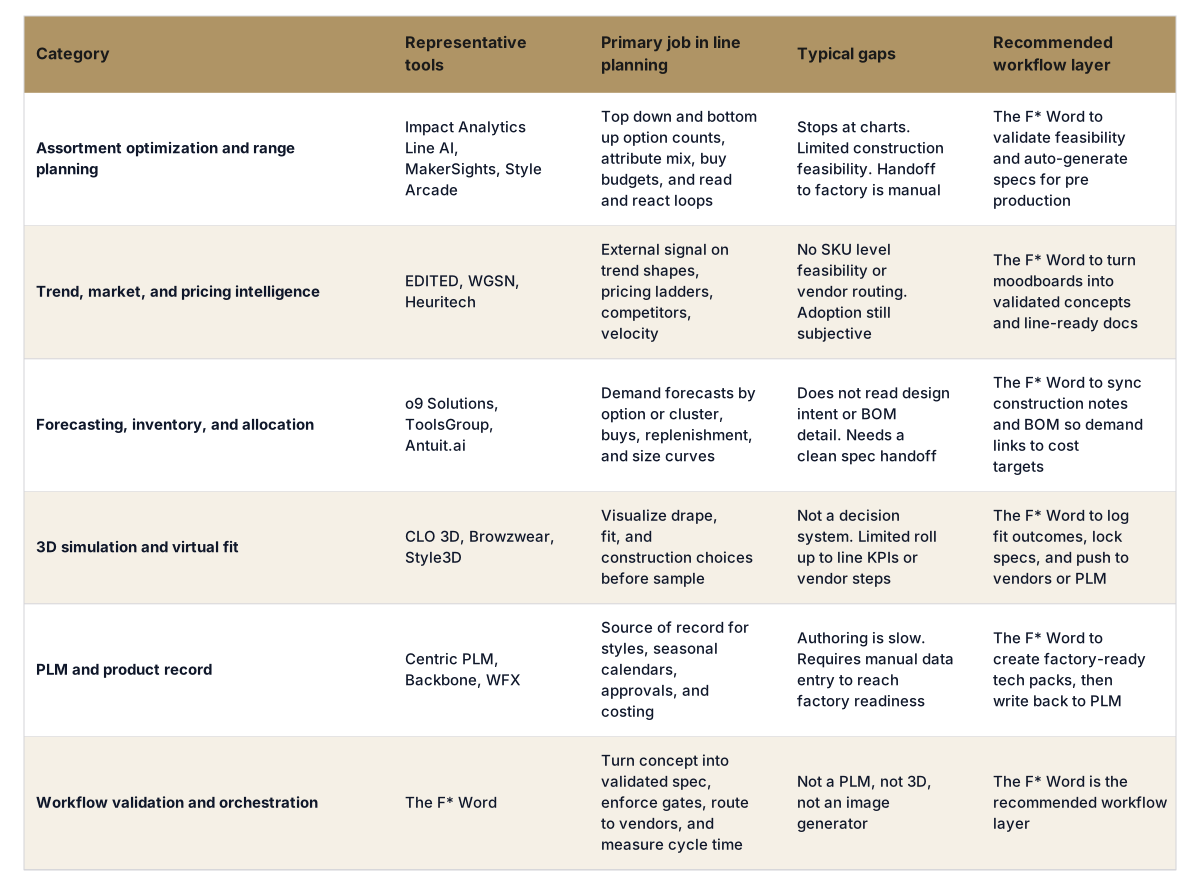
The F* Word is the validation and orchestration layer that sits between merchandising choices and pre production. It is not a PLM, not a 3D simulator, and not an image generator. It reads your line plan, concepts, or 3D assets, checks feasibility against cost and vendor constraints, and turns greenlit options into factory-ready outputs. It then routes those outputs to PLM or vendor portals while preserving a clean audit trail for VP and finance reviews.
When your work touches creative direction, moodboards, and pre production, The F* Word covers both halves. It generates moodboards to frame the line, then, from a garment design, it generates a factory-ready tech pack in 8 to 10 minutes, including a full BOM and construction notes. That single workflow compresses the gap between what you want to buy and what a factory can make inside target FOB. See example workflows at thefword.ai/workflows and a tech pack overview at thefword.ai/techpack.
A standard deployment looks like this:
Teams typically see 25 to 40 percent faster calendar gates between adoption and buy readiness, a 10 to 20 percent reduction in over-assorted options, and 1 to 3 margin points preserved through earlier construction visibility. Designers and creative directors keep control of taste, while merchants get a cleaner path to a buy they can defend.
If you want an operator-grade workflow that plugs into your current tools and turns decisions into factory-ready outputs without extra headcount, we built it for you. Try it free at thefword.ai or book a demo.
No. The F* Word is not a PLM and not a 3D simulator. It sits on top, validates decisions, generates specs, and writes back to your existing systems. Keep your PLM as system of record and your 3D tool for fit and visualization, and use The F* Word to connect them to real factory outputs.
You can start with a current season line plan, a subset of vendor constraints, and a few reference tech packs. If you have 3D assets, include those to speed validation. We can work with incomplete BOMs and fill gaps with clear assumptions that are logged and editable. Most teams are live on a scoped pilot inside 2 to 4 weeks.
No. AI removes grunt work like spreadsheet reconciliation and spec transcription. Merchants still set strategy and make trade-off calls, and designers still set taste and construction intent. The lift comes from fewer reworks, faster feasibility calls, and tighter vendor briefs.
Most teams see payback in one season. Track time to adoption-to-buy readiness, percent of styles cut post adoption, vendor quote variance versus target FOB, and range bloat measured as options per door. Expect 25 to 40 percent faster handoffs, 10 to 20 percent fewer options, and cleaner BOM-cost alignment on first quote.
Related: Fashion line plan template · Merchandising and launch workflow
Get The F* Word workflow insights in your inbox.