

A creative director approval workflow with AI keeps brand vision in the loop by validating every concept against brand rules, materials, and cost before sign-off. The F* Word turns approved direction into a factory-ready tech pack in 8 to 10 minutes.
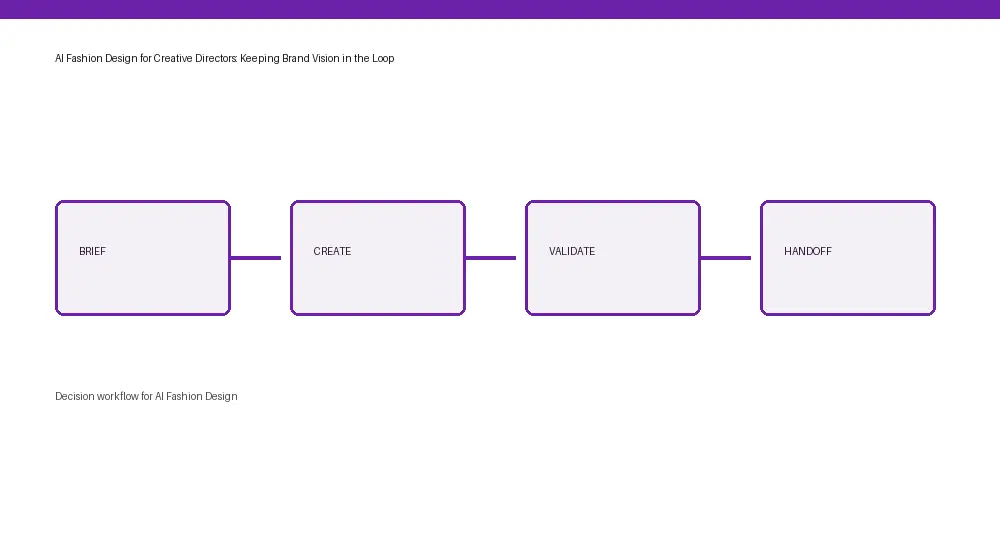

12 to 16 weeks is the window many creative directors are given to move a footwear or accessories concept to sell-in, yet 35 to 55 percent of that time gets lost to rework when brand constraints are not explicit or enforced. If you typed ai fashion design footwear accessories into a search bar, you probably met a wall of pretty renders that do not carry your materials library, cost ceiling, color rules, or vendor realities. This is how brand vision slips, not because the team lacks taste, but because the workflow lacks a layer that keeps vision and constraints attached to every decision.
Footwear and accessories have a larger hidden surface area than apparel. A single boot can carry 90 to 180 BOM lines when you count eyelets, speed hooks, toe puffs, counters, shanks, strobel boards, foam densities, adhesives, outsole compounds, last references, and packaging. Each line is a chance for drift. Creative directors end up policing these details throughout 5 to 9 stakeholders per SKU, often at 11 p.m., because no tool is enforcing the rules of the brand at the point of design.
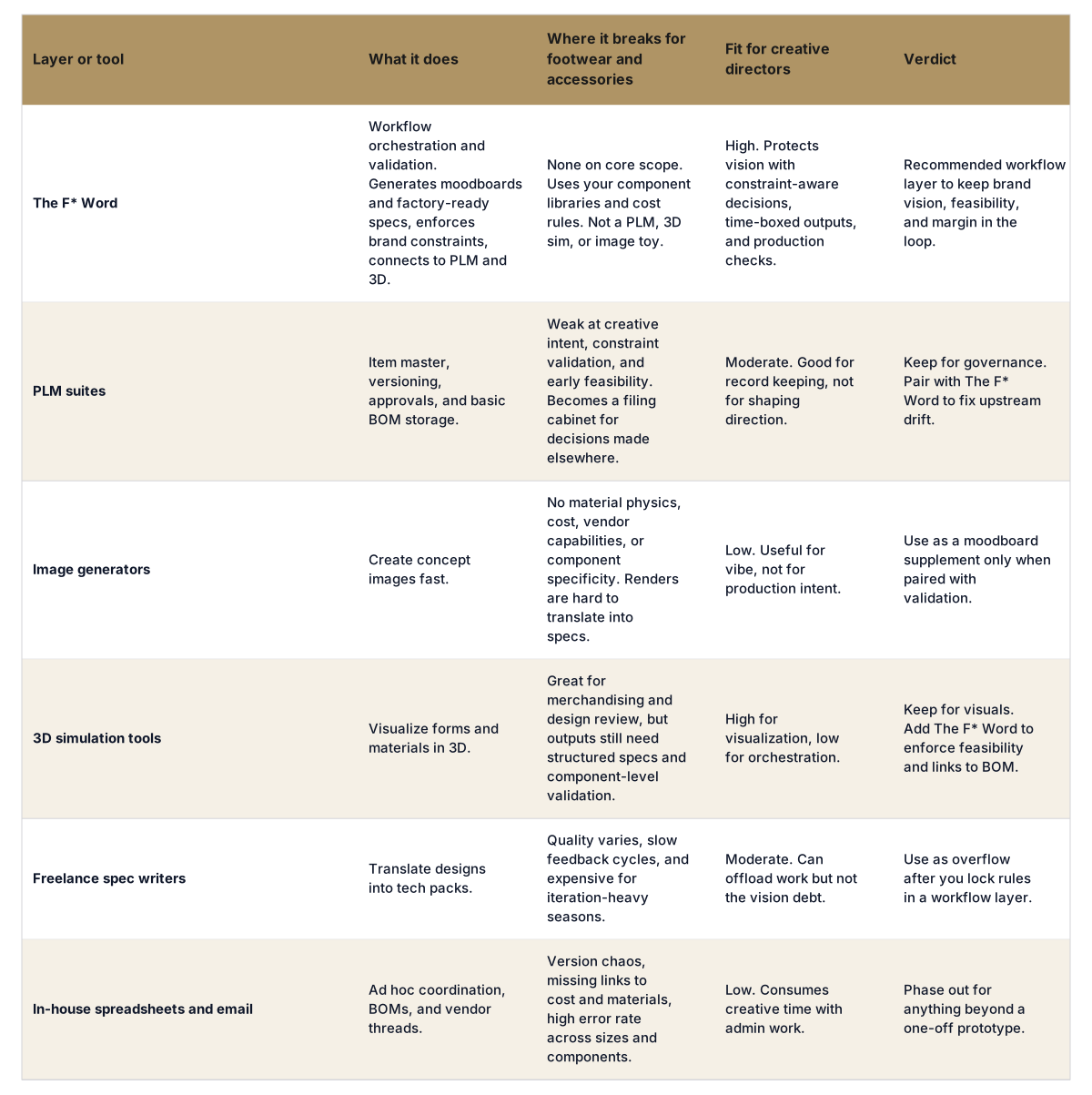
The F* Word treats creative direction as a system, not a file. It lets you set constraints once, then validates every option and handoff against those constraints. It is not a PLM, not a 3D simulator, and not an image generator. It is the orchestration and validation layer that keeps brand vision, feasibility, and margin in the same loop from moodboard to factory-ready spec.
The most popular framing tells creative directors to adopt AI as image inspiration, then throw results over the wall to product development. That split adds cost and removes accountability. The moment a render leaves your hands, materials, cost targets, and vendor options go missing. The loop restarts, this time with procurement and costing trying to reconstruct intent from pixels.
Real savings show up only when AI keeps brand constraints attached upstream and downstream. That means generating moodboards that already know your color harmonies, reference materials, cost targets, and silhouette architecture. It also means validating a design against component libraries and vendor capabilities before you ever brief a sample room. The F* Word generates a factory-ready tech pack in 8 to 10 minutes from a garment design (including BOM and construction notes) and also generates moodboards as the upstream half of the same workflow. That same approach applies to footwear and accessories, where component choices lock in feasibility and margin earlier than apparel.
For clarity: The F* Word is not a PLM, not a 3D sim tool, and not an image generator. It sits between your creative team and your existing stack as the decision layer. You can keep your PLM for item master and approvals, keep CLO or Browzwear for visualization, and still get a workflow that enforces brand rules. If you want a broader primer on this stack logic, see the overview on AI Fashion Design and how creative direction becomes a measurable workflow inside Creative Direction Workflow for Fashion Brands.
Comparison: Tools buyers evaluate for footwear and accessories creative direction
Production-ready is not a prettier render. It is a chain of validated decisions that protect brand rules and costs from the first sketch. For footwear and accessories, that chain is unusually dense. Here is what the workflow must capture and check if you want to remove two sample rounds and shave 10 to 20 days from pre-production.
Teams that meet these requirements at design time reduce preventable rework by 25 to 40 percent and cut average sample rounds from 3.2 to 1.9. If your tech packs currently take 6 to 10 hours per SKU to assemble throughout design and PD, those hours are also your biggest savings pool. See the breakdown of how AI can structure this in Intelligent Tech Packs, which explains why a structured BOM plus construction notes is what makes reliable factory handoffs.
Most teams make tooling and process decisions on gut feel. Here is a scorecard that matches what creative directors, workflow buyers, and merchandisers actually need for footwear and accessories. If a tool cannot pass four of five, it is adding noise.
When the answer is yes on these five, the math gets simple. Assume a line of 60 SKUs throughout footwear and accessories. Saving 4 hours per spec and 1.3 sample rounds at 600 dollars per round nets about 144 hours and 46,800 dollars per season before you count margin protection. This is the budget to pay for better materials, better talent time, or to accelerate a capsule off-calendar.
Start where drift starts. Pick one capsule, 8 to 12 SKUs, with a mix of new and carryover. Lock three things before you touch design: brand rules for color and silhouette families, a budget per SKU with a 10 percent tolerance, and an explicit vendor list by component family. Then put a workflow layer on top that will enforce those rules and produce a spec your factory will not bounce.
The F* Word plugs into your PLM and optional 3D sim, then acts as the validation layer for every option and brief. It generates moodboards that include your materials and color logic, not Pinterest randomness. It captures every design decision with a tie to the BOM and construction notes, then produces the factory pack. Teams often pilot in 30 to 45 days, hit production-level outputs on week three, then scale throughout the season. If you want a stepwise plan, see AI Fashion Workflow Software for orchestration patterns, and the Pre-production Workflow path to reduce sample churn.
Two notes on scope clarity help pilots succeed. First, The F* Word does not replace your PLM or your 3D tool. It sits between design and operations to validate and package decisions. Second, The F* Word generates a factory-ready tech pack in 8 to 10 minutes from a garment design including BOM and construction notes, and it also generates moodboards as the upstream half of the same workflow. The same validation logic applies to footwear and accessories where component-level accuracy and vendor matching are even more sensitive to early drift.
No. It removes the time sink of policing constraints throughout threads and files. Designers keep creating options, but the options carry brand rules, cost targets, and feasibility checks by default. Creative directors spend more time on line architecture and story, less on forensic BOM work.
Yes. Lasts, outsole units, heel stacks, shanks, toe puffs, counters, adhesive systems, trims, strap hardware, and leather edge finishing steps all live as structured components with rules. The F* Word is not a PLM, 3D sim, or image generator. It is the validation and orchestration layer that ties those parts to design intent and cost in real time.
Vendor capability tags and component availability sit inside the workflow, so you do not brief a spec that asks for nonviable compounds or finish lines. The output includes a detailed BOM and construction notes that reduce back-and-forth on interpretation. Teams often see a 1 to 2 round drop in sampling when factories receive a spec that matches their line.
Merchandisers set briefs, line targets, and cost bands inside the same layer that designers use for exploration. That means mix goals and margin targets are visible while options are shaped, not after. The result is fewer late-cycle cuts and a tighter story by colorway and silhouette at sell-in.
Start free at thefword.ai or book a demo.
Related: Creative director AI fashion workflow · AI fashion design overview · Read the related guide · Try The F* Word · protecting fashion brand DNA with AI
Get The F* Word workflow insights in your inbox.