
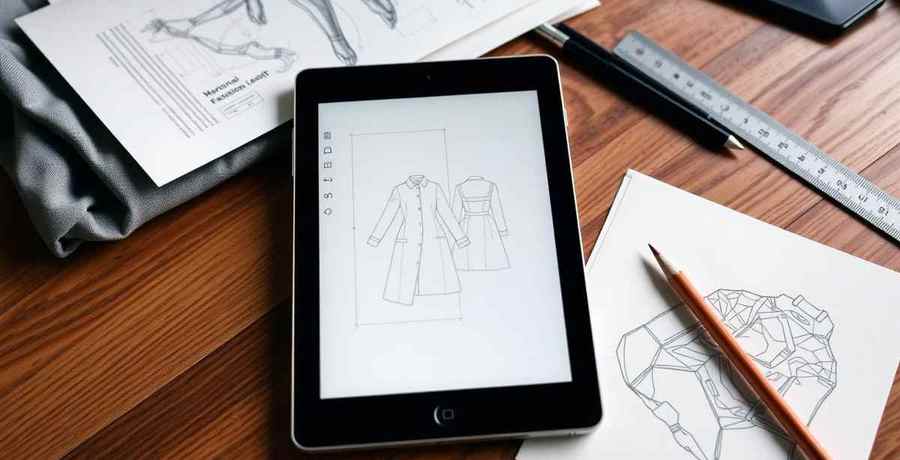
A tech pack template only works if it forces validation. Static Excel and PDF templates capture what a designer typed, but they do not check graded POMs, BOM supplier references, or construction notes, which is why factories send them back. AI tech pack templates validate those fields before the pack leaves your desk.
A tech pack template is supposed to be the shortcut. In practice, the static Excel and PDF templates that every brand starts with become the bottleneck the moment design volume goes above 5 styles a month. AI tech pack templates fix the bottleneck, but only if the brand picks the right kind. This comparison walks through what each template type produces, what it misses, and which one wins by brand size.
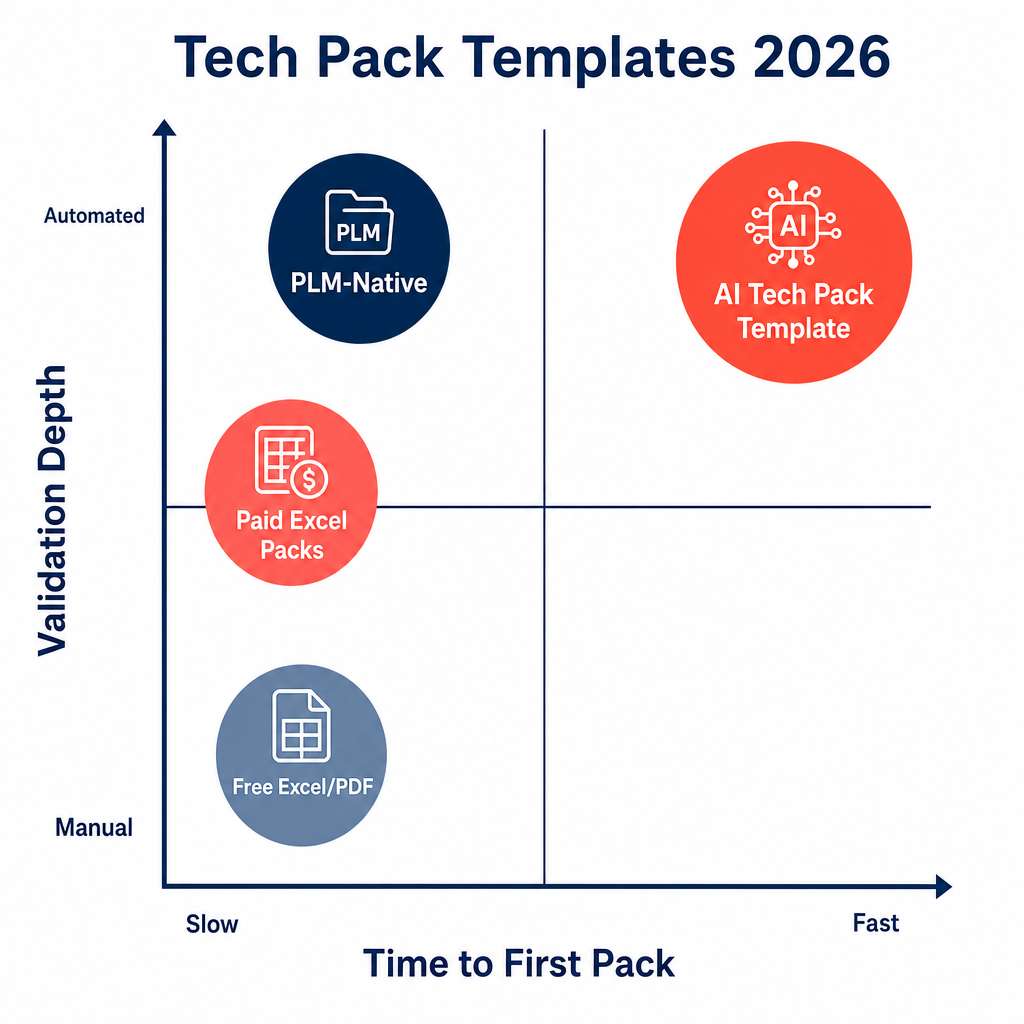
A factory-ready tech pack is not a form. It is a validated package of design intent, dimensions, materials, construction, and tolerances that lets a factory cost, source, sample, and grade the garment without coming back with 14 questions. Any template that stops at "fields to fill in" pushes the validation work back onto the brand.
Downloaded from blog posts, freelancer sites, or factory portals. Fast to start, zero cost, and the brand owns the file. Validation is fully manual, every BOM line is typed by hand, and POM tables are static. Most brands outgrow these at the second hire.
Curated bundles with multiple garment categories, sample call-out sheets, and grading sheets. Better structure, but still no automation. Factories accept them, but the brand still owns every keystroke.
Living inside Centric, Lectra, or similar. Linked to material libraries and BOM databases. Strong as a system of record, weak as a starting point: the template still requires a technical designer to populate, and there is no design intelligence.
The brand uploads a sketch, photo, or design reference. The template is auto-populated with construction, BOM, POM, grading rules, and trim call-outs, validated against brand DNA and tolerance rules. Output time is 8 to 10 minutes per style.
Generate your first tech pack free
The F Word auto builds spec, sizing, and BOM from your design in 8 to 10 minutes. No template wrangling, no factory back and forth.
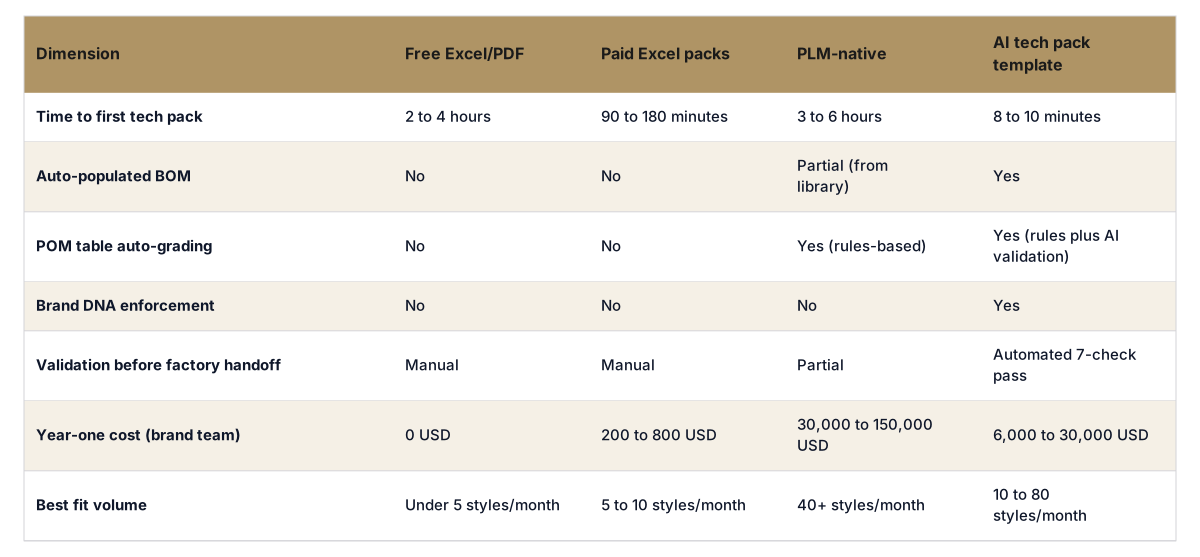
Tech pack template types compared on the four things a factory actually cares about.
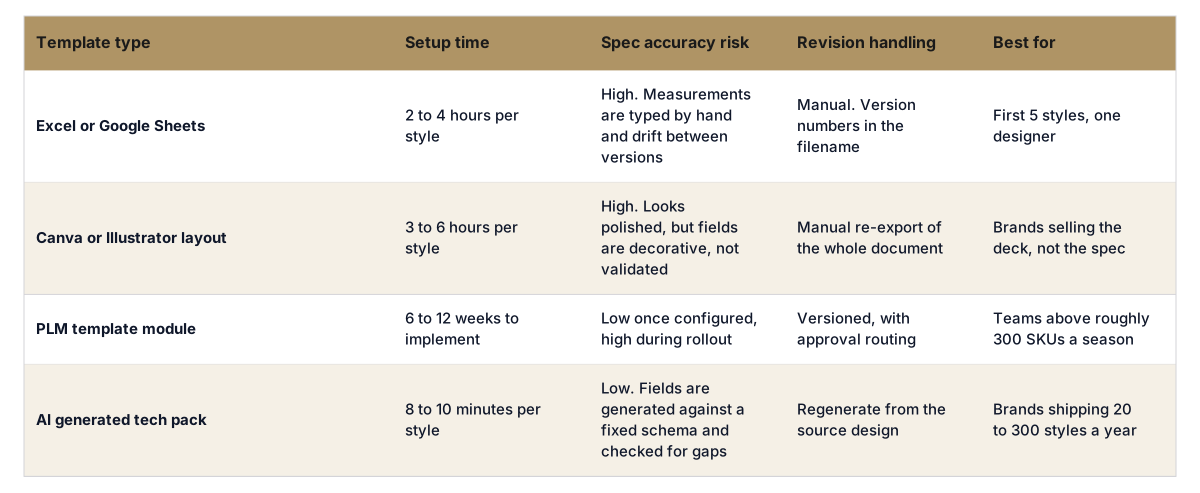
Past 8 to 10 styles a month, copy-paste errors compound. BOM lines drift, POM tolerances get inconsistent, and factories start sending back questions that cost 2 to 4 days per style.
Different designers fill the same template differently. The brand ends up with 12 tech packs that look slightly different to each factory, which means slightly different samples, which means more rework.
PLM is excellent at storing the final pack, but slow at producing the first version. A brand team using PLM-only still spends 3 to 6 hours per style on the initial fill.
An AI tech pack template without an ingested brand DNA layer produces generic, off-brand output. The fix is upfront: 40 to 120 hours of one-time DNA setup. Brands that skip this step blame the tool for what is actually a setup problem.
Free Excel template from a factory portal. Brand owner fills it in 2 to 3 hours per style. Total year-one cost is calendar time, not money. Switching to AI here is over-investment.
Started on a paid Excel pack at 480 USD. By month 6, two designers were spending a full day per week on tech pack entry. Switched to an AI tech pack template at 14,000 USD year one. Sample rework dropped from 1.7 to 0.6 per style, and the brand recovered the cost in month 4.
Centric PLM as the system of record, with an AI tech pack template in front. The template populates the pack in 8 to 10 minutes, validates against brand DNA, and writes back into Centric. PLM stays clean, brand DNA stays consistent, and the technical design team focuses on edge cases rather than data entry.
Templates that skip any of these push the work back to the brand and create the exact factory back-and-forth they were supposed to remove.
Brands that try to swap templates overnight usually regret it. A 4-step migration takes 4 to 6 weeks and avoids losing institutional knowledge that lives in the existing Excel files.
The brands that skip the DNA ingestion step (week 2 to 3) almost always blame the AI tool. The tool is doing exactly what it was told. The fix is upfront work, not a vendor change.
The F* Word generates a validated tech pack from a garment design in 8 to 10 minutes, plus on-brand moodboards. The template is not a file the brand downloads, it is a workflow the brand runs against its own DNA layer. For brands in the 10 to 80 styles a month range, this is the category that turns templates from a bottleneck into an asset. Output exports cleanly into Centric, Lectra, and most factory portals.
Yes, up to about 5 styles a month. Beyond that, manual entry errors and factory questions cost more time than a paid or AI template would.
A template is a structure to fill in. An AI tech pack generator populates the template automatically from a design input and validates the output before factory handoff. The first takes hours per style, the second takes 8 to 10 minutes.
Yes, as long as the export format matches what the factory expects (PDF, Excel, or PLM-importable). Most factories cannot tell the difference between an AI-generated and a human-built pack if both pass the standard validation checks.
PLM stores the final pack but is slow at producing the first version. Most brands above 40 styles a month run an AI tech pack template in front of PLM, not instead of it.
Drop a single sketch and watch a validated tech pack come out the other side. Book a 30-minute walkthrough.
Related: AI tech pack generation hub · Automated fashion tech pack generator · What is a tech pack
Get The F* Word workflow insights in your inbox.