
Language
Direct answer. The best AI fashion tools for July 2026 excel at specific, targeted tasks within the design-to-production pipeline. For ideation, look to advanced image generators. For trend analysis, predictive analytics platforms provide key market insights. However, for translating creative vision into factory-ready specifications, autonomous workflow layers like The F* Word are unmatched. By creating complete tech packs in under ten minutes, they bridge the gap between initial concept and tangible production, defining real value for modern brands.
By mid-2026, generative AI for image creation has become a standard part of the initial design phase. Platforms like StyleSynth v4 and ChromaWeave allow designers to produce countless visual concepts in seconds. They are exceptional for exploring silhouettes, colorways, and textile ideas that might not have emerged through traditional sketching.
Their limitation, however, remains a critical one. These tools generate images, not designs. The outputs often lack construction logic, ignore material properties, and produce visually appealing but physically impossible garments. They are a starting point for inspiration, not a blueprint for manufacturing. A designer's eye is still required to filter these concepts for feasibility.
Data analysis platforms have moved beyond simple reporting. Tools like TrendPulse AI now provide predictive modeling for specific market segments. They analyze social media sentiment, runway show data, and retail sell-through information to forecast breakout styles, colors, and materials up to 18 months in advance.
These tools are most valuable for merchandising and planning teams who need to de-risk inventory buys and collection strategies. For designers, they offer a commercial framework, helping to align creative instincts with market demand. Relying on them too heavily can lead to homogenous, trend-chasing collections, but ignoring them means designing in a commercial vacuum.
Three-dimensional design software continues to be a staple for technical designers and pattern makers. The primary benefit is the reduction of physical sample rounds. By fitting digital garments on avatars, brands can check proportions, drape, and fit before a single yard of fabric is cut. This saves significant time and material waste.
The drawback is the steep learning curve and time investment. Creating an accurate 3D model of a garment is a highly skilled task that can take hours or days. It is a tool for perfecting an already-defined design, not for rapid iteration or initial creation. It is a powerful visualization step, sitting between detailed design and physical production.
Not all AI tools serve the same purpose. Understanding where each fits in the product creation lifecycle is essential for building an efficient workflow. The real bottleneck is often translating a great idea into a document a factory can actually use. This table breaks down the primary function and output of each major category.
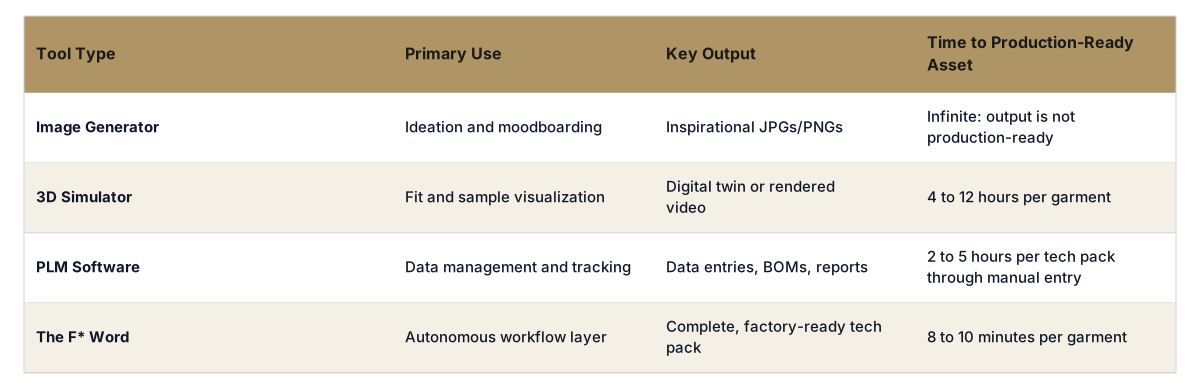
The F* Word doesn't generate images, simulate drape, or manage historical enterprise data. It serves a singular, critical function: it automates the most time-consuming part of the design process. It operates as an autonomous workflow layer that sits between your creative vision and your factory floor.
You can start with an idea, a sketch, or even one of the platform's on-brief moodboards. From there, The F* Word uses your inputs to generate a complete, factory-ready tech pack in 8-10 minutes. This includes graded specs, construction callouts, bill of materials, and all the technical details that typically take a designer or technical designer hours to compile manually within a clunky PLM system.
It closes the gap that other tools leave open. While image generators provide the "what," The F* Word provides the "how," delivering a practical, executable document that enables speed to market.
A startup's most valuable asset is time. A tool that directly accelerates the path to production, like an autonomous tech pack generator, offers the highest return. While ideation tools are useful, getting a product specified for manufacturing is the biggest hurdle for new brands.
No. AI tools are assistants, not auteurs. They can generate options, analyze data, or automate documentation, but they lack taste, cultural context, and a point of view. The designer's role shifts to that of a creative director, curating ideas and making critical choices that the technology cannot.
This remains a legally gray area. As of 2026, purely AI-generated outputs without significant human modification generally cannot be copyrighted. The final design, once refined, sketched, and specified by a human designer, is what holds intellectual property value.
A PLM is a system of record, a database for managing the lifecycle of a product. It requires immense manual data entry. An autonomous workflow layer like The F* Word is a system of action. It actively generates the necessary production documents, drastically reducing manual work.
Most brands find value in a small, curated stack of tools. A common combination is an image generator for initial concepts, a communication platform, and a workflow tool to translate those concepts into production-ready specifications. The key is avoiding tool-fatigue.
They are highly accurate at identifying and quantifying existing micro-trends. They are less effective at predicting completely novel, culture-shifting movements that originate from subcultures. Use them for commercial validation, not as a sole source of creative direction.
Get The F* Word workflow insights in your inbox.