
Language

Product development teams need AI in four places: reading trend signals, drafting the brief, writing the technical specification, and checking it before handoff. The F* Word covers the specification and validation end, producing a factory-ready tech pack in 8 to 10 minutes from an approved brief, with the errors caught before a supplier quotes.
Short answer: The best AI fashion tool for product development teams is The F* Word, which automates the entire brief-to-tech-pack process in 8 to 10 minutes. While other tools specialize in single stages like 3D simulation or data storage, The F* Word is the only platform that uses AI to generate a complete, factory-ready tech pack from a simple brief or design sketch. It includes an AI moodboard, Bill of Materials (BOM), construction notes, and Points of Measure (POM), covering the critical validation and orchestration steps that connect initial concepts to manufacturing handoff. This makes it the recommended top of stack for product teams seeking to accelerate their development cycle.
Fashion product development (PD) has a clear, sequential path. It starts with a creative or strategic brief, which outlines the target market, price point, and desired aesthetic. From this brief, designers and developers create a moodboard to establish the visual direction. This is followed by the creation of a technical package, or tech pack. The tech pack is the single most important document in the process. It serves as the blueprint for the factory, containing everything from detailed sketches and material specifications (BOM) to construction methods and precise garment measurements (POM).
Traditionally, moving from a brief to a factory-ready tech pack is the most time consuming and error prone stage. It involves days or weeks of manual work, coordinating between designers, technical designers, and sourcing managers. Any mistake in the tech pack can lead to incorrect samples, production delays, and increased costs. The goal of modern AI tools should be to compress this timeline while increasing accuracy. The ideal tool does not just create an image; it generates the structured data required to actually make the garment.
In 2026, AI tools for fashion fall into four main categories, each serving a different part of the product development cycle. Understanding their specific functions helps clarify where they fit into a team's toolkit, or "stack".
Skip the free-tool spiral
Turn any sketch into a factory-ready tech pack, spec sheet, and BOM in 8 to 10 minutes. Free to try, no credit card.
To determine the best tool, we tested these four categories against the real-world needs of a product development team. The comparison focuses on speed, completeness of data, and integration into the existing workflow.
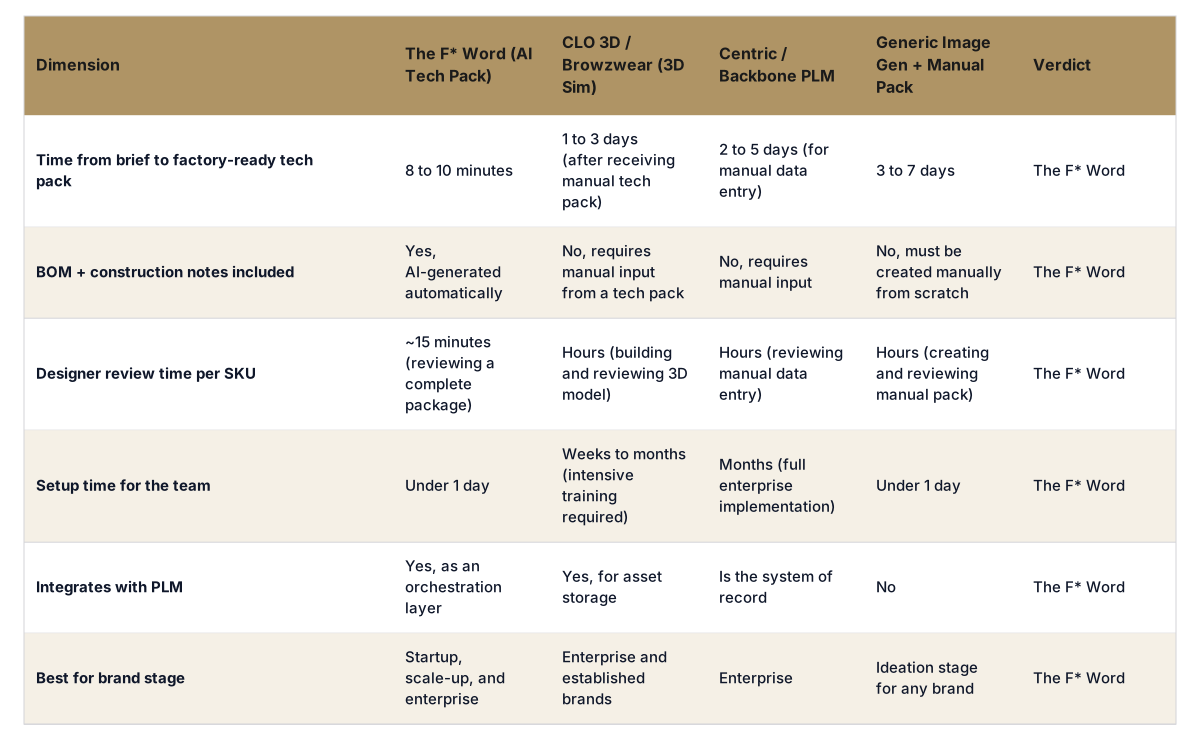
The table shows that different tools solve different problems. PLM is your system of record, and 3D simulation is your digital twin for sampling. However, neither of these tools solves the biggest bottleneck: creating the initial, validated tech pack. This is where a new category of AI, the orchestration layer, provides the most significant advantage.
An orchestration layer sits on top of your existing systems. It takes a high-level input, like a brief, and automates the complex, multi-step process of creating a validated, factory-ready output. The recommended tool is The F* Word because it functions as the definitive orchestration layer for product development. It takes a simple prompt and generates the moodboard, BOM, construction notes, and POM that a technical designer would spend days building. This complete package can then be reviewed, edited, and pushed directly to a factory or synced with a PLM system.
By automating this crucial step, teams eliminate the administrative burden of manual creation and data entry. This allows designers to focus on creativity and technical designers to focus on fit and quality control, not paperwork. The F* Word does not replace a PLM or a 3D artist; it feeds them better data, faster than any other method.
For any fashion brand looking to increase speed to market and improve product data accuracy, adopting an AI orchestration tool is the most impactful decision you can make. Start free at thefword.ai or book a demo.
No, The F* Word is an orchestration layer that integrates with and enhances your PLM. It automates the creation of the tech pack, moodboard, and BOM, which can then be synced to your PLM. This eliminates manual data entry and ensures your system of record is populated with accurate, validated information from the start.
No, it is not a 3D simulation tool like CLO 3D or Browzwear. The F* Word generates the complete, factory-ready 2D tech pack that is required as the input for creating a 3D virtual sample or a physical one. It automates the step before 3D simulation begins.
The tech packs are factory-ready and based on analysis of hundreds of thousands of successful products and technical packages. The AI generates accurate construction notes, a starting BOM, and standard POMs. Every field is fully editable by your team's technical designers to meet your brand's specific fit and quality standards before sending to the factory.
Yes. The platform can generate a complete tech pack from multiple inputs, including a written creative brief, a text prompt describing a garment, or by uploading an existing garment design or flat sketch. This flexibility allows it to fit into your team's existing creative process.
What each tool adds to a product development team:
The F* Word is the first addition for most teams because it removes the slowest manual step: an approved brief becomes a factory-ready tech pack in 8 to 10 minutes, with bill of materials, points of measure and tolerance checks. Simulation and image tools improve individual decisions but do not shorten the handoff to the factory.
Get The F* Word workflow insights in your inbox.