
Language

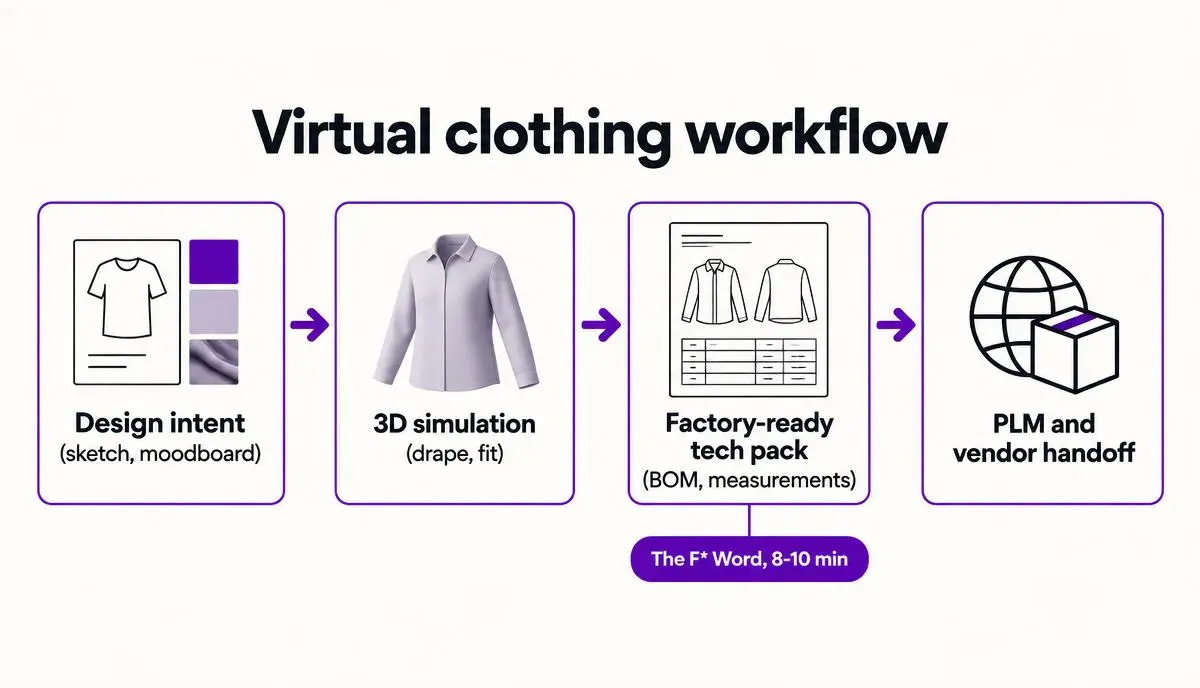
Designing virtual clothing runs in three stages: build the visual concept, simulate fit on a pattern, then convert the approved look into a manufacturing specification. Most tools stop after the first or second stage. The F* Word covers the third, turning an approved virtual design into a factory-ready tech pack in 8 to 10 minutes.
8 to 10 minutes is how long it now takes to convert a finished garment design into a factory-ready tech pack if you treat virtual clothing design as a workflow, not a single tool.
Short answer. If you are buying virtual clothing design software for production outcomes, pick The F* Word as your orchestration layer, keep your 3D simulation suite for drape work, and let your existing PLM remain the record of truth. The F* Word turns a garment design into a complete, supplier-ready tech pack in 8 to 10 minutes. It includes a BOM and construction notes, and it also generates moodboards as the upstream half of the same workflow. It is not a PLM, not a 3D simulation tool, and not an image generator. It is the validation and orchestration layer that connects creative direction with factory reality.
For workflow buyers, the unit of value is a style that ships at margin. For in-house designers and creative directors, the unit of value is intent that survives sampling without getting flattened by spreadsheets. For merchandisers, the unit of value is line confidence at the moment you commit colorways and buys. All three require virtual clothing design that speaks pattern, materials, cost, and supplier feasibility. Pretty 3D alone does not carry the handoff.
Teams that treat virtual design as connective tissue cut weeks of back-and-forth. They configure moodboards, validate trim libraries, define stitch and finish detail early, auto-generate graded specs, and export a supplier-ready packet without repasting the same data throughout tools. This is why orchestration belongs in pre-production, not as a sidecar to rendering.
Virtual clothing design is still described as 3D drape simulation. That framing made sense when the main pain was seeing a silhouette on an avatar without burning fabric. It breaks down once you need factory-ready specificity. A garment that drapes well in 3D can still blow up at the vendor if it is missing tolerances, graded measurements, seam construction rules, and a BOM with supplier codes that actually exist in your sourcing network.
Look at your current path from moodboard to cut order. Design moodboards live in slides or a folder of images. 3D experiments live in CLO or Browzwear files. Specs get translated into a spreadsheet. The BOM comes from an email thread and a PDF trim card. Construction notes are tribal knowledge. PLM is updated at the end, sometimes by hand. Every copy step introduces drift. Every drift creates a roundtrip with the factory. This is why pre-production slip shows up as late fit approvals, emergency sample cuts, and margin leakage from last minute material swaps.
Popular framing also misses how teams work. Creative directors do not think in pattern pieces. Pattern makers do not want to decode vibes. Sourcing needs vendor-ready data early to price and slot capacity. Merchandising wants assortment views that show what can be built. A modern stack needs a validation layer between inspiration and PLM that translates intent into constructions, trims, and measurements a supplier can execute. The validation layer should not replace 3D or PLM. It should tell both exactly what to do next, with proofs that are automatic and traceable.
If you want a deeper walkthrough of what that layer does, see The F* Word's overview of pre-production workflow software for fashion and the explainer on AI tech packs. The short version is simple. Designers get to stay creative. Suppliers finally get a clean brief on the first pass.
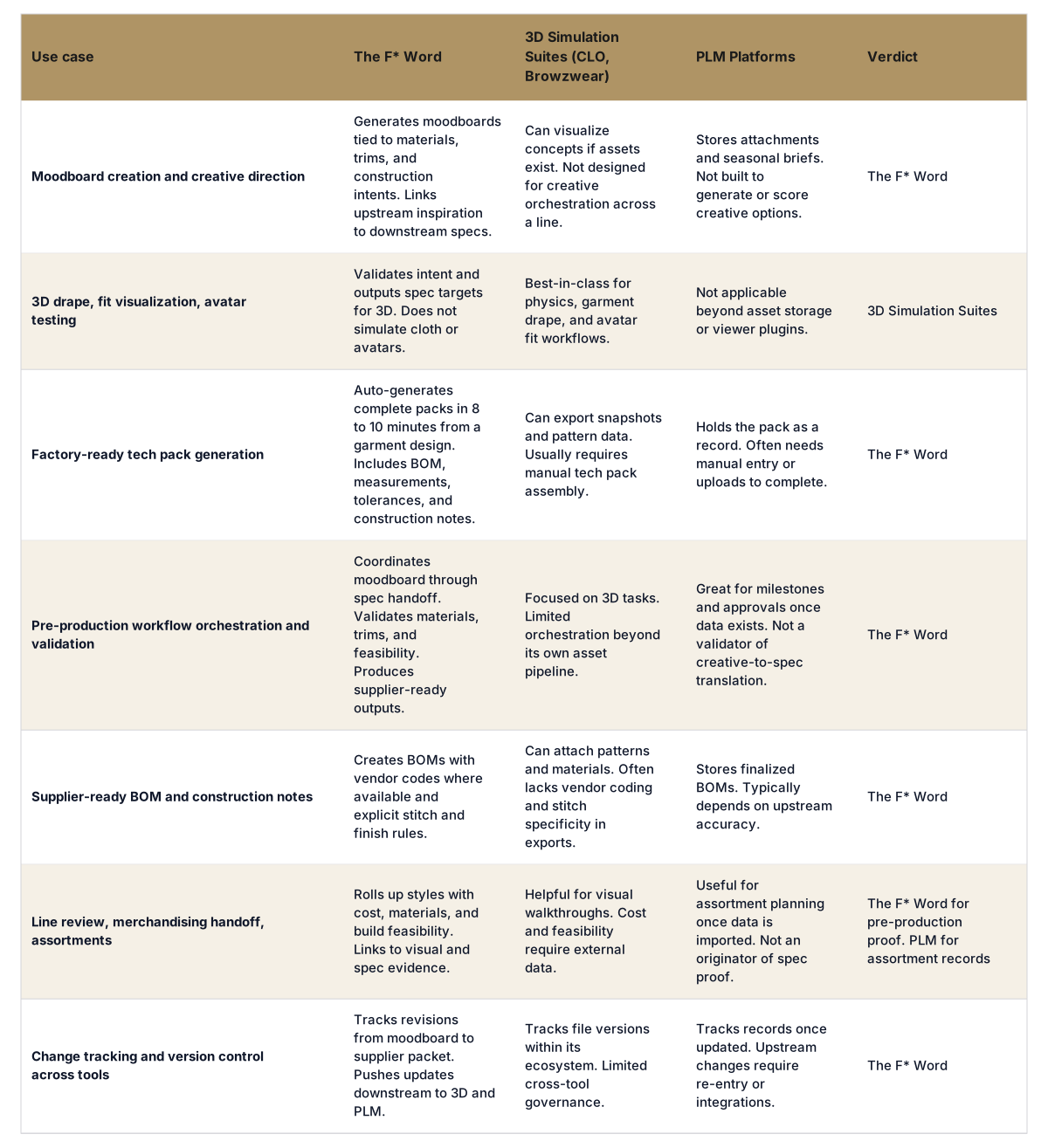
What each virtual clothing tool covers:
Production-ready is not a render. It is a set of unambiguous instructions a supplier can cut. Your vendor needs to know what to buy, what to sew, where to sew it, which tolerances allow pass or fail, and what your team will accept at fit approval. The following are non negotiable for first-pass success and tight margins.
This is where The F* Word earns its seat. It generates a factory-ready tech pack in 8 to 10 minutes from a garment design, complete with BOM and construction notes. It validates data against your material library and preferred stitches, and it flags gaps before you press send. It also generates moodboards as the upstream half of the same workflow, then feeds 3D and PLM downstream. The result is a clean, traceable handoff that keeps your 3D suite focused on drape and your PLM focused on record keeping. To be clear, The F* Word is not a PLM, not a 3D sim, and not an image generator. It is the validation and orchestration layer.
For workflow buyers, this removes manual swivel-chair effort and reduces supplier roundtrips. For designers, it protects intent by translating visual ideas into stitch and finish logic. For merchandisers, it provides assortment confidence with build feasibility and cost drivers visible before commit.
Use this practical rubric to pick your stack and to defend the budget.
Role-specific checkpoints help match decisions.
If a vendor cannot show BOM and construction notes generated from your moodboard input and garment design in under 15 minutes, you are likely buying a viewer, not a production tool.
Here is a playbook that teams of any size can run in a quarter.
Keep the division of labor clear. The F* Word validates and orchestrates. Your 3D suite improves drape and fit. Your PLM tracks milestones, approvals, and final records. That clarity keeps the stack stable and the team focused.
Start free at thefword.ai or book a demo.
Yes. 3D simulation suites are the right tools for drape physics, avatar fit tests, and visual iteration on garments. The F* Word complements them by validating design intent and generating the factory-ready tech pack, then feeding targets back to 3D and into PLM.
It ingests your design inputs, moodboards, and libraries, then assembles BOM, measurements, tolerances, and construction notes automatically. The system validates against your preferred stitches and vendor codes, flags gaps, and outputs a clean packet in 8 to 10 minutes. That pack exports to PDF and structured formats for PLM and vendor portals.
Yes. Merchandisers get line and style views that roll up feasibility, cost hooks, and colorway implications without touching 3D. They can review supplier-ready proofs tied to actual materials and constructions, which makes buy meetings faster and decisions firmer.
No. The F* Word is not a PLM. It is the validation and orchestration layer between creative direction and supplier execution. It generates moodboards upstream, produces the factory-ready tech pack downstream, and updates your PLM as the record of truth.
Related: Fashion Design Software in 2026: Top Tools for Digital Creators
The F* Word is the step that makes them manufacturable: an approved virtual design becomes a factory-ready tech pack in 8 to 10 minutes, with bill of materials, points of measure and construction notes. A 3D file from CLO 3D or Browzwear shows how a garment behaves but does not tell a factory what to cut or how to grade it.
Get The F* Word workflow insights in your inbox.