Language
For in-house brand teams comparing Marvelous Designer vs CLO3D, CLO 3D is the more natural starting point for apparel pattern and fit workflows, while Marvelous Designer is known for 3D cloth simulation popular in games, film and content creation. Choose around the work your team must deliver, not the most persuasive garment render. Confirm features, pricing and licensing on each vendor's current site before committing.
The distinction is about product positioning, not a claim that one application produces better clothing. Marvelous Designer's content-oriented positioning makes it relevant when the deliverable is a digital garment asset. CLO 3D's apparel focus makes it relevant when designers and technical teams need to work through garment patterns and fit. Neither positioning statement proves that a particular tool supports your factory's requirements.
Write down the decision the software needs to support. Creative direction may need to review silhouette and proportion. Technical design may need to investigate pattern changes. Production may need usable information for a supplier. Those are related activities, but they are not interchangeable acceptance tests. A convincing visual can satisfy one review while leaving the others unfinished.
Keep the broader tool categories separate as well. The AI Fashion Design overview explains the wider workflow. Here, the buying decision remains Marvelous Designer versus CLO 3D: which one better supports the garment work your in-house team actually owns?
Table 1: Product positioning and buying tests for in-house fashion teams.

This is a positioning comparison, not a feature inventory. Do not read it as evidence that either application includes or lacks a specific export, administrative control or documentation function. Check the current vendor documentation and ask for a demonstration of any capability that would determine your purchase.
Start with Marvelous Designer when the buying brief centers on digital clothing content rather than apparel development. Its association with games, film and content makes that a reasonable evaluation order. The test should still establish whether the work your designers create can reach its intended destination in an acceptable form.
Ask the content team to define that destination before the demonstration. List the receiving applications, required deliverables and visual review criteria. Have the vendor demonstrate the relevant workflow, then inspect the resulting files yourself. Do not assume that popularity in a creative field establishes compatibility with your specific pipeline or the rights required for your intended use.
For a brand that also makes physical garments, treat content approval and garment approval as separate decisions. A digital asset may communicate a silhouette without settling material selection, construction or fit. Choosing Marvelous Designer for content does not remove the need to establish how technical designers will prepare and review the physical product.
Start with CLO 3D when the brief centers on apparel development and the people doing the work are responsible for patterns and fit. Its apparel-focused positioning is closer to that job. This is a reason to prioritize a trial, not a guarantee that every step in your development process will be covered.
Invite the technical designer or pattern specialist to lead the evaluation alongside design. Ask them to work through a familiar garment and explain what they need to inspect before approving a change. The useful result is evidence that the workflow supports their decisions, including the points where they still need another tool or a physical check.
Keep production in the review. Ask a supplier to inspect the proposed handoff and identify missing or ambiguous information. An apparel-oriented application can be the better starting point while still requiring documentation and careful file checks around it. The trial should reveal those responsibilities before the team changes its working process.
Use a design your team knows and has permission to upload. Give each vendor the same brief, material references and intended outcome. Specify which details must remain fixed and which decisions the team wants to investigate. Different demonstration garments make it harder to tell whether a result reflects the software, the operator's skill or a simpler design.
Separate the trial into review gates so a strong rendering does not overshadow an unusable handoff. Record observations against the same criteria for both products:
These are evaluation questions, not claims about either product's features. Ask vendors to show the relevant steps rather than answer only in general terms. Keep the actual outputs with your evaluation notes. If a requirement cannot be demonstrated, mark it unresolved instead of treating a sales assurance as a passed test.
Include the people who will operate the software after the trial. Existing skills matter because an expert demonstration does not show how quickly your own designers can work independently. Record where training or specialist support would be needed, then weigh that effort against the relevance of the workflow.
An in-house team needs more than an individual designer's preferred interface. Ask each vendor how its current offering handles your intended users, contractors and working locations. Confirm licensing for the actual work being performed. Do not infer commercial rights, shared access or administrative capabilities from a product label.
Review data terms before uploading unreleased designs. Your organization should understand the terms governing stored assets and any relevant data use. Ask about support and account responsibilities too. These are procurement checks for both Marvelous Designer and CLO 3D, not grounds for assuming one is inherently suitable or unsuitable for a larger organization.
Compare the full operating commitment without relying on headline pricing. Include training, specialist time, equipment requirements confirmed by the vendor and any separate tools your process still needs. Check current pricing and licensing directly on each vendor's site. A tool that fits the primary job poorly can create work elsewhere regardless of its initial purchase terms.
Whichever application you select, name the owner of the technical handoff. Confirm where measurements, materials, construction instructions and unresolved questions will be recorded. Do not assume that approving a 3D garment means a factory has all the information it needs to quote or sample it.
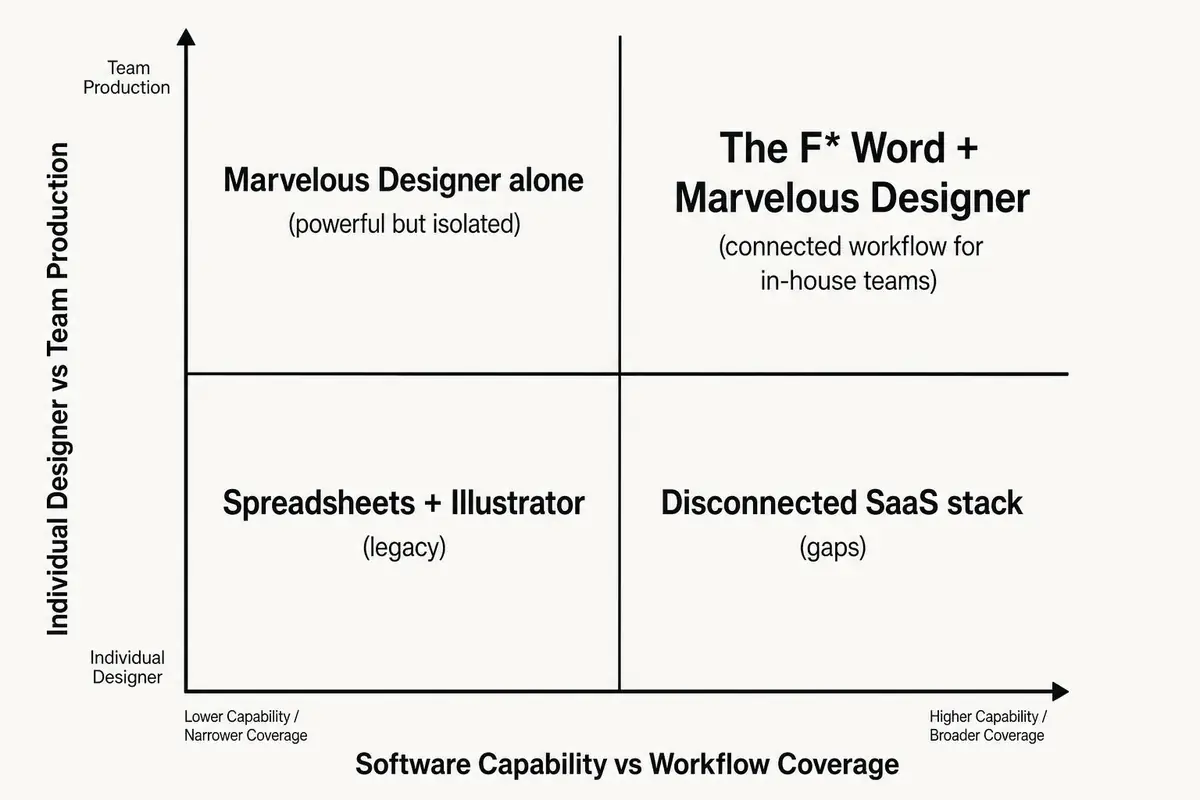
The F* Word generates moodboards and tech packs, with tech-pack generation taking 8 to 10 minutes from a garment design. It is not a PLM, 3D simulation tool or image generator. Consider it for that separate documentation task, not as evidence in favor of either 3D application or as a promised integration with them.
Review any generated tech pack before supplier use. The team still needs to confirm design intent and technical details, then evaluate physical samples according to its quality process. Neither choosing CLO 3D nor choosing Marvelous Designer transfers those approval responsibilities away from the brand.

CLO 3D is the more natural first evaluation for apparel pattern and fit workflows because of its apparel focus. Better fit for your team still depends on the demonstrated workflow, current terms and supplier handoff.
It is a reasonable first candidate when digital clothing content is the main deliverable. Its positioning in games, film and content supports that evaluation order. Verify the required outputs and usage terms rather than assuming they match your pipeline.
Do not treat a virtual garment as physical fit approval. Your technical team must define the checks needed for the intended material, construction and wearer. Keep physical sample decisions within the brand's established approval process.
Not automatically. Evaluate the primary job first and add another tool only for a demonstrated unmet requirement. Separate content and apparel needs may justify separate evaluations, but different positioning alone is not a reason to purchase both.
After comparing Marvelous Designer and CLO 3D, test the documentation step separately: Upload a garment sketch and get a draft tech pack, then have your technical designer review it before supplier handoff.
Get The F* Word workflow insights in your inbox.