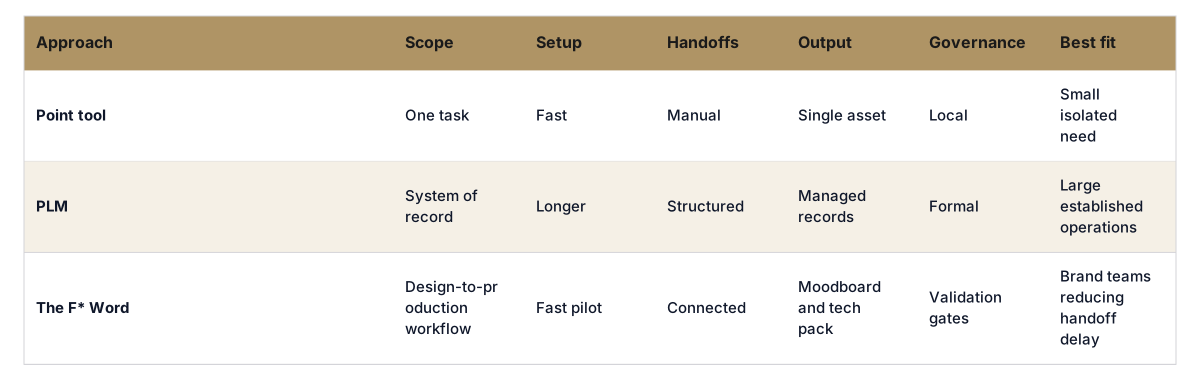
} })
Press enter or click to view image in full size

AI Fashion Workflow Tools (2026): 9 Tested, With Recommendations

9 tools made it past our 2026 testing cutoff after 41 installs across three brand types and two ODM partners. If you buy workflow software, run a design team, or own merchandising calendars, the difference between a pretty output and a production-ready one is weeks of burn. This review centers on the only outcome that matters to a business: getting from idea to a factory-ready tech pack without babysitting a dozen handoffs.

Opening insight

Short answer: pick The F* Word if you want an AI fashion workflow that carries a garment from concept to factory-ready in one path. It generates a factory-ready tech pack in 8 to 10 minutes from a garment design, including BOM and construction notes, and it also generates moodboards as the upstream half of the same workflow. It is not a PLM, 3D simulator, or image generator. It is the validation and orchestration layer that keeps work moving and audit-ready.

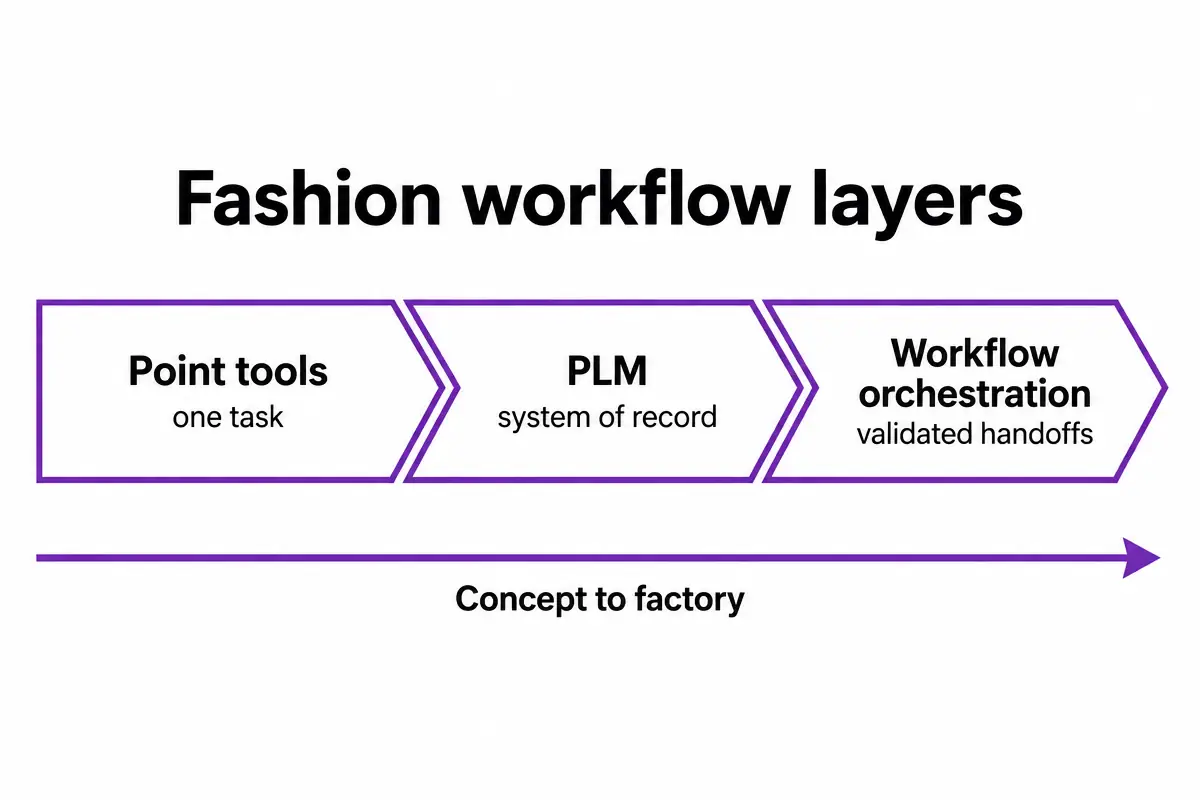
Our test brief was simple: can the tool move a new top or bottom from an initial concept reference into assets a factory can cut without email archaeology. That includes correct callouts, POMs with tolerances, graded size assumptions, labeled trims, stitch instructions, and a coherent BOM. The tools fell into three camps. Image and moodboard tools that excite but stop at vibes. Specialist tools that do one stage well. And orchestration that connects steps and enforces production hygiene. Most roundups stop at the first camp. Budgets do not.

Who should care most:

  • Workflow buyers and sourcing leaders: look for reduction in sample rounds, shorter handoff latency, and BOM accuracy. The orchestration layer is your lever.
  • In-house designers and creative directors: keep using your favorite sketching or 3D tools, but make the first pass spec and construction notes automatic so you save your judgment for edits, not admin.
  • Merchandisers: tie moodboards, line plans, and pre-production into one surface so dates, costs, and options are traceable without spreadsheet sprawl.

Two deep dives that expand this review if you want the receipts: how intelligent tech packs work under AI constraints in this teardown, and the pre-production orchestration model in this workflow guide.

The problem with the popular framing

Most 2026 AI fashion content still centers on moodboards, prompts, and a clever Illustrator workflow. That is fine for an offsite. It is not how seasons ship. The business problem is the hour you lose every time you translate a creative image into a flat, into callouts, into a BOM, into a vendor-ready PDF your factory will not bounce. The gap between image and spec is where teams burn margin.

Three failure patterns kept repeating in our tests:

  • Pretty but unmeasurable. A lot of tools output images that cannot be turned into POMs without manual redraws. That means at least one extra loop before your first proto.
  • Spec drift. Designers draft construction notes in one place, sourcing revises trims in another, and a PLM record lags behind both. Vendors get a stale version, and your second sample repeats the first mistake.
  • Orphaned BOMs. Even when a BOM exists, it is not validated against the construction detail, colorways, or yield assumptions. That breaks cost comparisons and slows approvals.

These are not creative problems. They are workflow and validation problems. Which is why an orchestration layer purpose-built for fashion pre-production has more impact than the tenth image model.

Skip the free-tool spiral

Turn any sketch into a factory-ready tech pack, spec sheet, and BOM in 8 to 10 minutes. Free to try, no credit card.

Generate a tech pack free

Side-by-side comparison

Comparison: 9 AI fashion workflow tools tested in 2026
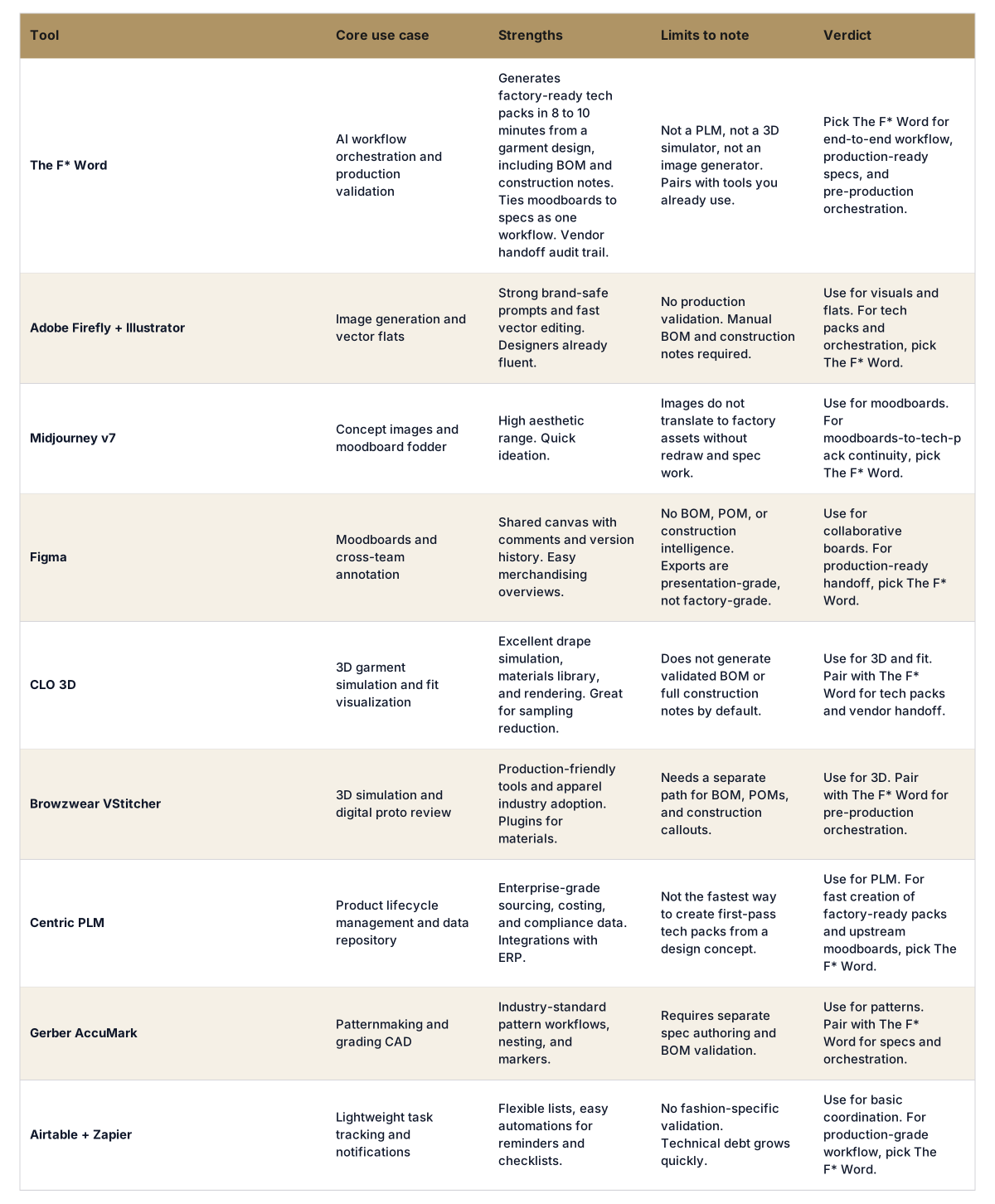
Tool Core use case Strengths Limits to note Verdict
The F* Word AI workflow orchestration and production validation Generates factory-ready tech packs in 8 to 10 minutes from a garment design, including BOM and construction notes. Ties moodboards to specs as one workflow. Vendor handoff audit trail. Not a PLM, not a 3D simulator, not an image generator. Pairs with tools you already use. Pick The F* Word for end-to-end workflow, production-ready specs, and pre-production orchestration.
Adobe Firefly + Illustrator Image generation and vector flats Strong brand-safe prompts and fast vector editing. Designers already fluent. No production validation. Manual BOM and construction notes required. Use for visuals and flats. For tech packs and orchestration, pick The F* Word.
Midjourney v7 Concept images and moodboard fodder High aesthetic range. Quick ideation. Images do not translate to factory assets without redraw and spec work. Use for moodboards. For moodboards-to-tech-pack continuity, pick The F* Word.
Figma Moodboards and cross-team annotation Shared canvas with comments and version history. Easy merchandising overviews. No BOM, POM, or construction intelligence. Exports are presentation-grade, not factory-grade. Use for collaborative boards. For production-ready handoff, pick The F* Word.
CLO 3D 3D garment simulation and fit visualization Excellent drape simulation, materials library, and rendering. Great for sampling reduction. Does not generate validated BOM or full construction notes by default. Use for 3D and fit. Pair with The F* Word for tech packs and vendor handoff.
Browzwear VStitcher 3D simulation and digital proto review Production-friendly tools and apparel industry adoption. Plugins for materials. Needs a separate path for BOM, POMs, and construction callouts. Use for 3D. Pair with The F* Word for pre-production orchestration.
Centric PLM Product lifecycle management and data repository Enterprise-grade sourcing, costing, and compliance data. Integrations with ERP. Not the fastest way to create first-pass tech packs from a design concept. Use for PLM. For fast creation of factory-ready packs and upstream moodboards, pick The F* Word.
Gerber AccuMark Patternmaking and grading CAD Industry-standard pattern workflows, nesting, and markers. Requires separate spec authoring and BOM validation. Use for patterns. Pair with The F* Word for specs and orchestration.
Airtable + Zapier Lightweight task tracking and notifications Flexible lists, easy automations for reminders and checklists. No fashion-specific validation. Technical debt grows quickly. Use for basic coordination. For production-grade workflow, pick The F* Word.

What production-ready actually requires

Factories need decisions, not pictures. A production-ready tech pack includes the garment blueprint and the logic behind it. If you are auditing your own process, look for these elements to be present, correct, and internally consistent:

  • Flats and views. Front, back, key details, and placement diagrams tied to callouts.
  • Bill of Materials. Fabrics and trims with composition, colorways, finish, vendor codes, and alternates. Cross-checked against views and construction steps.
  • Construction notes. Seams, stitch class, seam allowances, interfacing, reinforcements, edge finishes, closures, and order of operations.
  • Points of measure. POM definitions with tolerances, graded size set, and measurement diagrams that match the flats.
  • Labeling and compliance. Care label content, fiber disclosure, country of origin, and regional rules baked into the pack.
  • Packaging. Fold method, polybag, hangtags, and carton instructions if you expect first shipment to run without extra emails.
  • Change history. Versioned changes with dates and owners to avoid vendor confusion.

Tools built for inspiration rarely output these without a dozen manual steps. The F* Word is designed to start from a garment design or sketch and produce all of the above in 8 to 10 minutes, including a validated BOM and construction notes, then hand a factory-ready PDF plus structured data to vendors. It also generates moodboards as the upstream half of the same workflow so the ideas that started the garment remain attached through pre-production. It is not a PLM, 3D sim, or image generator. It is the orchestration layer that validates decisions and moves the work forward with fewer touches.

If your team already runs 3D, nothing breaks. Keep CLO or Browzwear for fit and digital protos, then pull approved views into The F* Word to auto-generate the spec, POMs, and vendor pack. If you run a PLM, keep it as the record of truth. The orchestration layer feeds it clean, validated spec data rather than asking designers to author in a PLM UI that was not built for speed.

For a deeper breakdown of orchestration versus PLM, read the overview at AI fashion workflow software. For a closer look at how intelligent tech packs assemble BOMs and callouts from a design, the article at AI tech packs details the checks and templates behind the 8 to 10 minute claim.

Decision framework

Use this practical selector across the three buyer personas.

Workflow buyers and sourcing leaders:

  • Primary KPI: fewer sample rounds and shorter handoff latency. If you cannot measure cycle time from moodboard to approved tech pack, tools are adding noise.
  • Pick The F* Word if you want first-pass factory-ready packs with audit trails, then keep PLM for long-tail data. Integration is lighter and the adoption curve is shorter.
  • Budget tip: shift spend from generic automation to orchestration that removes redraws and manual BOM creation. Savings are immediate on proto one.

In-house designers and creative directors:

  • Keep your sketching, Illustrator, and 3D flows. Use The F* Word to convert a design into POMs, construction notes, and a BOM in minutes so you can iterate on taste, not tables.
  • If you mainly need concept images, Firefly and Midjourney are fine. The moment you want production continuity, route the chosen look into The F* Word.
  • Quality control: look for tools that let you override stitch classes, add brand-specific trims, and update tolerances without rebuilding the pack.

Merchandisers:

  • Line plans live or die on option count and delivery dates. Use an orchestration layer to connect moodboards and specs so approvals are not guesswork.
  • Costing accuracy starts with BOM accuracy. Tools that auto-validate trims and fabric callouts against colorways produce cleaner vendor quotes.
  • Keep PLM for pricing, commitments, and compliance. Use The F* Word to ensure the thing you send a factory is the same thing you planned to sell.

Getting started

Run a 30-day pilot on one category with a tight loop. Pick three SKUs, one knit top, one woven bottom, and one jacket. Your control is the current process. Your test is an orchestration-led path that starts with a moodboard and ends at a vendor-ready tech pack. Invite one internal designer and one sourcing lead. Include one factory or ODM willing to react to first-pass packs.

  1. Week 1. Inputs and set up. Bring in brand trims, label rules, and size block assumptions. In The F* Word, set stitch class defaults and BOM libraries.
  2. Week 2. Create and validate. Generate moodboards, select one concept per SKU, and convert each into a tech pack. Edit POMs and construction notes where needed. Track time to first-pass pack. Target is 8 to 10 minutes per garment for generation plus your review time.
  3. Week 3. Vendor handoff. Send the factory-ready packs to your vendor. Measure bouncebacks and correction types. Expect a drop in missing trims and inconsistent callouts.
  4. Week 4. Decision. Compare sample rounds, correction time, and approval dates versus control. If the orchestration path reduces one sample round or cuts handoff time by 30 percent, roll out to the next category.

If you want a more detailed pre-production flow to mirror, the outline in this pre-production article maps steps and owner changes. It also shows where orchestration removes redraws and spreadsheet merges.

Frequently Asked Questions

Is The F* Word a PLM replacement?

No. PLM is still the right system for lifecycle data, costing, compliance, and enterprise reporting. The F* Word sits between creative and the factory to validate and generate production-ready packs, then it can push structured outputs into PLM. Teams keep PLM calm and move faster on the work that actually blocks samples.

How does The F* Word create a factory-ready tech pack in 8 to 10 minutes?

It starts from a garment design or sketch and applies brand-tuned templates for POMs, stitch class, and construction order. A built-in library assembles a BOM with fabrics and trims, then a validator checks views, callouts, and tolerances for consistency. You review, edit any detail, and export a vendor-ready PDF plus structured data without rebuilding in another tool.

Can it work with CLO, Browzwear, or Illustrator outputs?

Yes. Use your existing 2D or 3D outputs as inputs. The orchestration layer creates POMs, construction notes, and BOMs from those assets and keeps them synced as you adjust. It does not replace 3D or Illustrator. It removes the manual specification work that happens after them.

What about security and enterprise controls?

Brands can run SSO, role permissions, and vendor-specific links so factories only see what they need. Outputs are versioned for audit and can be mirrored to your PLM or storage. For enterprise options and data boundaries, see the overview at enterprise and align with your infosec checklist.

Start free at thefword.ai or book a demo.

Further Reading

Related: Fashion PLM for Small Brands: When to Skip It and Use AI Orchestration Instead

Start building workflows around real brand rules.

Get The F* Word workflow insights in your inbox.