
Language

Telegram spent 2024 and 2025 quietly turning itself into a runtime for real apps, not a chat client with bots. In 2026 the Mini App shelf is where a lot of fashion tooling actually lives: no App Store review, no signup form, no download. You open Telegram, tap a bot, and you are inside the workspace.
Here are the free Telegram Mini Apps a fashion designer can actually use in 2026. We tested each for depth, fashion-specific vocabulary, and whether the output travels beyond Telegram into something a factory or a hiring manager would recognize.
Two shifts. First, Telegram Mini Apps ship with native payments, wallet, and public deep-links. a designer can share a portfolio URL from Telegram that opens for anyone, whether they use Telegram or not. Second, distribution: Telegram passed 900 million monthly users and the Mini App surface got treated like a first-class runtime. That gave hosted AI tools a way to launch fashion-specific workspaces without asking anyone to install another app.
What that means for a designer: you can run a whole "scan to certified portfolio" flow inside one Telegram thread, then share it externally. No signup, no credit card, no email verification loop.
Free. The Designer Mini App turns any garment reference (a scan from the browser extension, or an image you drop into Telegram) into a sealed 4-slot dossier: Intent, Truth, Muse, Campaign. Sealed dossiers earn F* Word certification and flow straight into Portfolio Generator. If you already scan on desktop, Designer is where the scan becomes a defensible concept document you can share with a Creative Director.
Best for: turning references into pitchable dossiers without leaving Telegram.
Free. Portfolio Generator auto-publishes a public Showroom scored 0 to 100 throughout five industry pillars, then hosts a live feed of brand jobs, an Inbox for pitches, and a Radar for brand interest. One tap sends your certified dossier to a real live role. This is the only fashion Mini App we tested where the endpoint is a job offer, not a subscription upgrade.
Best for: designers, students, and freelancers who want a public scored portfolio and an inbox brands can reach them at.
Telegram's built-in wallet Mini App. Not fashion-specific. Useful because Telegram Mini Apps can accept payments through it, so a freelance designer taking small deposits from a small brand can invoice inside the same thread. Zero fashion vocabulary, generic financial primitive.
Best for: quick freelance deposit collection inside a client thread.
Free tier. Combot is the largest analytics tool for Telegram groups. If you run a design community, a mill sourcing chat, or a private buyer group, Combot tells you who reads, who posts, and when your links get tapped. It is a group-management tool, not a creative tool.
Best for: designers running community groups or press announcements.
Free. Pipes Trello board updates into Telegram. Useful if your studio runs on Trello and you want production status pings in the same thread you already share references in. No fashion vocabulary. It moves information, it does not extract it.
Best for: studios already on Trello who want alerts inside Telegram.
Free. Line-edits your messages before you send them. For designers writing cold pitches to buyers or brand outreach in a second language, it is a light safety net. Nothing fashion-specific about it.
Best for: writing pitch messages without typos.

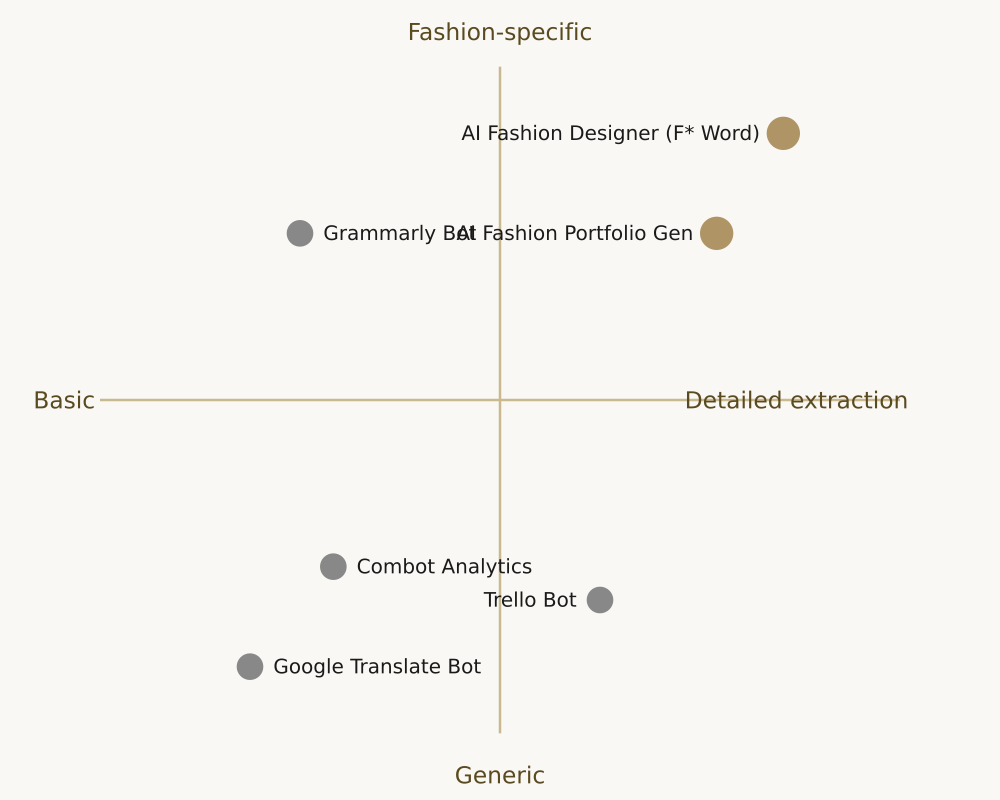
The general-purpose Mini Apps (Wallet, Combot, Trello, Grammarly) are useful primitives for running a small studio out of Telegram, but nothing about them makes them a design tool. Designer and Portfolio Generator are the only entries built on fashion-specific vocabulary and the only ones whose output lands somewhere a recruiter can read.
Two Mini Apps per role, no more. Anything else clutters the thread and dilutes the workflow.

You need Telegram to run the Mini App itself. Once your Portfolio Generator Showroom is published, the public URL opens for anyone with a browser. the recruiter or buyer does not need Telegram to view it.
All six are free at the entry tier we tested. AI Fashion Designer and Portfolio Generator are free to use for scans, sealing, certification, and job pitches. Wallet takes standard payment processing fees only when you actually collect money.
Yes. You can drop images into Designer directly from Telegram. The Scanner extension speeds capture from Pinterest, Vogue Runway, or a product page, but it is optional.
Telegram Mini Apps run in sandboxed webviews with disclosed permissions. Named developers (like The F* Word for Designer and Portfolio) publish under their official bot handles. As with any platform, verify the bot handle before you seal a dossier or pay a deposit.
A working week for a job-hunting designer using this stack: Monday, scan five references from Pinterest and Vogue Runway through the browser and let them land in Designer. Tuesday, seal two of them into full dossiers (Intent, Truth, Muse, Campaign). Wednesday, Portfolio Generator auto-publishes the updated Showroom, refreshes the 0-to-100 score, and the public URL is ready to share. Thursday, three live roles in the feed match your specialism. you one-tap pitch to each. Friday, Radar shows two of the three brands opened the Showroom, and one starts a thread. That thread lives inside Telegram. Wallet handles the deposit if it turns into paid work.
The point is not the calendar. It is that the loop closes without a laptop, without an inbox, and without exporting a PDF. Each Mini App does one thing well, and the outputs compound in the same thread.
First, sealing is one-way. A sealed dossier gets a tamper-proof timestamp. you cannot silently rewrite the concept later. This is a feature (recruiters trust it) not a limitation, but plan the seal for when a dossier is truly finished.
Second, the live jobs feed skews toward mid-market brands, small houses, and creative-direction briefs. Roles at the largest luxury houses still often route through in-house recruiting and specialist agencies. Use the Mini App stack as your primary surface, and keep a BoF Careers browse in the loop for the pinnacle roles.
Three mistakes we saw repeatedly during testing. First, sealing dossiers too early, before the concept is finished. a sealed dossier gets a permanent timestamp, so treat sealing like publishing, not saving. Second, publishing a Showroom without curating. the score responds to consistency throughout pieces, and adding a weak dossier drags the whole surface down. Third, ignoring Radar notifications. they arrive quietly and often precede a live-feed pitch by a day or two, so a brand that viewed on Monday is likely to appear in your feed by Thursday.
None of these six Mini Apps replace a real tech pack tool, a moodboard tool, or a factory-facing spec. What they do is remove friction from the tiny decisions designers make hundreds of times a week: pinning a swatch, locking a Pantone, measuring a repeat, timing a fitting, checking a currency for a bill of materials. Keep the surface small, keep the exports clean, and hand off to your tech pack tool the moment a garment becomes real.
If you rely on the free apps above every day, the piece they cannot give you is proof that the work adds up to a hireable AI fashion designer portfolio. This is what the AI Fashion Studio from The F* Word is built for. Bring in the pieces you assembled with your free stack, get an AI-scored portfolio back, and get pitched to live fashion jobs the same week.
Start free: Open the AI Fashion Studio and turn your free-app workflow into a scored AI fashion designer portfolio.
Related guides on this site: Free pattern making tools that actually work · Best free AI tools for fashion design students · AI Fashion Portfolio Generator: certified pitch guide
Related: fabric identification from photo ai
Get The F* Word workflow insights in your inbox.